Inside the Machine: What AI Actually Is
Strip away the mystique. By the end of this chapter, you'll understand AI better than 95% of teachers in your district.
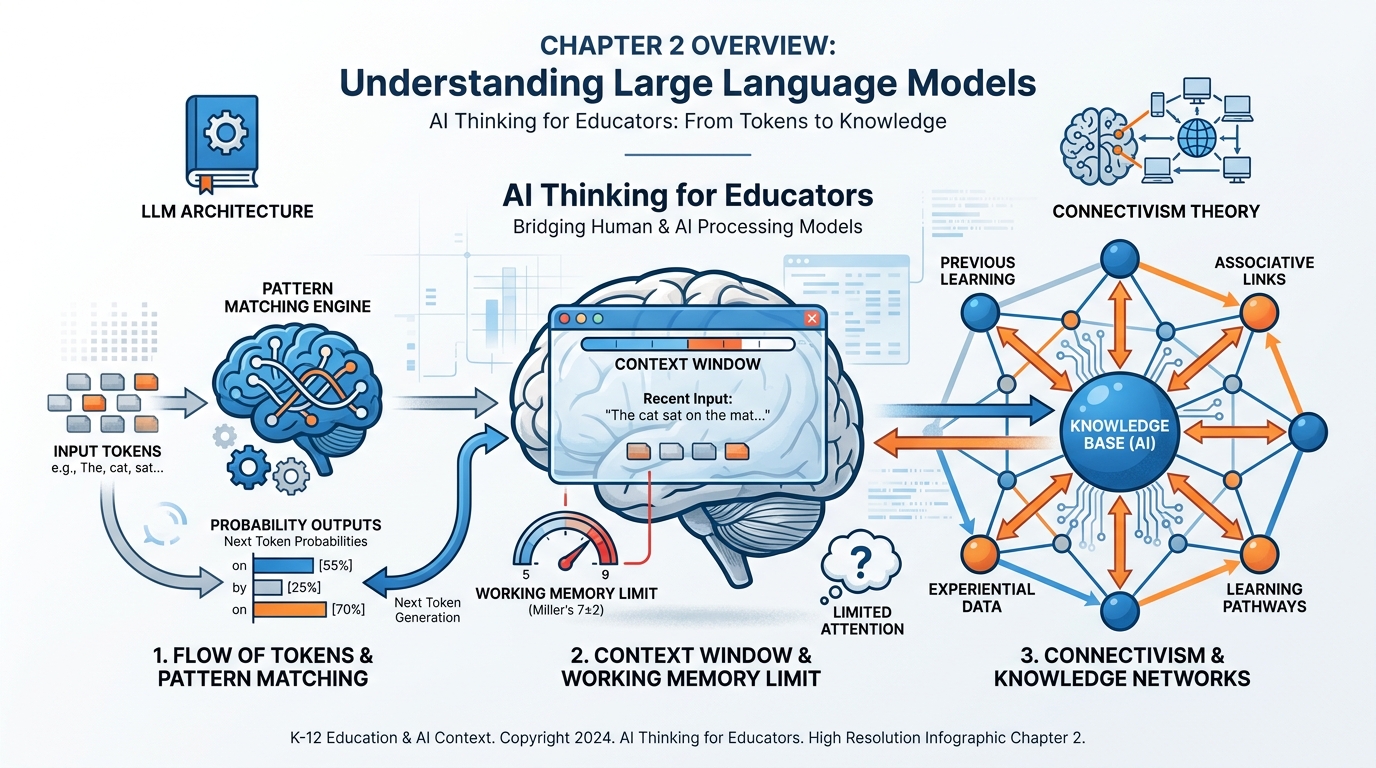
Figure 1:Chapter 2 at a Glance. Tokens become patterns. Patterns produce probability. Context determines everything. And the network is where knowledge actually lives — in your brain and in the AI. By the end of this chapter, this entire diagram will make sense.
You’ve been using it. Maybe every day. Maybe nervously, maybe with growing confidence. But here’s a question most teachers have never been directly asked:
Do you actually know what it is?
Not “it’s an AI.” Not “it generates text.” Not “it might be wrong sometimes.” Those answers are like saying a car is “a thing that moves.” Technically true. Completely useless for becoming a skilled driver.
This chapter is the one where we open the hood.
Not with code. Not with math. With the kind of clear, honest explanation you’d give a brilliant colleague who just happens to have never studied computer science. Because here’s the truth: understanding how AI works — at the conceptual level — is not optional for educators anymore. It’s the difference between using a tool and being used by one.
By the time you finish this chapter, you will understand what a large language model actually does. You’ll know why your AI sometimes “forgets” what you told it an hour ago. You’ll understand why a vague prompt produces a vague answer. You’ll see the connection between how AI processes information and how your students’ brains process information. And you’ll have a name for what you’ve been doing when you’ve gotten spectacular results — or frustrating ones.
Let’s begin.
12.1 The Question Everyone Whispers But Nobody Asks: What Is This Thing?
Walk into any teachers’ lounge in America right now and you’ll hear one of two things about AI. Either it’s going to destroy education — students cheating, thinking dying, the whole enterprise collapsing. Or it’s going to save education — personalized learning, instant feedback, the teaching profession finally getting the support it deserves.
What you won’t hear is anyone explaining what it actually is.
That silence is a problem. Because without understanding what you’re working with, you can’t make good decisions about when to use it, when to refuse it, and how to teach your students to do both.
So let’s start with the most honest description I can give you.
AI — specifically, the kind you’ve been using — is a very sophisticated autocomplete.
Wait. Don’t close the book.
I know that sounds reductive. I know it doesn’t feel like “just autocomplete” when it writes a lesson plan in thirty seconds or explains the French Revolution in five different reading levels. But bear with me, because this metaphor is going to do a lot of work for you.
When you type on your phone and it suggests the next word, it’s doing something simple: it’s guessing what word usually comes next based on patterns in how humans write. It’s been trained on text. It’s learned associations. “I’m going to the ___” — the phone suggests “store” or “gym” or “bathroom.” It’s pattern matching.
What ChatGPT, Gemini, and Claude do is exactly that. Except instead of being trained on a few years of text messages, they were trained on an almost incomprehensible amount of human-written text — articles, books, websites, scientific papers, Reddit threads, Wikipedia, code repositories — essentially a massive compressed representation of everything humans have ever written down and made accessible.
And instead of predicting one word at a time from a phone’s keyboard, they’re predicting tokens at lightning speed, each prediction informed by everything that came before it in the conversation, calibrated by billions of pattern weights learned during training.
Is it “thinking”? That’s actually a philosophical question, and we’ll brush it briefly in section 2.10. What it is doing is something genuinely remarkable: it is generating text that is statistically consistent with how a knowledgeable, articulate human would respond to your input. At scale. Instantly.
That’s not magic. It’s not a person trapped inside a computer. It’s not sentient. But it’s also not nothing. It is, without exaggeration, one of the most useful tools ever made available to educators.
And you deserve to understand how it works.
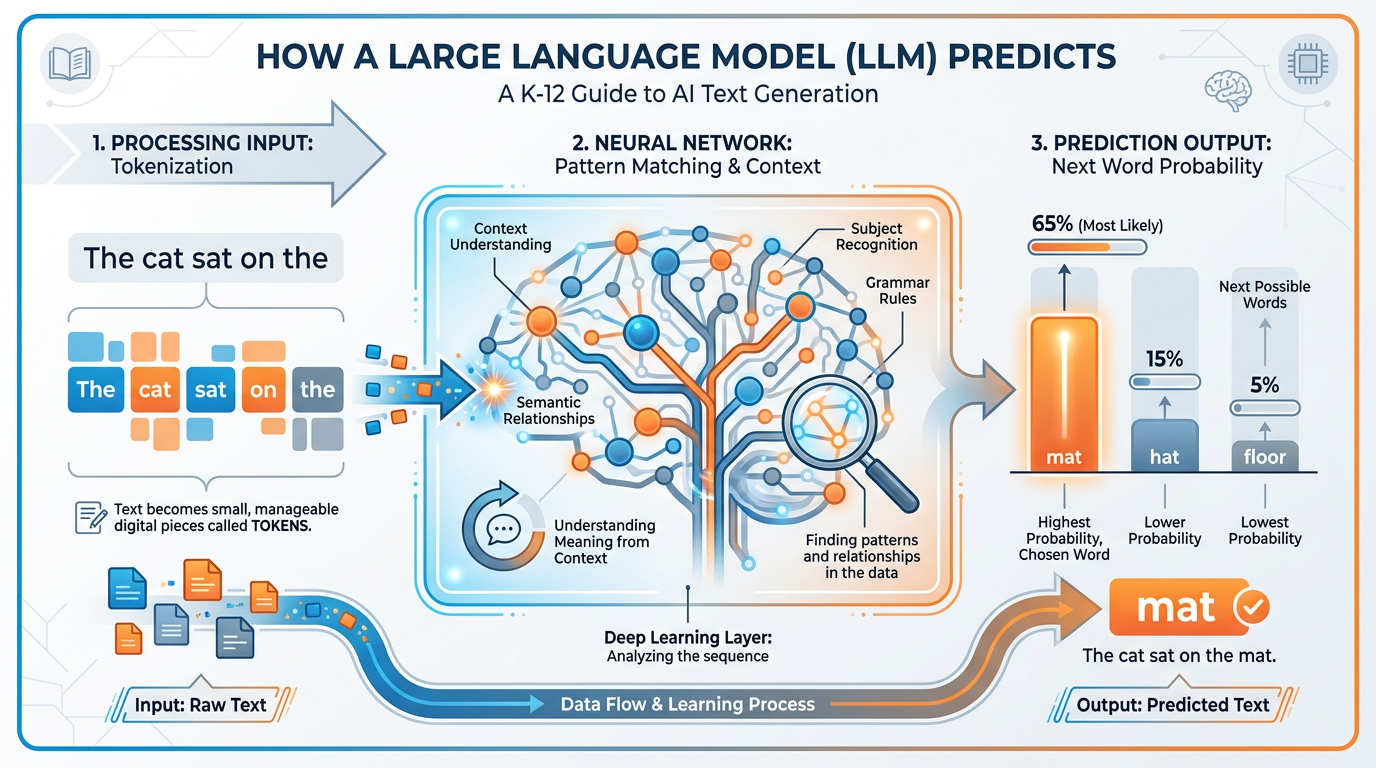
Figure 2:How an LLM actually works. Text in. Tokens recognized. Patterns matched against training. Probability distribution calculated. Most likely next token chosen. Repeat thousands of times. That’s the whole trick — and it produces something that looks a lot like understanding.
22.2 Large Language Models in One Sentence: AI Is the Prediction
Here is the complete technical description of what a large language model does, in one sentence:
A large language model predicts the most statistically probable next token given everything it has seen so far.
Every word you’ve ever gotten from an AI. Every lesson plan. Every parent email. Every explanation that made a difficult concept suddenly click. All of it came from that one mechanism, running millions of times per response.
Now let’s unpack that sentence, because each word matters.
Large — these models are trained on datasets so vast that the word “large” is almost comical. We’re talking hundreds of billions of parameters — the internal numerical weights that encode patterns from the training data. GPT-4 is estimated to have around 1.8 trillion parameters. Gemini Ultra is in a similar range. These are not just big programs. They are compressed representations of enormous amounts of human knowledge.
Language — they work with language. Text in, text out. They don’t “see” the world unless they’re multimodal (which some now are — they can also process images, audio, and video). But at the core, language is their medium.
Model — this is important. It’s a model of how language works. A statistical approximation of human writing and thought. Not a database. Not a search engine. Not a person. A model. And like all models, it is useful and imperfect.
Predicts — this is the heart of it. Not retrieves. Not knows. Predicts. The AI is always, in every response, making a probabilistic guess about what should come next. Sometimes that guess is almost certain (after “The capital of France is,” there’s basically one answer). Sometimes it’s genuinely uncertain (after “The best approach to teaching fractions to struggling third graders is...,” there are many valid continuations).
Most statistically probable — the AI doesn’t always pick the most probable answer. There’s a setting called “temperature” that introduces variation, which is why you can ask the same question twice and get different responses. Higher temperature = more creative and varied. Lower temperature = more consistent and conservative.
Given everything it has seen so far — this is the context. This is everything. And we’re going to spend a lot of this chapter on it.
A neural network trained on vast human-written text
A statistical pattern-matcher that predicts next tokens
A compressed representation of human knowledge and language
A tool that generates probable, coherent continuations of input
A system that has no real-world experience — only text representations of the world
It is NOT a database you can query for facts (it can hallucinate)
It is NOT a person, a consciousness, or a mind
It is NOT a search engine (though some are connected to the web)
It is NOT always right — it can be confidently, fluently wrong
It is NOT consistent across sessions unless you provide context
32.3 Tokens, Patterns, and Probability — Without the Math
Let’s talk about tokens, because this concept will change how you write prompts.
You don’t type words into an AI. You type text that gets broken into tokens — small chunks that may be words, word-fragments, or even individual characters. The model “sees” tokens, not words.
Here’s an easy example. The word “unbelievable” might be split into three tokens: “un,” “believ,” “able.” The word “cat” is one token. The word “photosynthesis” might be split into “photos,” “ynth,” “esis.” Punctuation, spaces, and capitalization all affect tokenization.
Why does this matter to you as a teacher?
A few reasons.
First: token limits are real. AI models can only process a certain number of tokens in one conversation. When people say an AI has a “200,000 token context window,” they mean it can process roughly 150,000 words before it starts losing track of earlier information. (More on this in section 2.6.)
Second: the AI isn’t reading words the way you read words. It’s processing token sequences. When it produces an answer, it’s generating a token sequence, one token at a time, each predicted based on all prior tokens. This is why asking it to “think step by step” actually improves results — it forces the token sequence to build reasoning into the generation process.
Third: this explains some of the weirdness. AI can misspell a word it knows well. It can fail at simple arithmetic (because numbers aren’t always logically organized in token-space). It can suddenly get confused about a proper noun. These aren’t signs of stupidity. They’re artifacts of the token prediction mechanism operating at the edge of its training.
Now for probability. Here’s where it gets genuinely interesting.
The AI isn’t just predicting one word. It’s calculating a probability distribution across its entire vocabulary for each position in the output. Before it “chooses” the next token, it has assigned a probability to every possible next token — and picks from that distribution.
Think of it like a weather forecast. Tomorrow’s weather isn’t one definitive fact — it’s a distribution: 70% chance of sun, 20% chance of clouds, 10% chance of rain. The AI’s prediction works the same way. At every step, it has a “forecast” for every word it could possibly say next.
This is why AI-generated text feels fluent and natural. It’s not choosing randomly. It’s not choosing from a template. It’s choosing from the statistically most human-like continuation of everything that came before. When it works, it produces text that reads like an expert wrote it. When it fails, it produces text that reads like an expert almost wrote it — but something is slightly off.
That “slightly off” is what educators need to learn to catch.
42.4 The Flashlight in the Dark Room: A Theory of Context
Picture a large dark room. You’re standing in the doorway holding a flashlight.
The beam of your flashlight illuminates a small circle in front of you. You can see clearly what’s in that circle. The rest of the room? In darkness. You can’t see it. You can’t act on information you can’t see.
That’s exactly how AI experiences a conversation.
The “room” is everything that has ever happened — every message you’ve ever sent, every response it’s ever given. The “flashlight beam” is the context window: the portion of the conversation that the AI can currently see and process. Everything outside the beam might as well not exist.
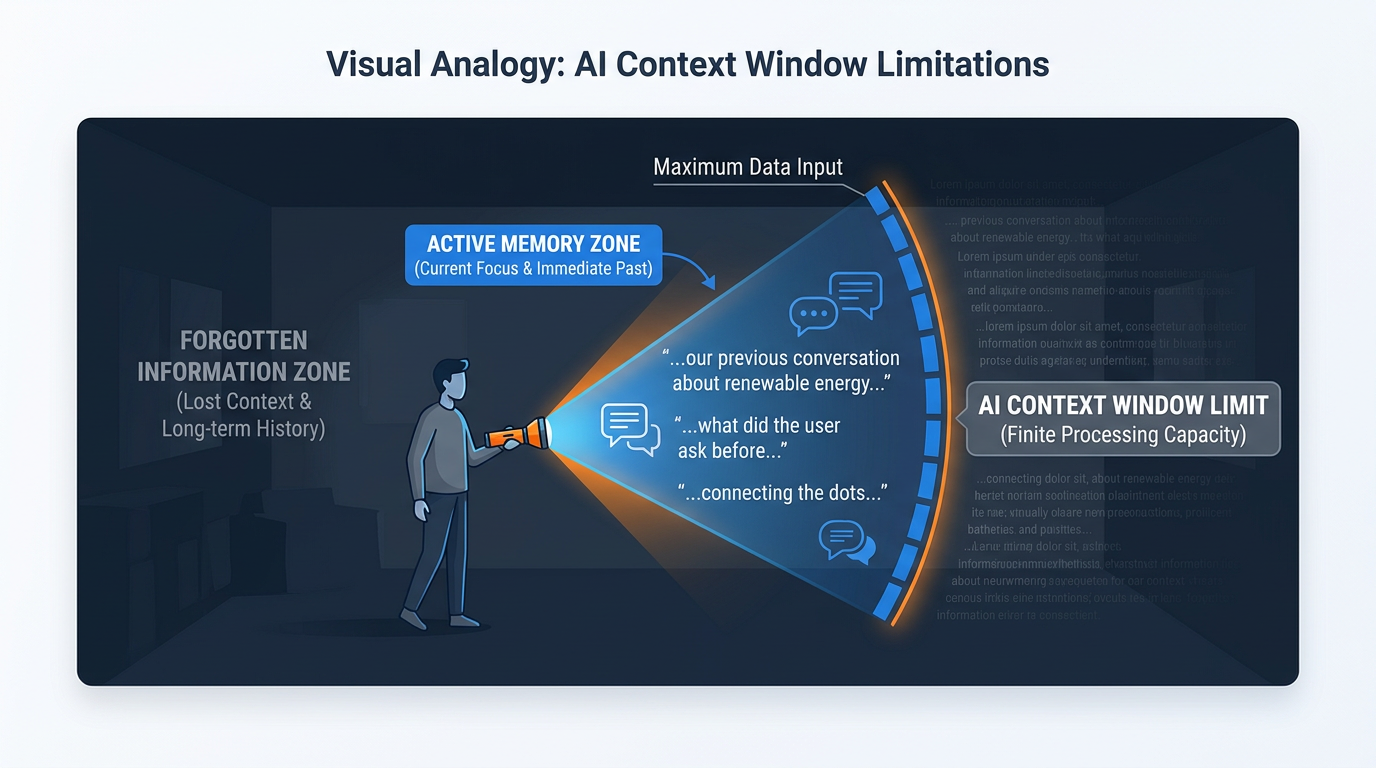
Figure 3:The flashlight in the dark room. The AI can only “see” what’s inside the context window — the beam of light. Everything outside it is dark. When a conversation grows long enough, your earliest instructions can slip into the darkness, and the AI starts responding as if they never existed.
This metaphor carries real weight for teachers. Here’s why.
When you start a new conversation with Gemini or ChatGPT, the context window is empty. Clean slate. The flashlight beam is pointed at a blank floor. As you and the AI exchange messages, those messages fill the illuminated circle. The AI is aware of all of them — and each response is generated based on the full visible history.
But here’s what changes everything: the AI doesn’t have a memory between sessions. When you close the chat window and come back tomorrow, the room is dark again. The AI has no idea you spoke yesterday. Every conversation is, from the AI’s perspective, the first conversation.
This is not a bug. It’s an architectural feature — one with profound implications for how you use AI in your teaching practice. You can’t assume continuity. You can’t build on previous conversations unless you explicitly re-establish context at the start of each new session.
“But wait,” you might be thinking, “what about when I come back to the same Gemini Gem and it seems to remember my preferences?” That’s because the Gem itself — which we’ll explore in Chapter 3 — contains a system prompt that re-establishes context at the start of every session. Someone (you or the AI) pre-loaded the flashlight beam with information.
More on that in a moment. First, let’s talk about where the real skill lives.
52.5 Context Engineering — Where the Real Skill Lives
Here’s a sentence that will reframe how you think about AI:
Everything you give the AI before it responds is context engineering.
Not just the question you ask. Everything. The role you assign it (“Act as an experienced fifth-grade math teacher”). The background information you provide (“My students are mostly English language learners”). The examples you share (“Here’s a lesson plan I wrote last year that worked well”). The constraints you specify (“Keep the response under 200 words”). The format you request (“Give me a numbered list, not paragraphs”).
All of that is context. All of it shapes what comes back.
Most teachers, when they first use AI, do almost no context engineering. They type a question and wait. Sometimes they’re delighted by the result. Often they’re disappointed. Then they conclude that “AI isn’t that useful for what I do” — and they’re wrong. They’ve just never learned to use the flashlight.
Context engineering is the difference between walking into a meeting with no briefing and walking in with a complete dossier. The AI is exactly as informed as you make it. It cannot read your mind. It cannot know that you teach seventh grade unless you say so. It cannot know that you want an activity that requires no technology unless you specify it. Every assumption it makes is based on statistical patterns from training data — which means it will give you a generic answer unless you give it specific information.
Think about how you’d brief a very smart substitute teacher who has never been to your classroom. You’d tell them the grade level, the subject, the current unit, the general behavior norms, the students with special needs, and what you want accomplished by end of period. You wouldn’t just say “teach them something about photosynthesis” and walk away.
Context engineering is writing that briefing — every single time.
62.6 The Context Window: Why Your AI Sometimes Forgets What You Just Said
The context window is the technical name for the flashlight beam. It’s the amount of text — measured in tokens — that the AI can hold in “active memory” at once.
Different models have different context window sizes. As of 2026, Gemini 1.5 Pro has a context window of up to 1 million tokens. Gemini 2.0 and 2.5 models have extended this further. Claude 3.5 Sonnet can handle up to 200,000 tokens. GPT-4 Turbo maxes at 128,000 tokens.
One million tokens sounds enormous. And it is — it’s roughly 750,000 words, or about five average novels. For most classroom use cases, you will never hit this ceiling.
But here’s the catch: even within a context window, not all context is created equal.
Research on large language models has consistently shown that AI models suffer from something researchers call the “lost in the middle” effect. Information at the very beginning of the context (your initial instructions) and at the very end (the most recent exchanges) gets attended to well. Information buried in the middle of a very long conversation gets processed less reliably.
So yes, it’s possible for the AI to “forget” something you told it three hours ago, even if that information is technically still in the context window — because it’s buried in the middle, and the model’s attention mechanism is giving it less weight.
This is why teachers who have great AI sessions often unconsciously restate key context at intervals. “As I mentioned, I’m teaching a sixth-grade class with a 1:1 iPad program...” — that re-anchoring pulls the key information back into the high-attention zone.
Context Window Usage: Low
All instructions remain fresh and high-attention
AI maintains consistent tone and role
Responses stay tightly aligned with your initial brief
Best for: single tasks, quick answers, isolated requests
Pro tip: For short, focused tasks, start a new conversation each time. Clean context = consistent results.
Context Window Usage: High
Early instructions may receive less attention
AI may drift from initial role or constraints
Risk of “context rot” (see section 2.8)
Best for: iterative work where conversation history is the point
Pro tip: Periodically restate key constraints. “Remember, I need everything in eighth-grade reading level.”
72.7 Working Memory Is 7 ± 2 — Why the Context Window Has the Same Problem Your Students’ Brains Do
In 1956, a cognitive psychologist named George Miller published one of the most cited papers in the history of cognitive science. Its title is delightful in its specificity: The Magical Number Seven, Plus or Minus Two: Some Limits on Our Capacity for Processing Information.
Miller’s finding was this: the human working memory — the part of your mind that holds information you’re currently processing — can hold roughly 7 chunks of information at once, give or take 2. Fewer than 5, and a task feels trivial. More than 9, and things start falling out.
This isn’t a weakness. It’s a design feature. Working memory is your brain’s active workspace, not its storage. It’s the mental scratchpad where you hold the number you just looked up while you dial it, where you hold the beginning of a sentence while you figure out how to end it, where you hold the steps of a problem while you work through them.
When you overload working memory, things drop. Not randomly — the most recently added items tend to survive, while earlier items get displaced. Sound familiar?
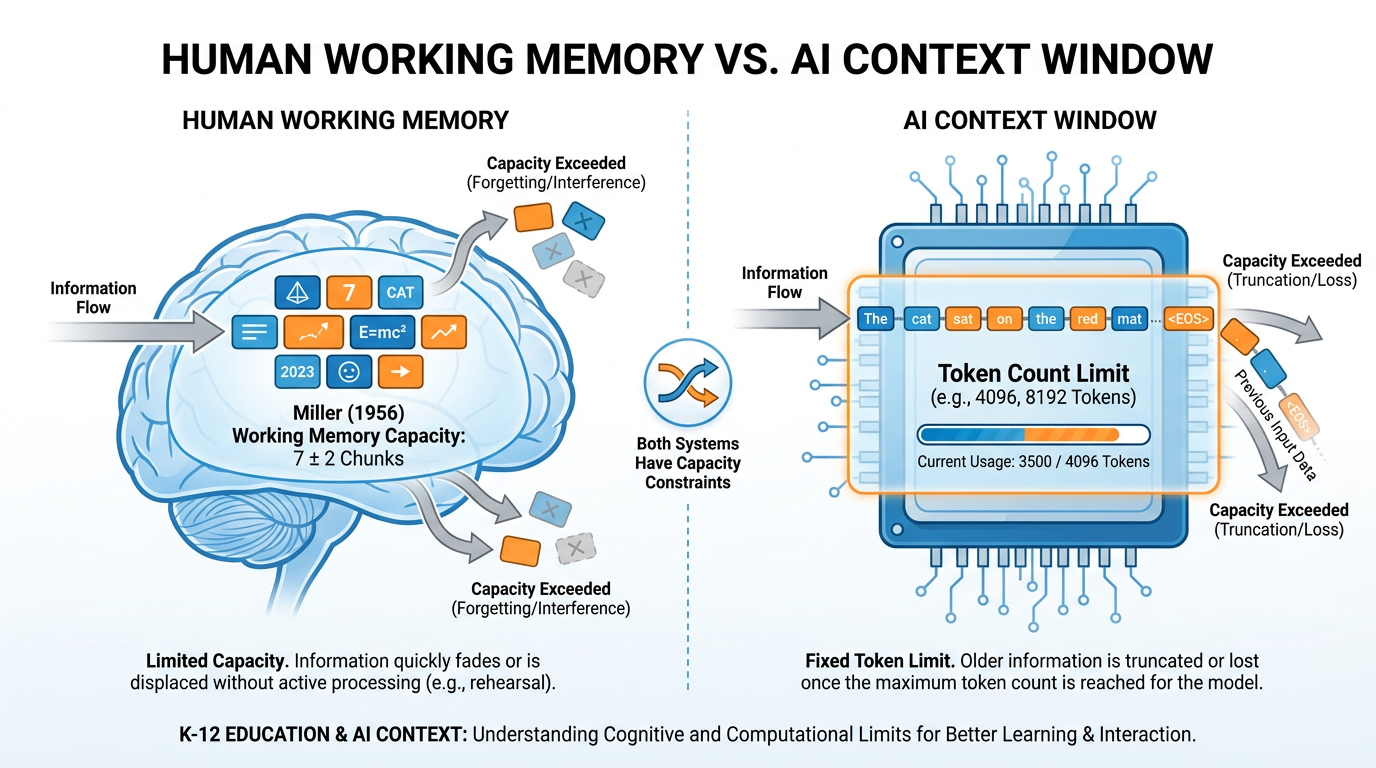
Figure 4:The same capacity problem, two different systems. George Miller described human working memory in 1956. The AI context window is a different technology, but it faces a structurally identical challenge: finite capacity, priority weighting, and displacement when overloaded.
Now here is the bridge. The AI’s context window is, in a deep structural sense, working memory for a machine.
It has a capacity limit. Information within it is not weighted equally — recency and prominence matter. When new information floods in, earlier information can effectively “drop.” The model doesn’t “forget” in the biological sense, but its attention weights — the mechanism that determines what it focuses on when generating a response — can effectively deprioritize information that has been “pushed to the middle.”
Your students experience this every class period. You introduce the day’s learning objective. You explain three concepts. You demonstrate a procedure. You ask them to apply. By the time they’re in application mode, the first concept you introduced — the one you’d most like them to connect to — is the one most likely to have been displaced from active processing.
This is why you repeat key ideas. This is why you use anchor charts. This is why “Do Now” activities that prime relevant prior knowledge are so effective — they load working memory with the most useful context before new information arrives.
The exact same logic applies to AI. Prime the context. Re-anchor key information. Don’t assume it’s still “loaded” just because you mentioned it once, earlier.
🧠 Deep Dive: Atkinson & Shiffrin’s Memory Model — and Why It Still Matters
In 1968, Richard Atkinson and Richard Shiffrin published their multi-store model of memory — one of the most influential frameworks in cognitive psychology. Their model proposed three stages:
1. Sensory memory — holds incoming information for fractions of a second (iconic for visual, echoic for auditory). Almost everything is discarded here.
2. Short-term / working memory — the Miller 7±2 scratchpad. Information here is active but fragile. Without rehearsal or meaningful encoding, it decays in 15–30 seconds.
3. Long-term memory — essentially unlimited storage, relatively permanent, organized by schema and associations.
The critical insight for teachers: information only moves from working memory to long-term memory through encoding — a process that requires effortful engagement, meaningful connection-making, and often retrieval practice.
AI has a version of this architecture too. The context window is roughly analogous to working memory. The training data is roughly analogous to long-term memory (though the mechanism is completely different — the AI doesn’t “store” knowledge in discrete memories; it encodes it in the weights of the neural network).
Here’s the key difference: your students can build long-term memories from classroom experiences. The AI cannot. Every session, it starts fresh from its training weights. It can only “remember” what you put in the context window — which means the teacher, not the AI, is responsible for continuity.
This insight should make you more strategic about how you structure AI-assisted work. Think of yourself as the long-term memory that the AI lacks. You’re the continuity. You’re the institutional knowledge. You’re what persists.
That’s not a consolation — it’s a superpower.
82.8 Context Rot: When a Long Conversation Quietly Goes Bad
There is a phenomenon that experienced AI users learn by hard experience. Nobody in the mainstream AI conversation talks about it enough.
Context rot.
Here’s how it happens. You start a conversation with a clear, well-structured prompt. The AI is responsive, helpful, on-target. You ask a follow-up. Then another. The conversation grows. You go deep on a topic. At some point — and it’s never one obvious moment — the AI starts drifting. Its responses get a little generic. A little less tailored. A little less “you.” You ask it to do something you already specified an hour ago, and it doesn’t quite do it the same way anymore. You find yourself repeating things you’ve already said. The AI seems to be... getting confused.
That’s context rot.
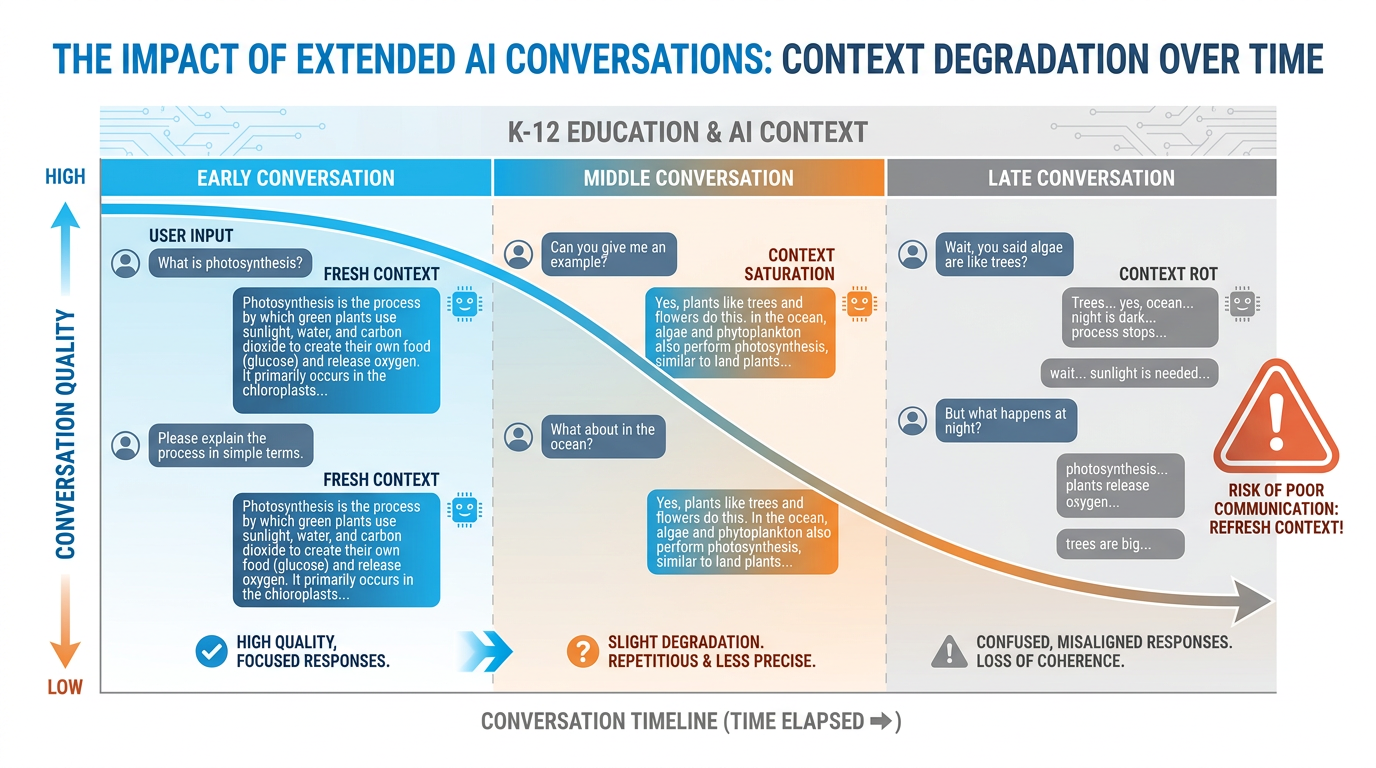
Figure 5:Context rot in action. A fresh conversation starts clear and tightly aligned to your prompt. As the conversation grows long, quality degrades. The AI’s attention gets diluted across too much history, and early instructions receive progressively less weight. The fix is simple: start fresh, re-prime context, or use a Gem that manages context automatically.
Context rot happens for several interconnected reasons:
Attention dilution. In very long conversations, the model’s attention mechanism — the part that determines what prior context is most relevant — gets spread thin. There’s more context to weigh, and the signal-to-noise ratio drops.
Instruction drift. Your original instructions are now far back in the context. New content keeps being added. The model keeps calibrating against the full conversation, and the cumulative effect of all subsequent exchanges can subtly pull it away from your original framing.
Coherence pressure. The model is always trying to produce coherent output consistent with the full conversation history. In a long, winding conversation, the “coherent” direction might not be the direction you actually wanted.
The fix is straightforward. For tasks that require sustained focus, start a new conversation. Re-state your context at the beginning. Don’t try to ride one conversation for hours of work. Think of it like getting a fresh whiteboard: clean it periodically rather than trying to write over the accumulated smudging.
92.9 Prompt Engineering — The Difference Between Mediocre and Magical Output
Prompt engineering is a term that sounds more technical than it is. At its core, it means: writing better instructions for your AI.
Every teacher is already a natural prompt engineer, even if they don’t know it yet. Think about how you write assignment instructions for students. You’ve learned, over years, that “write something about the Civil War” produces very different results than “Write a 3-paragraph analysis identifying the two most important economic causes of the Civil War, using at least two specific examples from primary sources, for an eighth-grade audience.” You’ve learned that specificity matters. Constraints help. Examples clarify. Context shapes the product.
AI prompting works the same way.
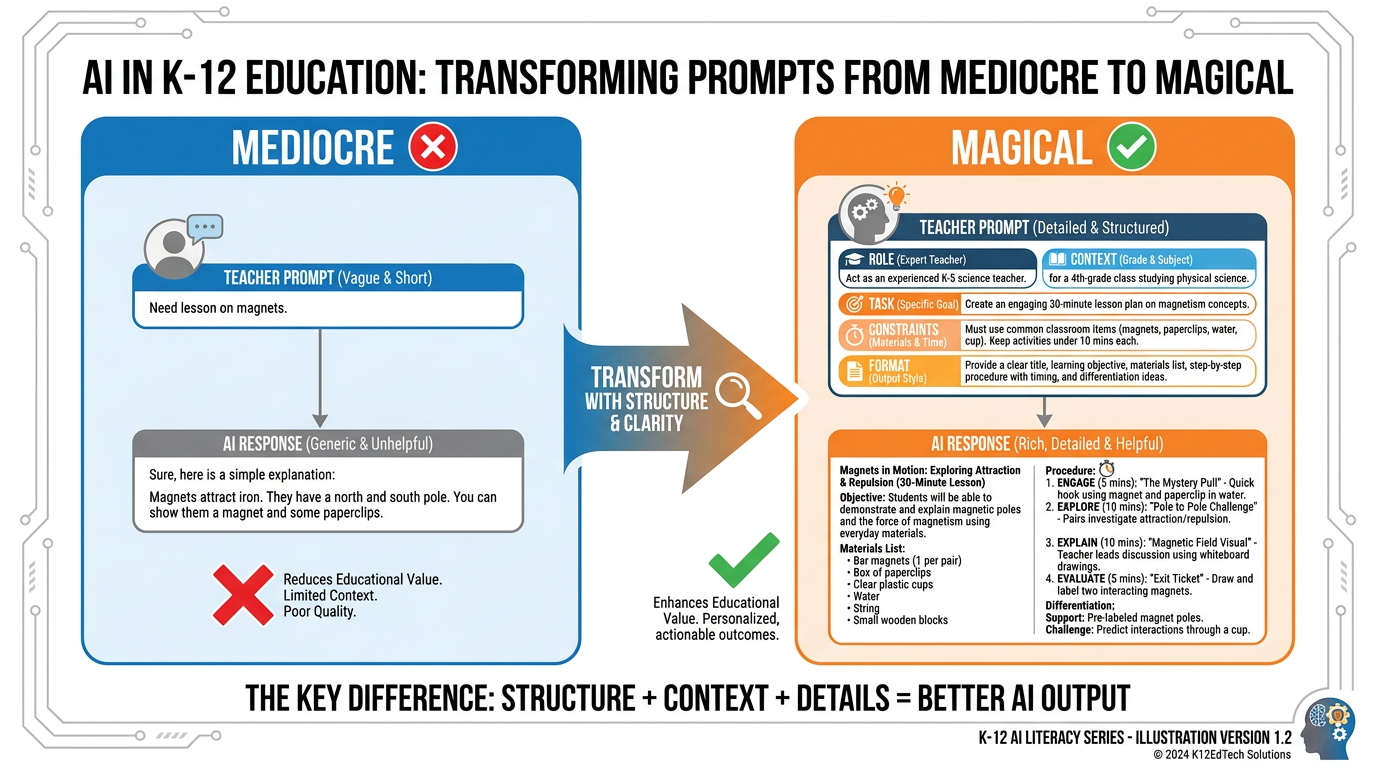
Figure 6:The anatomy of a great teacher prompt. The difference between a mediocre AI response and a magical one is almost always in the prompt, not the model. Five components — Role, Context, Task, Constraints, Format — transform generic output into something actually useful for your classroom.
The anatomy of a great teacher prompt has five components. You don’t need all five every time. But knowing them changes how you write every prompt.
1. Role — Tell the AI who it should be.
“You are an experienced seventh-grade ELA teacher specializing in supporting English language learners...”
2. Context — Tell it your situation.
“...in a Miami public school. My current unit is persuasive writing. My students are largely intermediate English proficiency, bilingual Spanish/English...”
3. Task — Tell it exactly what to do.
“...Create a graphic organizer that helps students identify claim, evidence, and reasoning in a persuasive text...”
4. Constraints — Tell it what NOT to do, or what limits to respect.
“...The organizer should have no more than 5 boxes, use simple vocabulary, and require no writing longer than 2 sentences per box...”
5. Format — Tell it how to deliver the output.
“...Present it as a table I can copy into a Google Doc.”
Compare this to: “Make a graphic organizer for persuasive writing.”
Both inputs take less than 10 seconds to write once you’ve practiced. One produces a generic template you’d find on Teachers Pay Teachers. The other produces something that actually works for your students on your schedule in your classroom.
There are two more advanced prompting techniques worth knowing immediately:
Chain of Thought Prompting. Adding “Let’s think through this step by step” to a prompt dramatically improves reasoning quality. Why? Because it forces the token generation to follow a reasoning path, rather than jumping straight to an answer. The intermediate steps become part of the context that shapes the final output. It’s essentially asking the AI to use a whiteboard before giving the answer.
Few-Shot Prompting. Providing 2–3 examples of what you want before asking for the real thing. “Here are two parent emails I’ve written that I’m happy with. [Examples]. Now write me a similar email about [topic].” The AI learns your voice, your tone, your level of formality — from examples rather than lengthy description.
You will use both of these in the lab at the end of this chapter.
102.10 Knowledge Lives in Networks — and So Does the AI
In 2005, George Siemens published a paper that rattled the foundations of educational theory. His argument: the theories we had — behaviorism, cognitivism, constructivism — were all designed for a world where knowledge was relatively stable, stored in humans and books, and acquired through direct experience and formal instruction.
That world, he argued, was over.
In the networked world, knowledge doesn’t live in one place. It lives between places — distributed across people, databases, organizations, and connections. Learning isn’t just the acquisition of information. It’s the ability to navigate, connect, and traverse networks of knowledge.
He called this theory Connectivism.
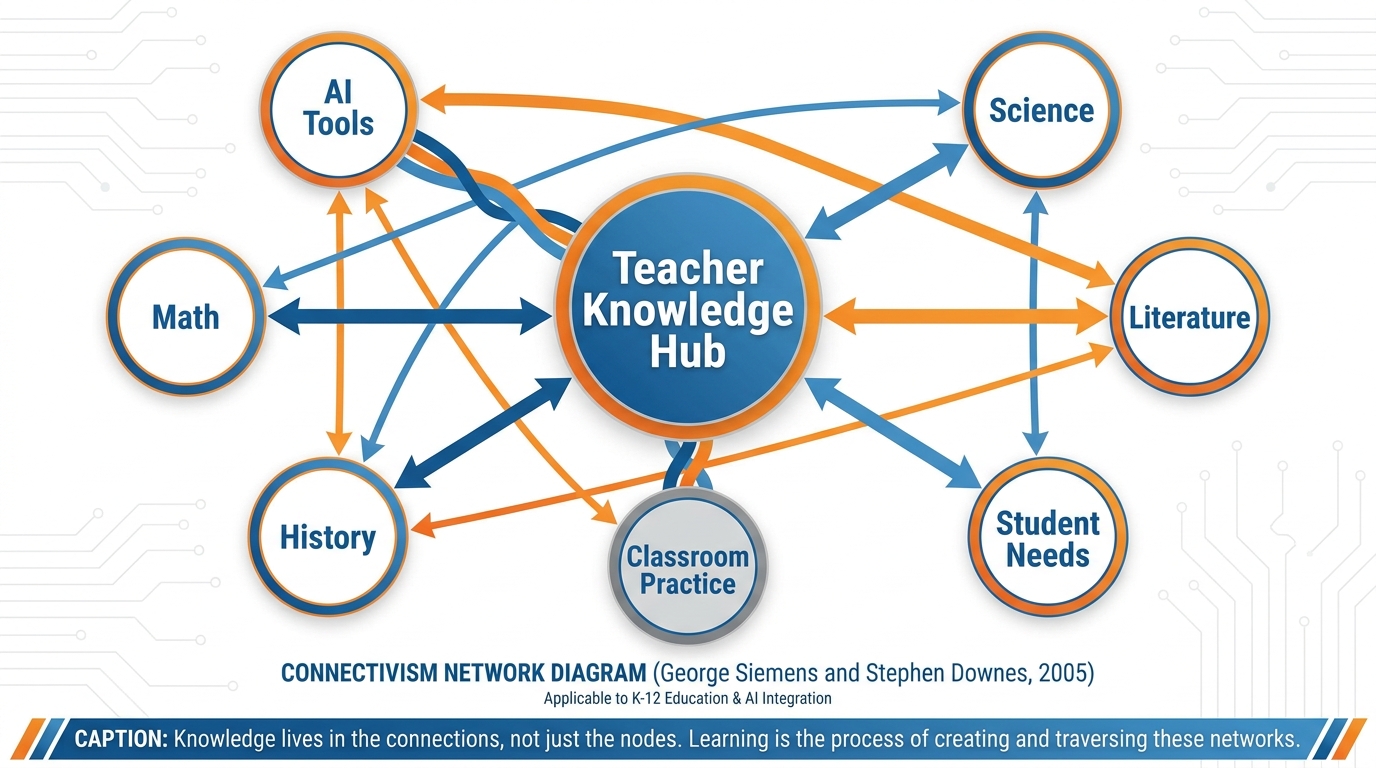
Figure 7:Knowledge lives in networks. Siemens and Downes argued in 2005 that in the digital age, learning is fundamentally about maintaining and traversing connections between nodes of knowledge. The AI itself is a kind of crystallized network — billions of weighted connections between concepts, patterns, and ideas.
This theory maps onto AI with startling precision.
A large language model is not a database with information stored in neat rows and columns. It is a network — billions of weighted connections between tokens, concepts, patterns, and associations, built up through training on vast amounts of human writing. When it generates a response, it is not retrieving a stored answer. It is traversing a learned network of associations to find a path that is statistically coherent given the input.
Here’s the practical implication for you as an educator.
Your students no longer need to be the sole repository of knowledge. The network stores much of it. What they need is the ability to navigate — to know what questions to ask, how to evaluate what comes back, how to connect new information to existing understanding, and when to trust the network versus when to be skeptical of it.
This is a profound shift in the purpose of teaching. It doesn’t mean content knowledge is irrelevant. You need to know enough to evaluate what the network returns — just like you need to know enough math to catch an error on a calculator. But it does mean that the premium cognitive skills — synthesis, evaluation, connection-making, judgment — matter more than they ever have.
Downes extended this argument by emphasizing that learning in a connected world requires what he called “connective knowledge” — the knowledge that emerges from meaningful connections, not just the accumulation of facts. The teacher’s job is increasingly to help students build the quality of their connections, not just the quantity of their information.
Your students live in a connectivist world. Your AI tools are expressions of that world. The classroom of the future — the one you’re already in — is one where the teacher’s most important function is helping students navigate and evaluate networks, not simply fill them.
112.11 The Big Three of the Modern AI Landscape
Walk into any professional development session on AI in education and you’ll hear three names: ChatGPT, Gemini, and Claude. These are the Big Three. They dominate how educators interact with AI. Understanding what makes each one distinct will make you a smarter user of all of them.
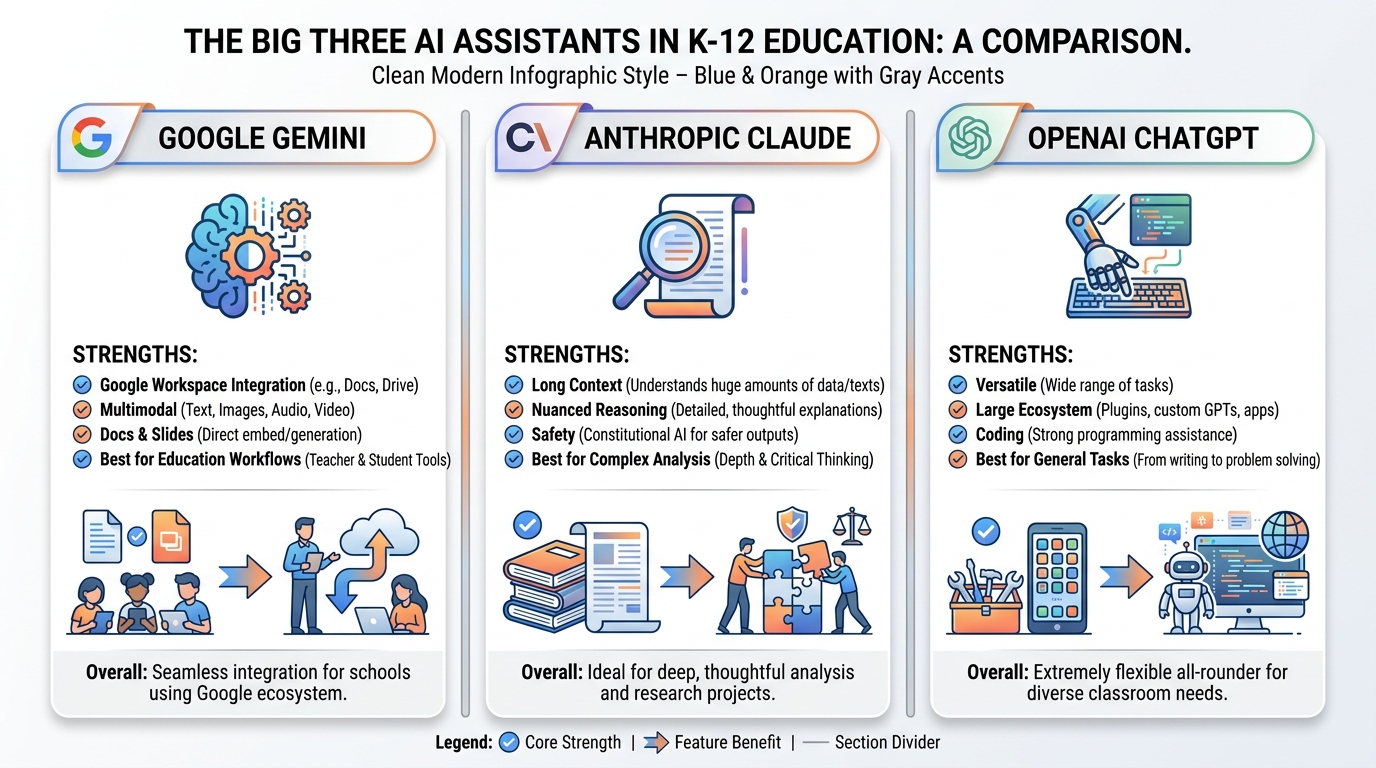
Figure 8:The Big Three. Each of the dominant AI assistants has a distinct character and set of strengths. Knowing which tool is best suited for which task is itself a form of AI literacy.
Google Gemini is the AI that lives inside the Google ecosystem you already use. It can see your Google Docs, interact with your Google Classroom, generate slide decks inside Google Slides, and work with Google Meet. For K-12 teachers already embedded in Google Workspace for Education, Gemini is the natural home base. It’s not always the most powerful in pure reasoning tasks, but its integration advantage for educators is enormous.
Anthropic’s Claude is, in the opinion of many researchers and power users, the most sophisticated AI writing assistant currently available. Its responses tend to be more nuanced, more carefully reasoned, and more stylistically sophisticated than competitors. It has the largest effective context window in practice, making it exceptional for working with long documents, complex projects, or anything requiring sustained coherence across a long exchange. Claude also has a distinct character — more careful, more hedged, more willing to say “I’m not sure” — which some educators find valuable as a model of intellectual humility.
OpenAI’s ChatGPT is the one that started the public conversation, and it remains the most widely recognized AI assistant globally. Its ecosystem — the Custom GPT marketplace, the broad plugin support, the extensive third-party integrations — is unmatched in size. GPT-4o’s multimodality (it can see images, generate images via DALL-E, and process audio in real time) makes it remarkably versatile. For educators who want a single tool that can do the widest variety of tasks, ChatGPT remains a strong choice.
📊 Choosing the Right Tool for the Job
| Task | Best Tool | Why |
|---|---|---|
| Writing lesson plans in Google Docs | Gemini | Native integration, direct insertion |
| Analyzing a complex student essay | Claude | Superior nuanced reasoning |
| Generating diverse activity ideas | ChatGPT | Broad training, versatile output |
| Summarizing a curriculum document | NotebookLM | Source-grounded responses |
| Creating a custom AI teaching assistant | AI Studio | Full prompt and model control |
| Quick parent email draft | Any of the three | Basic task, all handle it well |
The skill isn’t picking one. It’s knowing which tool is right for which job — the same way a master carpenter knows when to use a chisel versus a saw.
122.12 Why We’re Building This Course on Google
You may be wondering why, given the landscape above, this course focuses primarily on Google’s tools. It’s a fair question, and you deserve a direct answer.
Reason 1: You’re already in Google. Most K-12 schools in the United States — and a majority of districts across Florida and the nation — operate on Google Workspace for Education. Your students have Google accounts. Your assignments live in Google Classroom. Your rubrics are in Google Docs. Building AI fluency on top of tools you already use daily is dramatically more efficient than learning a parallel tech stack.
Reason 2: The integration is real. Gemini doesn’t just run alongside your Google tools — it runs inside them. Gemini in Docs can help you draft directly in your document. Gemini in Classroom can analyze assignment submissions. NotebookLM can be loaded with your course materials and then answer student questions grounded exclusively in those materials. No other ecosystem offers this level of classroom integration for teachers, right now, in 2026.
Reason 3: The price point. Google’s AI tools are available to schools through Google Workspace for Education at pricing models that K-12 budgets can accommodate. Several core features — including the basic version of Gemini — are free.
Reason 4: The trajectory. Google has committed its AI infrastructure, its research talent, and its educational partnerships to the education sector in ways that suggest deep, sustained investment. This isn’t a product launched for press. It’s an ecosystem being built for the long term.
None of this means you shouldn’t use Claude or ChatGPT. You absolutely should. The AI literacy skills you develop in this course translate directly to any platform. The prompting frameworks work everywhere. The context management strategies work everywhere. The pedagogical thinking about when to use AI and when not to — that’s platform-agnostic.
But when you need a specific tool in hand for a specific lesson, we’re going to use Google’s.
132.13 Your Three Tools for the Rest of This Book
This course is built on three Google tools. Together, they cover the full range of what you’ll need as an AI-fluent educator. Here’s a quick orientation to each, before we spend dedicated chapters on them later.
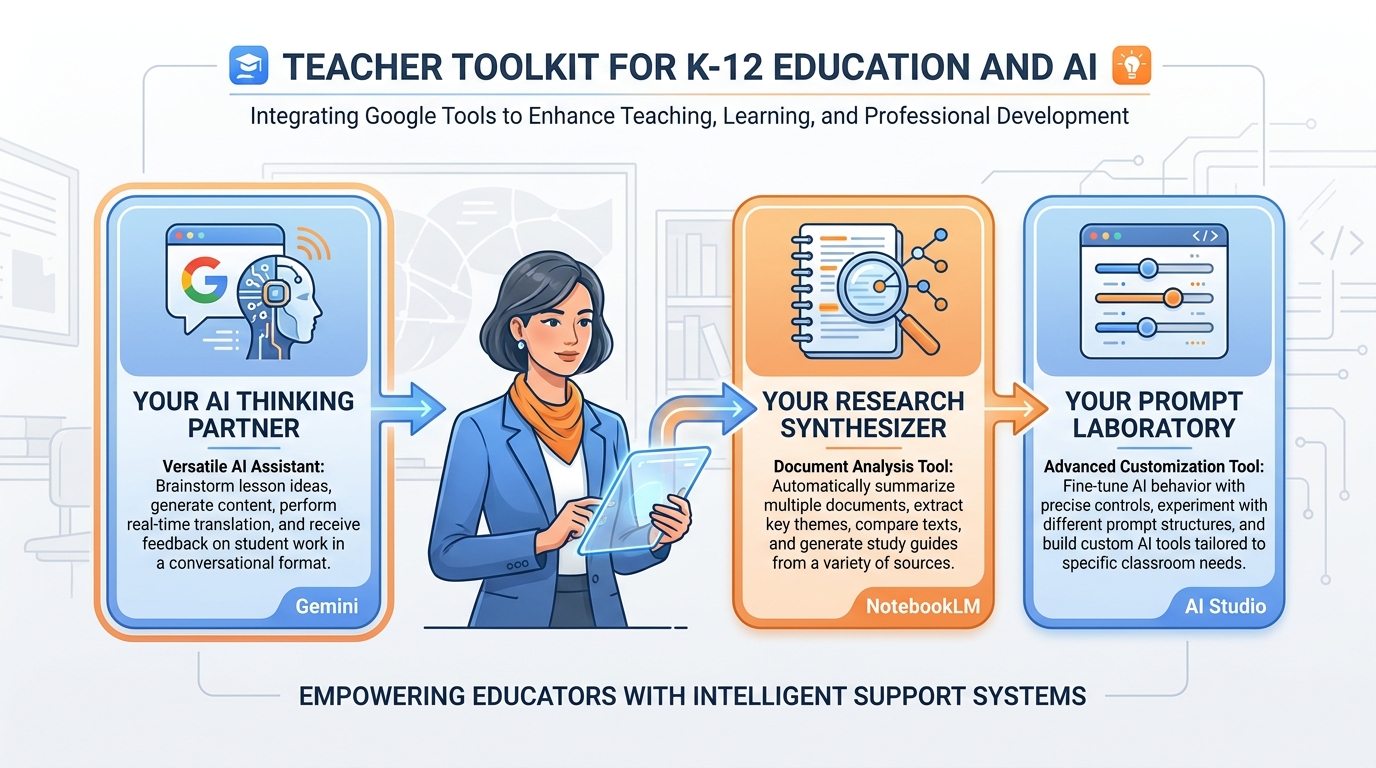
Figure 9:Your three tools. Gemini handles the wide range of everyday tasks. NotebookLM grounds AI responses in your specific documents. AI Studio gives you the ability to build custom AI assistants calibrated to your specific teaching needs.
Gemini (gemini.google.com) is your general-purpose AI thinking partner. It’s where you’ll draft lesson plans, generate differentiated materials, write parent communications, brainstorm ideas, and work through problems. Think of it as the smart colleague who’s always available, always patient, and always willing to take another pass at something if the first version isn’t right. Chapter 3 goes deep on Gemini, including how to build Gems — reusable custom AI personas configured for specific tasks.
NotebookLM (notebooklm
AI Studio (aistudio.google.com) is where the advanced work happens. It’s Google’s developer-facing interface for Gemini, but don’t let the word “developer” scare you off. AI Studio lets you build and test custom prompts, fine-tune AI personas, adjust model parameters, and create what are called “system prompts” — pre-loaded instructions that shape every response the AI gives in a session. If Gemini is the car, AI Studio is the garage where you tune the engine. Chapter 5 takes you through it step by step.
14Chapter Summary
Here’s what you now know that 95% of teachers don’t.
AI is sophisticated autocomplete. A large language model predicts the next token based on statistical patterns learned from vast human-written text. It doesn’t think in the way humans think, but it produces text that is statistically indistinguishable from thoughtful human writing — which makes it extraordinary useful and occasionally wrong in subtle ways.
Context is everything. The AI can only work with what’s in its context window. Everything you provide before asking the question shapes the answer. Context engineering — providing role, situation, task, constraints, and format — is the single most impactful skill you can develop.
The context window is working memory. Like Miller’s 7±2, the AI has a finite capacity for active information. Earlier context gets weighted less than recent context. Context rot happens when conversations grow long and quality quietly degrades. The fix: start fresh, restate key context, use Gems that manage context automatically.
Prompt engineering is teacher-adjacent work. The skills you already use to write good assignment instructions are the same skills that produce great AI prompts. You’re not starting from zero. You’re translating.
Knowledge lives in networks. Siemens and Downes were right about connectivism — and AI is a crystallized expression of that insight. Your students live in a networked knowledge world. Your job is helping them navigate it, not just fill it.
The Big Three each have a character. Gemini for Google integration. Claude for nuanced analysis. ChatGPT for versatility. Know your tools. This course focuses on Google, because that’s where you already live — but the skills transfer everywhere.
Your three tools await. Gemini, NotebookLM, and AI Studio form a complete toolkit for the AI-fluent educator. The rest of this book is about becoming fluent in all three.
You’ve just understood more about AI than most people ever will. Now let’s make sure you can use it.
15📝 Case Study & Discussion Board (2 pts)
15.1Case Study: The Two Teachers and the Same Question
Marcus is an eighth-grade history teacher at a Title I school in Broward County. He’s been using Gemini for six months and loves it — or he used to. Lately, he’s noticed something frustrating: when he first opens Gemini and types a question, the responses are excellent. But by the second hour of a working session, after going back and forth on a single lesson unit, the responses feel generic. Off. Like the AI doesn’t quite understand what he needs anymore. He hasn’t changed his prompts. He can’t figure out what’s wrong. His colleague Diane, who teaches down the hall, doesn’t seem to have this problem. When he looks over her shoulder one afternoon, he notices she almost never works in the same Gemini conversation for more than 20–30 minutes. She starts fresh constantly, and she always begins with the same structured header she keeps in a Google Doc.
15.2Discussion Prompt
Drawing on this chapter’s concepts — context windows, context rot, prompt engineering, and working memory theory — analyze what is happening to Marcus’s AI sessions. Then explain Diane’s approach in technical terms. What specifically is she doing that Marcus is not?
Your initial post (minimum 250 words) should:
Identify at least two specific mechanisms from this chapter that explain Marcus’s problem
Connect Marcus’s experience to Miller’s working memory research and explain why the parallel matters for teachers
Describe what Diane’s structured header approach is likely accomplishing at the level of context engineering
Include at least one scholarly or credible citation in your response
After posting, respond to at least two peers with substantive engagement — challenge an interpretation, extend an argument, or offer an example from your own classroom that supports or complicates their analysis. “I agree” is not a response.
Points: 2
16🧪 Hands-On Lab: Build Your Personal Teacher Prompt Library (10 pts)
What you’ll build: A Google Doc containing 10 reusable, field-tested AI prompts for your specific subject and grade level — your personal teaching toolkit for the AI era.
Time required: Approximately 60–75 minutes
What you’ll need: A Google account, access to gemini.google.com, a new Google Doc
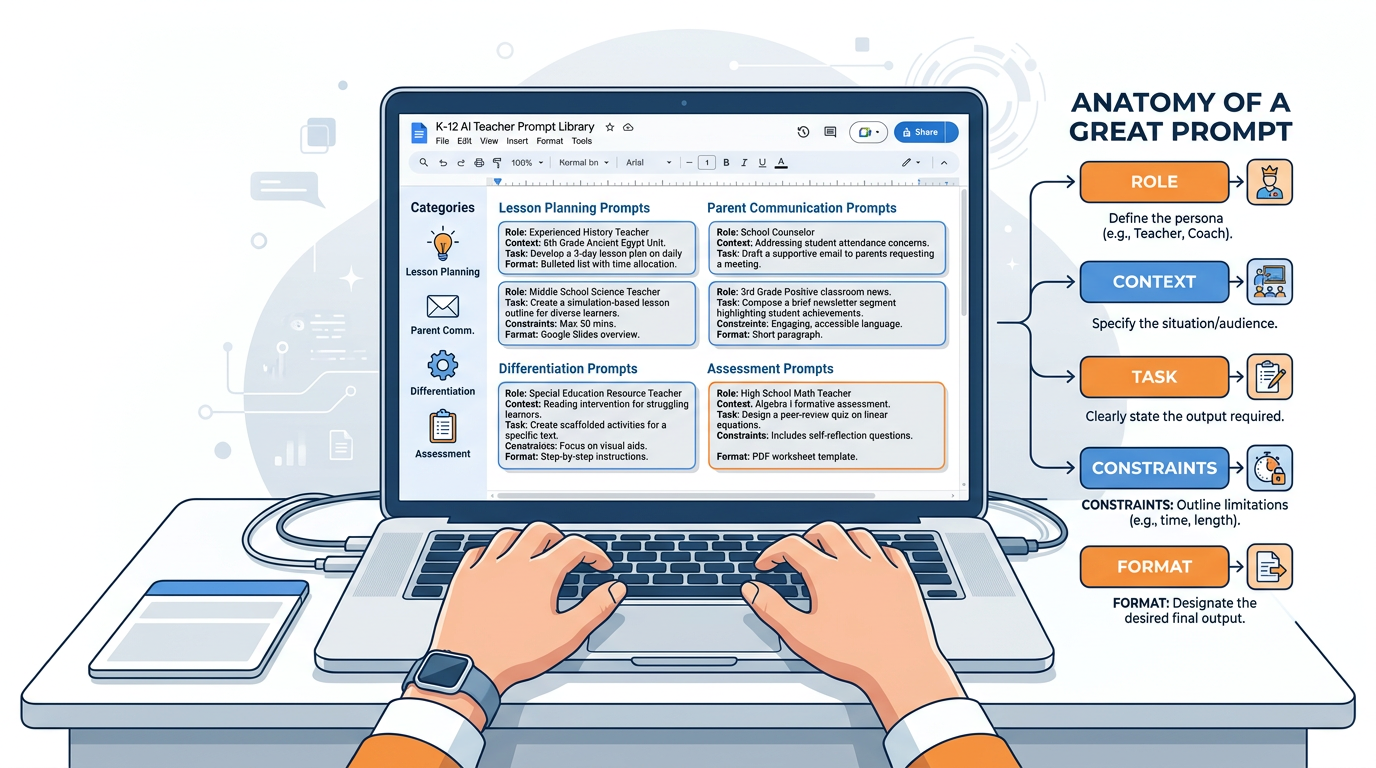
Figure 10:Your prompt library in action. A well-organized Google Doc becomes a permanent reference and launching pad. Each prompt you refine becomes a tool you can reuse, share with colleagues, and improve over time. This is your professional AI toolkit.
16.1Step 1: Open Gemini and Set Up Your Workspace
Open a browser and navigate to gemini.google.com. Sign in with your Google account. Click the + icon or “New Chat” to start a fresh conversation.
Open a separate tab and create a new Google Doc. Title it: My Teacher Prompt Library — [Your Name] — [Subject/Grade Level]
Set up the following headers in your Google Doc (you’ll fill these in as you build):
Lesson Planning Prompts
Differentiation Prompts
Parent Communication Prompts
Assessment & Feedback Prompts
Student Engagement Prompts
16.2Step 2: Learn the Anatomy of a Great Prompt
Before you build anything, internalize this framework. Every strong teacher prompt has five components — you don’t always need all five, but knowing them changes every prompt you write.
| Component | What it does | Example |
|---|---|---|
| Role | Tells the AI who to be | “You are an experienced 5th-grade science teacher...” |
| Context | Gives your situation | “...in a Title I school with 28 students, many ELL...” |
| Task | States exactly what you need | “...Create a 3-day lesson sequence on ecosystems...” |
| Constraints | Sets limits | “...No technology required, 45-minute periods, Lexile 800 max...” |
| Format | Specifies output structure | “...Deliver as a table with Day, Objective, Activities, and Assessment columns.” |
16.3Step 3: Build Three Prompts Together
We’re going to build your first three prompts as a class, walking through each component step by step.
Prompt 1: The Lesson Plan Helper
Open Gemini. Copy this prompt into the chat, then customize the bracketed sections for your own subject and grade:
You are an experienced [GRADE LEVEL] [SUBJECT] teacher with deep expertise in
differentiated instruction. I teach in [DESCRIBE YOUR SCHOOL CONTEXT — Title I,
suburban, urban, rural; class size; any relevant student population details].

I need a complete lesson plan for [TOPIC]. The lesson should:
- Fit within a [X]-minute class period
- Include a clear learning objective aligned to [STATE STANDARD OR FRAMEWORK]
- Have a brief "Do Now" activity (5 minutes)
- Include at least one activity for students to construct knowledge (not just receive it)
- End with an exit ticket that assesses the core objective

Format the plan as a structured table with: Time | Activity | Teacher Actions | Student Actions | Materials Needed
Run this prompt. Read the output. Then ask Gemini: “What would you change about this lesson for a student who reads two grade levels below?” Notice how the conversation builds context with each exchange.
Copy your best version into the Lesson Planning Prompts section of your Google Doc.
Prompt 2: The Parent Email Drafter
This one solves a problem every teacher has: the parent email that needs to strike exactly the right tone — professional but warm, clear but not alarming, direct but not blunt.
You are helping a [GRADE LEVEL] [SUBJECT] teacher draft a parent communication email.

Context: [Briefly describe the situation — student missing work, behavior concern,
academic progress update, positive recognition, etc.]

My communication style is [formal/conversational/warm but direct — describe yours].

Write an email that:
- Opens with a brief positive acknowledgment before the main message
- States the concern or update clearly without vague language
- Ends with a specific, actionable next step for the parent
- Is no longer than 200 words
- Avoids educational jargon that parents might not know

Do not use a generic opener like "I hope this email finds you well."
Test this with two different scenarios — a positive one (student achievement) and a challenging one (missing assignments). Copy both versions into the Parent Communication Prompts section of your Doc.
Prompt 3: The Differentiation Helper
You have a lesson. You need three versions: one for students who are ahead, one for students on grade level, and one for students who need additional support.
I have the following lesson activity: [PASTE YOUR ACTIVITY OR DESCRIPTION HERE]

I need you to create three differentiated versions of this activity:

1. **Enrichment version** — for students who have already mastered the core concept
   and need extension or deeper challenge. Add complexity, open-ended inquiry, or
   real-world application.

2. **Grade-level version** — the standard activity as designed for most students.

3. **Scaffolded version** — for students who need additional support. Simplify language,
   add visual supports or sentence starters, break the task into smaller steps.

Keep the core learning objective identical across all three versions. Format each as
a separate titled section.
Paste one of your existing activities or lesson tasks into this prompt. Run it. Then ask Gemini: “How would you further modify the scaffolded version for a student with dyslexia?”
Copy the output into the Differentiation Prompts section of your Doc.
16.4Step 4: Build Your Remaining 7 Prompts
You’ve now built 3 prompts together. Use the same Role + Context + Task + Constraints + Format framework to build 7 more on your own, tailored to your specific subject and grade level.
Here are the categories to fill and some starting ideas — but make them yours:
Assessment & Feedback Prompts (2 prompts)
A prompt that generates a rubric for a specific assignment in your class
A prompt that gives written feedback on a student paragraph, calibrated to a specific skill you’re working on
Student Engagement Prompts (2 prompts)
A prompt that generates a “hook” activity or compelling question for a new unit
A prompt that creates a choice board or menu of activity options for a concept
Subject-Specific Prompts (3 prompts — these are yours entirely) Build three prompts specific to the unique demands of your subject and grade level. Think about the tasks you do most often that eat the most time. Those are your candidates.
16.5Step 5: Organize and Polish Your Google Doc
Before you submit, make sure your Google Doc:
Has a clear title with your name, subject, and grade level
Uses headers to organize prompts by category
Labels each prompt with a descriptive name (e.g., “Lesson Plan Helper — Science/Grades 6-8”)
Includes at least one note under each prompt: when you’d use it, what worked, what you’d adjust
16.6🤝 Group Build
As a group, use AI to identify a specific, real problem in your teaching workflow related to prompting — a category of task that currently takes too long, produces inconsistent results, or you’ve never thought to use AI for. Use Gemini to develop a solution: a prompt, a prompt template, or a prompting strategy that addresses the problem. Be prepared to discuss with the full class: what problem you identified, how AI helped you design the solution, what you learned in the process, and where the AI fell short.
Submission: Share your Google Doc link in the LMS. Ensure sharing is set to “Anyone with the link can view.”
Points: 10
17🎯 In-Class Assignment (10 pts)
Details and instructions will be provided in class. Points: 10
18Glossary
Large Language Model (LLM) — A neural network trained on vast amounts of text to predict the next token in a sequence, producing fluent, contextually appropriate language output.
Token — The basic unit of text that an LLM processes. Tokens may be words, word fragments, punctuation, or whitespace. Approximately 1 token = 0.75 words.
Context Window — The amount of text (in tokens) that a language model can process in a single session. Information outside the context window is inaccessible to the model.
Context Engineering — The practice of deliberately structuring prompts and conversation history to maximize the quality, relevance, and specificity of AI output.
Context Rot — The degradation of AI response quality over the course of a long conversation, caused by attention dilution, instruction drift, and coherence pressure.
Prompt Engineering — The practice of designing, structuring, and refining input prompts to produce better outputs from AI language models.
Temperature — A model parameter that controls the variability of AI output. Higher temperature produces more creative, varied responses; lower temperature produces more consistent, conservative responses.
Working Memory — The cognitive system that temporarily holds and manipulates information during active processing. Capacity is approximately 7 ± 2 chunks (Miller, 1956).
Connectivism — A learning theory (Siemens & Downes, 2005) holding that knowledge in the digital age is distributed across networks of people, tools, and databases, and that learning consists in developing the ability to navigate and connect those networks.
System Prompt — Instructions loaded at the beginning of an AI session that shape all subsequent responses. Used in Gems and AI Studio to establish persistent role, context, and constraints.
Hallucination — A confident, fluent AI response that is factually incorrect. Hallucinations occur because the model is predicting probable text, not retrieving verified facts.
Few-Shot Prompting — A prompting technique that includes 2–3 examples of desired output in the prompt itself, allowing the AI to calibrate to your style, format, or criteria.
Chain-of-Thought Prompting — A technique that instructs the AI to “think step by step,” forcing the token generation process to follow explicit reasoning paths before reaching conclusions.
Multimodal AI — An AI model capable of processing multiple types of input — text, images, audio, and/or video — rather than text only.
Neural Network — The underlying architecture of large language models: a system of interconnected mathematical nodes with adjustable weights, trained through exposure to data to recognize and reproduce patterns.