Your Synthetic Educational Team: Agents with Google Antigravity
This is the chapter where you stop using AI as a tool and start hiring it as a teammate.
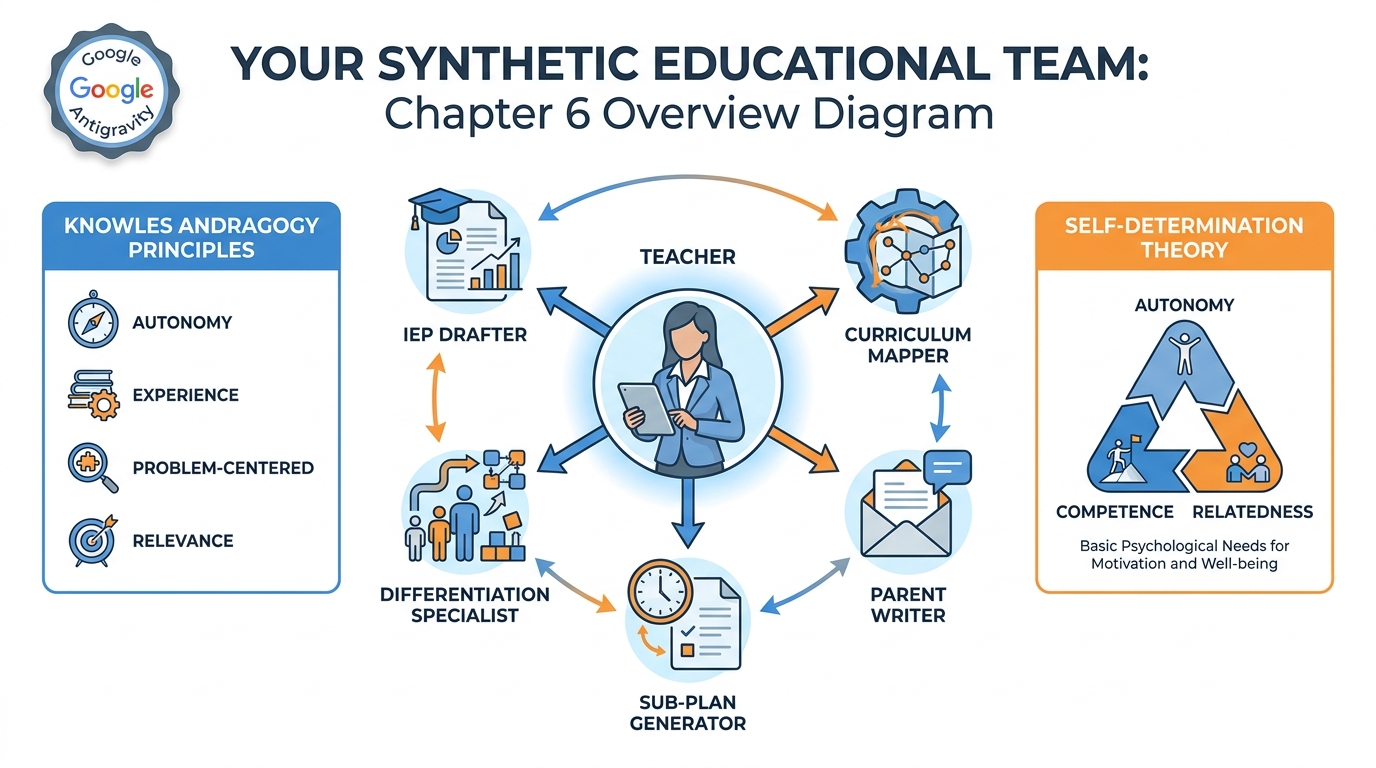
Figure 1:Chapter 6 at a Glance. Your synthetic educational team — five specialist agents, two powerful theories, and one platform that makes it all possible. By the end of this chapter, you will have stopped thinking about AI as a tool you use and started thinking of it as a team you manage.
There’s a moment that every teacher knows. You’re sitting at your kitchen table at 9:47 p.m. on a Wednesday. You have a stack of essays to grade, a parent email that’s been sitting in your inbox since Monday with the subject line “Concerned About My Child,” an IEP meeting tomorrow morning that requires a draft accommodation plan you haven’t started, and a sub folder that’s been empty since September because you haven’t had the time to build one. Your phone buzzes. It’s a colleague asking if you have a good activity for tomorrow’s lesson on fractions.
You have forty-three minutes before you absolutely must go to sleep or Thursday becomes a disaster.
This is not a morale failure. This is a structural one. You are one person doing the work of — if we’re honest — four.
What if I told you that right now, today, in 2026, you can hire a team? Not human employees. Not a teaching assistant who shows up for three hours a week. A synthetic team — AI agents that work in the background, that don’t get tired, that don’t need health insurance, that don’t go home at 3:15. A team that can draft your IEP accommodations, write the parent email, build your sub folder, map your curriculum to state standards, and give you a differentiation plan for your three students with learning differences — all while you’re sleeping.
This chapter is about how to build that team. And it begins with understanding what an agent actually is — because “agent” and “chatbot” are not the same thing, and the difference matters more than you think.
16.1 From Tools to Teammates — What an Agent Actually Is
You’ve been using AI tools since Chapter 1. You’ve had conversations with Gemini. You’ve built Gems. You’ve used AI Studio to craft custom models. Those are tools. You pick them up, use them, put them down. They respond when you speak. They wait when you don’t.
An agent is different. An agent is AI that acts.
Let me make this concrete. When you ask Gemini “Write me a parent update email for Marcus,” you get text. You copy it, paste it, edit it, send it. That’s a tool. You did most of the work.
When you deploy an agent for parent communications, something different happens. The agent knows who your students are (from your class roster in Drive). It knows Marcus’s current grade (from the gradebook you’ve connected). It knows your communication style (from the sample emails you gave it when you set it up). You type: “Send the weekly update for section 3.” The agent drafts all 28 emails, addresses each one personally, flags three for your review because something in the student’s data looks unusual, and waits for your approval before sending.
You reviewed them. You approved them. You sent them. But the drafting, the personalization, the data-pulling — the agent did that.
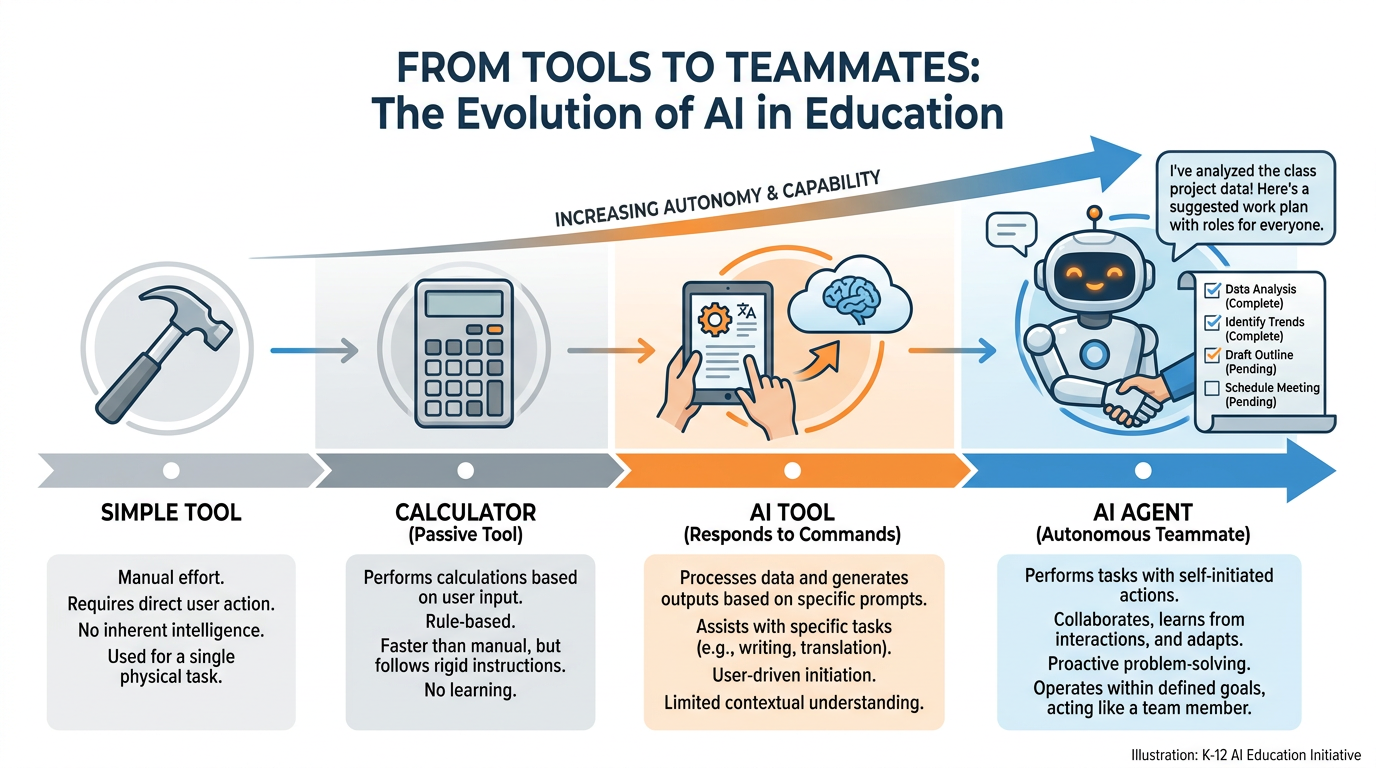
Figure 2:The Spectrum from Tool to Teammate. A hammer waits for you to swing it. A calculator waits for you to press keys. An AI tool waits for you to type a prompt. An AI agent doesn’t wait — it works toward a goal, using tools, making decisions, and reporting back. That difference is everything.
The technical definition is worth knowing:
Three things separate an agent from a tool:
Autonomy: The agent can act without being prompted at every step. It makes sub-decisions on its own.
Tool use: The agent can interact with external systems — your Drive, your email, your calendar — not just generate text.
Goal orientation: The agent has a defined objective it works toward, not just a query it responds to.
This matters for you, specifically, because your problem as a teacher is not lack of knowledge. You know how to write an IEP accommodation. You know how to email a parent. You know how to build a sub plan. Your problem is time — the brutal arithmetic of one person and an infinite task list. Agents don’t give you more knowledge. They give you more time.
26.2 Why “Synthetic Employees” Are the Next Frontier in Every Profession
In 2023, Sam Altman — the CEO of OpenAI — said something that sent a shockwave through every boardroom and faculty lounge in America: within a few years, AI agents would be capable of doing the work of an entire class of knowledge workers. Not replacing humans — that framing is always too simple — but performing the component tasks of knowledge work at scale.
By 2026, that prediction has landed. In law firms, AI agents draft contracts, review discovery documents, and flag compliance issues. In hospitals, agents pull patient histories, pre-fill intake forms, and schedule follow-ups. In finance, agents monitor portfolios, generate reports, and surface anomalies in real time.
Education has been slower to catch up — in part because of legitimate concerns about student data privacy, in part because of institutional inertia, and in part because the tools to make it practical didn’t exist until recently. That window is now open.
The concept of the “synthetic employee” — an AI agent assigned a specific job with specific responsibilities — is already reshaping every profession that runs on knowledge work. Teaching is knowledge work. The paperwork, the communication, the planning, the differentiation, the documentation — these are all, at their core, language tasks. And language tasks are precisely what agents are built for.
Here’s the question worth sitting with: If a doctor can have an AI agent that drafts clinical notes so she can spend more time with patients, why can’t a teacher have an AI agent that drafts parent communications so she can spend more time with students?
The answer, in 2026, is: she can. And this chapter is going to show you how.
36.3 Teachers Learn Like Adults Learn — Why Andragogy Makes Agents the Right Fit for You
Before we go further, I want to make a theoretical argument — because the best tools aren’t just the ones that work, they’re the ones that fit how you actually learn and work.
Malcolm Knowles introduced the concept of andragogy — the art and science of adult learning — in 1968 and developed it fully in 1970. His central argument was that adults do not learn the same way children do. Pedagogy (the teaching of children) assumes a dependent learner who needs to be guided toward knowledge they don’t know they need yet. Andragogy recognizes that adults are fundamentally different kinds of learners.
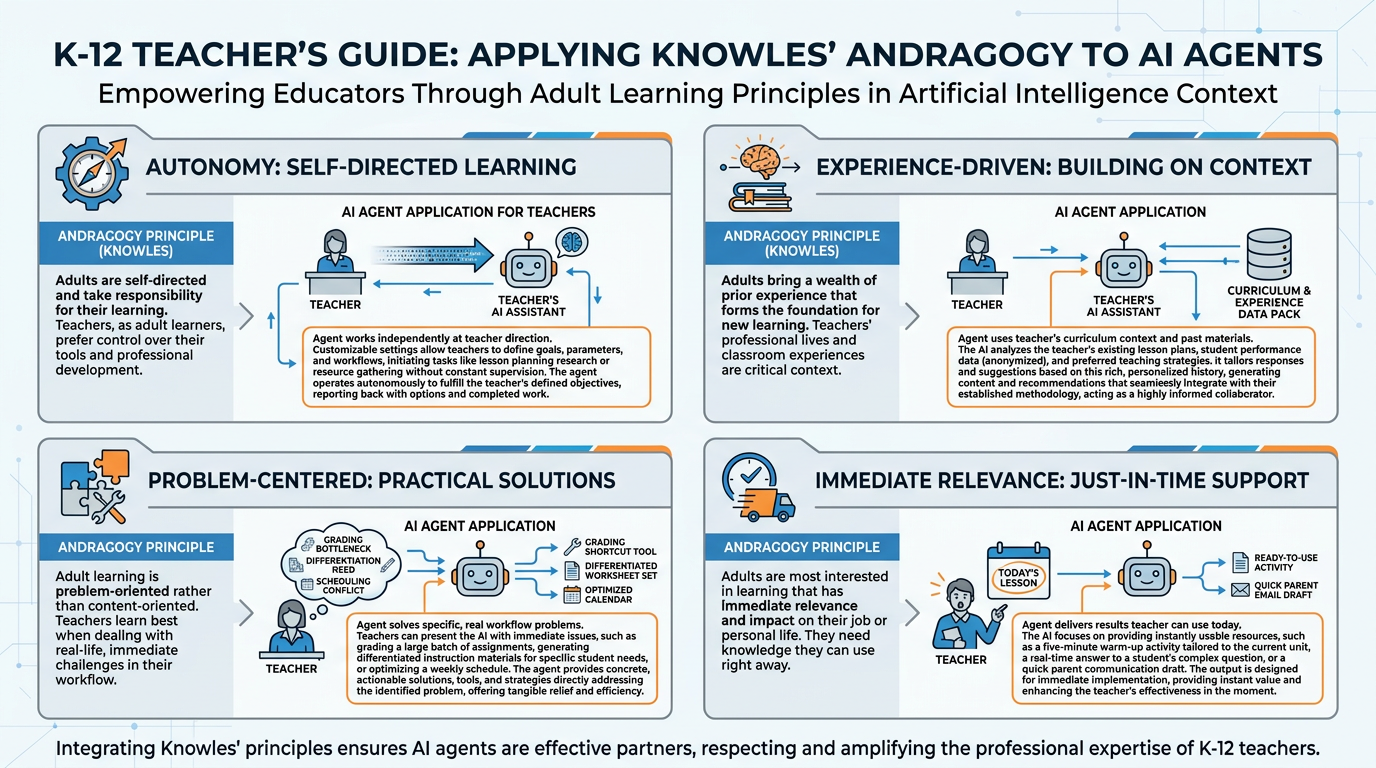
Figure 3:Andragogy Meets AI Agents. Knowles identified four characteristics of adult learners. Each one maps directly to why agents are the right tool for teachers — not students, not managers, not general users. Teachers specifically.
Knowles identified four core characteristics of adult learners. I want to map each one directly to why AI agents — not AI tools, not AI chatbots, but agents — are the right fit for you:
Autonomy: Adults need to be self-directing. They need to feel in control of their learning and work. A chatbot that requires you to prompt it constantly feels like being managed. An agent that you set up, brief, and then supervise feels like managing. That’s the right relationship for an adult professional. You are the director. The agent is the employee.
Experience-Driven: Adults bring a wealth of experience that shapes how they process new information. They learn best when new tools connect to what they already know and do. You already know how to write a sub plan. You already know what a good parent email looks like. You already know your students. An agent doesn’t replace that knowledge — it uses it. You brief the agent with your experience, and it executes with your preferences as the standard.
Problem-Centered: Adults don’t want to learn in the abstract. They want to solve a real problem they’re currently facing. You are not sitting in this class wondering theoretically about AI agents. You have a real 9:47 p.m. problem — the one I described at the start of this chapter. Agents are built to solve exactly that kind of problem.
Immediate Relevance: Adults need to see how the learning applies right now. Not next semester. Not in theory. The test of any tool for a teacher is: Can I use this this week? The answer, for the agents in this chapter, is yes. You will build one in the lab before this chapter is done.
This is why Knowles matters here. Agents are not just useful for teachers — they are andragogically aligned with how teachers learn and work. They respect your autonomy, build on your expertise, solve your actual problems, and deliver value immediately. That’s not an accident. That’s why the best technology for professionals tends to feel less like learning a new thing and more like getting better help doing the thing you already know how to do.
46.4 Welcome to Google Antigravity
You’ve been hearing about agents in the abstract. Let’s make it concrete with the platform this course uses: Google Antigravity — accessible at antigravity.google.
Google Antigravity is Google’s agent-building platform released in 2025 as part of the Google AI Pro and Ultra ecosystem. It lets you — without writing a single line of code — create, configure, and deploy AI agents that connect to your Google Workspace tools. For teachers, this means agents that can read your Google Drive, write to Google Docs, send Gmail drafts, check Google Calendar, and interact with Google Classroom.
The interface is designed for professionals, not programmers. You describe what you want the agent to do in plain language. You grant it access to the tools it needs. You set the guardrails. You run it. The agent figures out the steps.
Think of it as hiring. You’re not building a robot. You’re onboarding a new team member. You write their job description. You give them access to the files they need. You tell them what they’re allowed to do on their own and what needs your sign-off. Then you let them work.
Best for: Teachers who want to build custom agents with full Google Workspace integration.
Connect to Drive, Gmail, Calendar, Classroom, Docs, Sheets
Visual interface, no coding required
Multi-step task automation
Memory across sessions
Team sharing (share your agent with other teachers)
Available: Google AI Pro / AI Ultra subscribers
Access: antigravity.google with your personal Google account
Best for: Teachers who want simpler, conversational automation without building a full agent.
Works within the Gemini chat interface
Connect Drive, Gmail, Calendar, YouTube
One-step tasks (not multi-step pipelines)
No configuration needed — just enable extensions
Available: Free Gemini / Google AI Pro
Access: gemini.google.com → Settings → Extensions
Best for: Teachers who want to build deeply customized agents with system prompts and API access.
Full system prompt control
Connect external APIs
Build and test agent behaviors
Export to Google Cloud or Antigravity
No direct Classroom/Drive integration without additional setup
Access: aistudio.google.com with your personal Google account
For this chapter’s labs, we’ll use Google Antigravity primarily — it gives the most powerful Google Workspace integration with the least technical setup. If you’re on a free Gemini tier, the Gemini with Extensions path works for most of what we’re doing.
56.5 The Anatomy of a Useful Agent (Goal, Tools, Memory, Guardrails)
Every good agent has four components. Get all four right and you have a teammate. Get any one wrong and you have a problem.
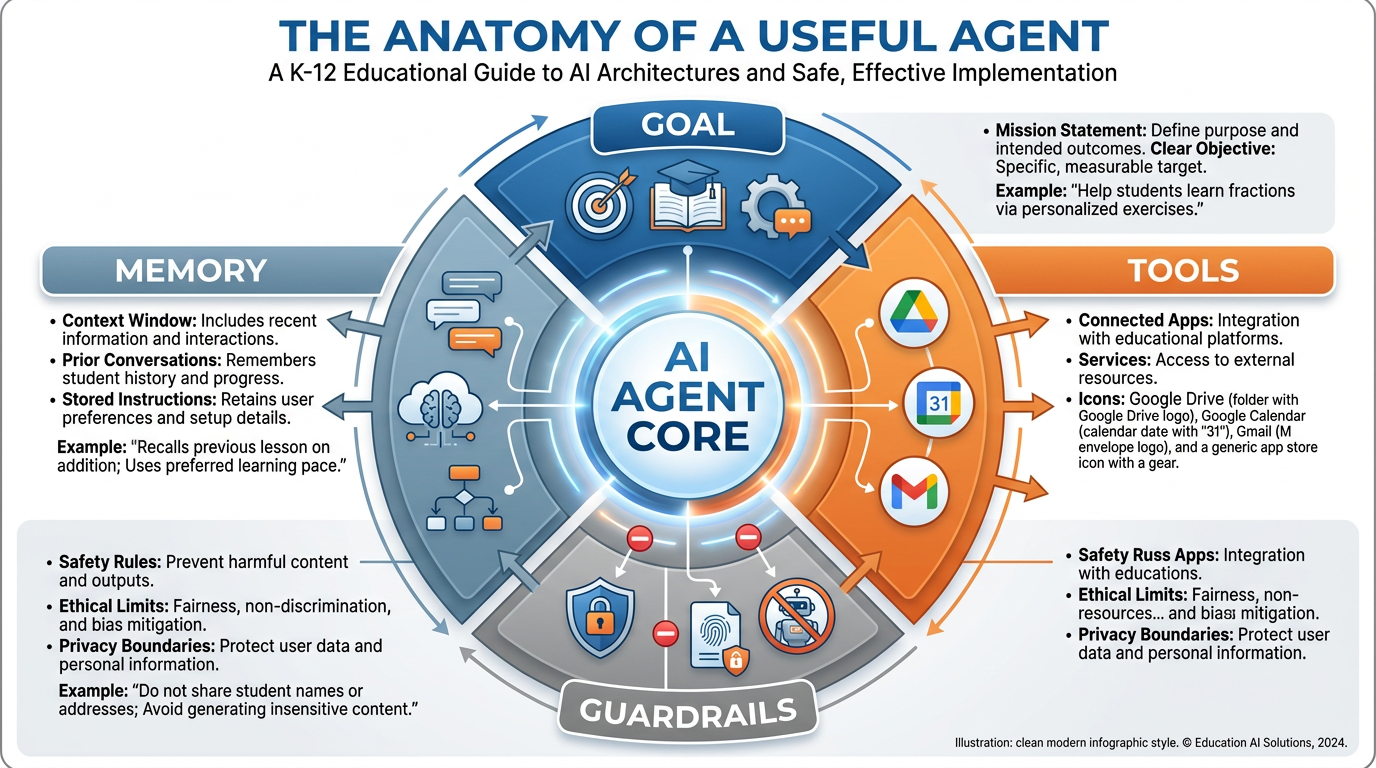
Figure 4:The Anatomy of a Useful Agent. Four components, all required. A goal without tools is a wish. Tools without guardrails are a liability. Memory without a clear goal is noise. You need all four to build an agent that actually helps.
GOAL — The agent’s mission statement. This is the most important component and the one teachers most often rush. A vague goal produces a vague agent. Compare these two:
❌ Weak: “Help me communicate with parents.”
✅ Strong: “Draft weekly progress update emails for each student in my roster, personalized with their current assignment status from my gradebook spreadsheet in Drive, written in a warm but professional tone, and flag any student whose grade has dropped more than 10 points this week for my urgent review before sending.”
The second goal gives the agent everything it needs: what to do, where to get the data, how to sound, and what to escalate. Write your goals like you’re onboarding a new employee who is excellent at following instructions but needs those instructions to be specific.
TOOLS — What the agent can access and use. In Google Antigravity, you grant tools at setup: which Drive folders it can read, whether it can draft (but not send) emails, which Sheets it can query. Tool selection is also a safety decision: give the agent access only to what it needs. An agent building sub plans doesn’t need access to your personal emails.
MEMORY — What the agent can remember across sessions. Good agents maintain context: your name, your class rosters, your preferred communication style, your district’s formatting requirements for IEPs. In Google Antigravity, you can build this memory by feeding the agent a “context document” — a Google Doc that describes who you are, who your students are, and how you like things done. Think of it as the agent’s onboarding packet.
GUARDRAILS — The rules that govern what the agent can and cannot do autonomously. This is non-negotiable for teachers. Every agent you build should have explicit guardrails:
Never send an email without my explicit approval.
Never share student data with any external service.
Flag anything related to student safety for immediate human review.
Always include “AI-assisted draft” notation on IEP documents.
Guardrails are where your professional judgment lives. The agent does the work. You maintain the responsibility.
Deep Dive: Why Guardrails Are Not Optional
Here’s a scenario that should make every teacher uncomfortable.
You build a parent communication agent with no explicit guardrails. You set it up on a Monday, test it, it works great. On Thursday, a parent sends a tense, confrontational email about a grade dispute. The agent, operating within its “respond to parent emails” mandate, drafts and sends a response that is technically accurate but tonally wrong for the situation — it’s professional, but it misses the emotional register the moment needed.
The parent is now angrier. You now have a conflict that didn’t need to happen. And it happened because you weren’t in the loop.
Guardrails prevent this. “Always flag parent emails that contain the words ‘dispute,’ ‘unfair,’ ‘principal,’ or ‘lawyer’ for immediate human response — do not auto-draft” is a guardrail that takes thirty seconds to set and prevents a crisis.
The agent is powerful precisely because it acts. That power requires you to be explicit about where it can and cannot exercise that power on its own.
66.6 Your First Agent — The Grading Assistant
Let’s build something. Not the most complex agent. The first one. And the first one should be the one that will save you the most time in the next two weeks.
For most teachers, that’s grading.
Not the judgment part of grading — that’s yours, and no agent can replace the experience and discernment you bring to evaluating student work. But the scaffolding part of grading: the rubric application, the feedback drafting, the comment writing, the grade recording. These are language tasks that can be dramatically accelerated by an agent.
Here’s what the Grading Assistant does:
You set it up with your rubric (pasted as text or linked as a Google Doc)
You set it up with your feedback standards (what good, developing, and beginning responses look like)
When you’re ready to grade, you paste in a student’s submission
The agent evaluates it against the rubric, drafts written feedback, suggests a score, and explains its reasoning
You review, adjust if needed, and accept or revise
You are not abdicating grading. You are making grading a review process instead of a from-scratch drafting process. For a 28-student class, the difference between drafting 28 pieces of feedback from nothing and reviewing 28 agent-generated drafts can be an hour of your Wednesday night.
Setting up your Grading Assistant in Google Antigravity:
AGENT GOAL:
You are a grading assistant for [Your Name], a [grade level] [subject] teacher.
When given a student submission, evaluate it against the rubric below and:
1. Score each criterion on a scale of 0-[max points]
2. Write 3-5 sentences of specific, constructive feedback for the student
3. Highlight one strength and one specific area for improvement
4. Provide a suggested total score

Use a warm, encouraging tone appropriate for [grade level] students.
Never be sarcastic or demoralizing. Focus on growth.

RUBRIC: [paste your rubric here]

IMPORTANT: Your output is a DRAFT for the teacher to review, not a final grade.
Always include: "TEACHER REVIEW NEEDED" at the top of your output.
This is your goal statement. Clean. Specific. With the guardrail built in.
76.7 The Specialist Roster Every Teacher Should Build
The Grading Assistant is your first hire. These are the five specialists who will complete your team.
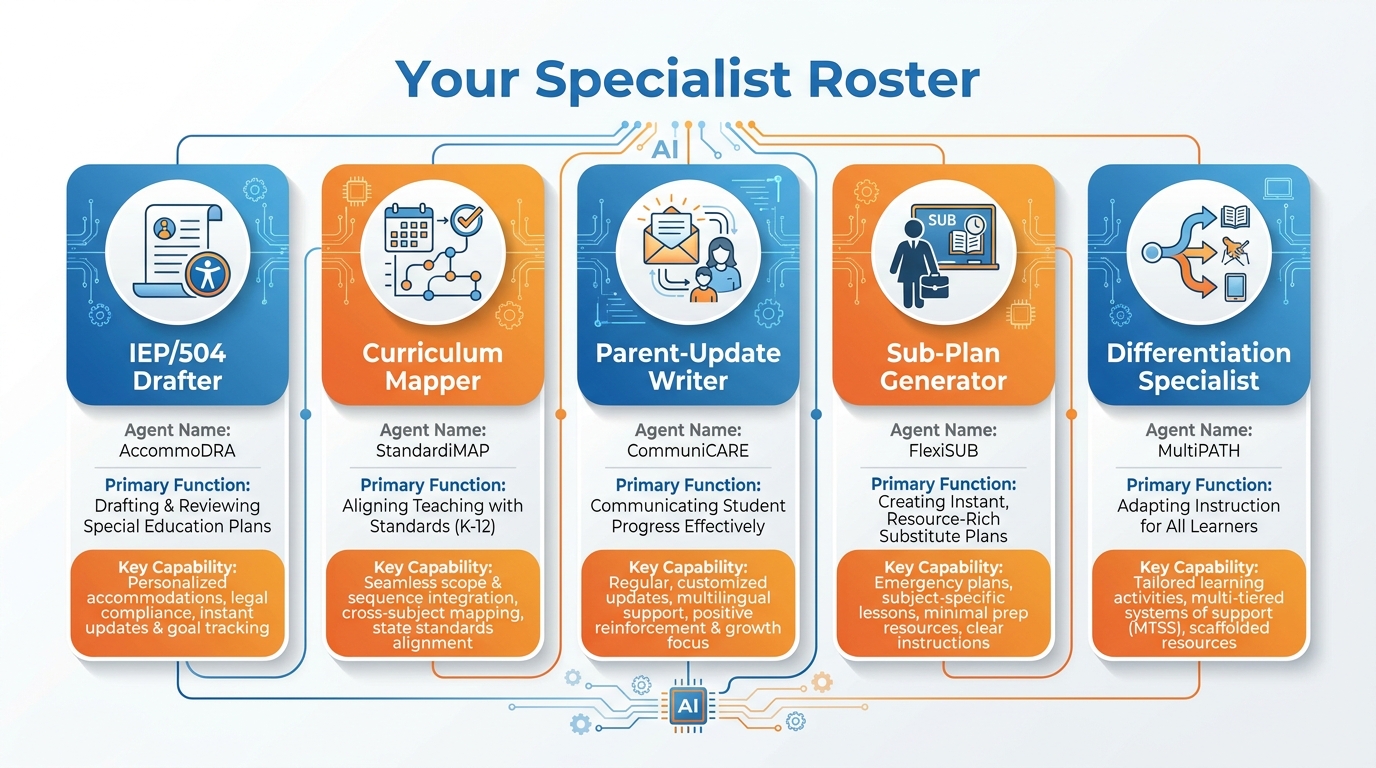
Figure 5:Your Specialist Roster. Five agents, five specific jobs. Each one addresses a task that currently costs you time you don’t have. Together, they function as the support team every teacher deserves and almost none actually get.
7.1The IEP/504 Drafter
Every special education coordinator in America is overworked. Every classroom teacher with students on IEPs is managing a documentation burden that can feel crushing. The IEP/504 Drafter agent doesn’t replace the special education professional’s expertise — it drafts the teacher’s contribution to the process.
What it does: Given a student’s name, current performance data, and the accommodation areas to address, it drafts the teacher’s section of an IEP or 504 plan using your district’s required language and format. It pulls the student’s recent assessment data from the gradebook spreadsheet you’ve connected and suggests accommodations aligned with observed patterns.
What you do: Review every word. Add professional observations the data can’t capture. Sign your name. Submit.
The guardrail that matters: All IEP/504 draft output must be flagged as DRAFT and reviewed by both the classroom teacher and the certified special education staff before any submission. Never present as final.
Sample goal statement:
You are an IEP documentation assistant for [Name], a [grade/subject] teacher.
When given a student name and the IEP section to draft, pull the student's
assessment data from [linked Sheets file], use Miami-Dade County Public Schools
IEP format, and draft the Present Levels of Academic Achievement and Functional
Performance (PLAAFP) statement and teacher-observation section.
Output: A clearly labeled DRAFT. Professional, specific, measurable language.
No diagnosis language. No speculation about causes of disability.7.2The Curriculum Mapper
State standards. District pacing guides. Textbook chapters that don’t align with either. The Curriculum Mapper agent lives at the intersection of these three things and translates between them.
What it does: Given a unit topic and grade level, it maps your planned lessons to the relevant Florida BEST Standards (or whichever standards apply), identifies gaps in coverage, suggests the order of instruction that builds prerequisites correctly, and outputs a color-coded alignment chart you can actually give to an administrator or include in a unit plan.
What you do: Review the alignment. Add the activities and assessments. Adjust the sequence based on your professional knowledge of your students. Submit.
The Curriculum Mapper saves the hours that used to go to cross-referencing — which is real, unglamorous, time-consuming work that adds no instructional value once it’s done.
7.3The Parent-Update Writer
Parent communication is one of the highest-leverage activities a teacher can do and one of the most consistently underdone, because it takes time teachers don’t have. The Parent-Update Writer changes this equation.
What it does: Every week or two, you give it a signal — “Run the Section 3 update” — and it drafts individual, personalized emails for every family in your roster, pulling current grade data, noting any recent missing work, flagging upcoming major assignments, and maintaining a warm, professional tone throughout. It queues the emails as drafts in your Gmail. You review, adjust any that need personal attention, and send.
The result: Every family hears from you regularly. No one falls through the cracks. No parent gets to “I never knew there was a problem” when the grade comes out at the end of the quarter.
What you do: Review every draft before sending. The agent does not send on its own. This is non-negotiable.
7.4The Sub-Plan Generator
This is the one you feel in your stomach every time you call in sick. The sub folder that’s always almost done. The three-page write-up you know you should have ready but keep not getting to because everything else is more urgent.
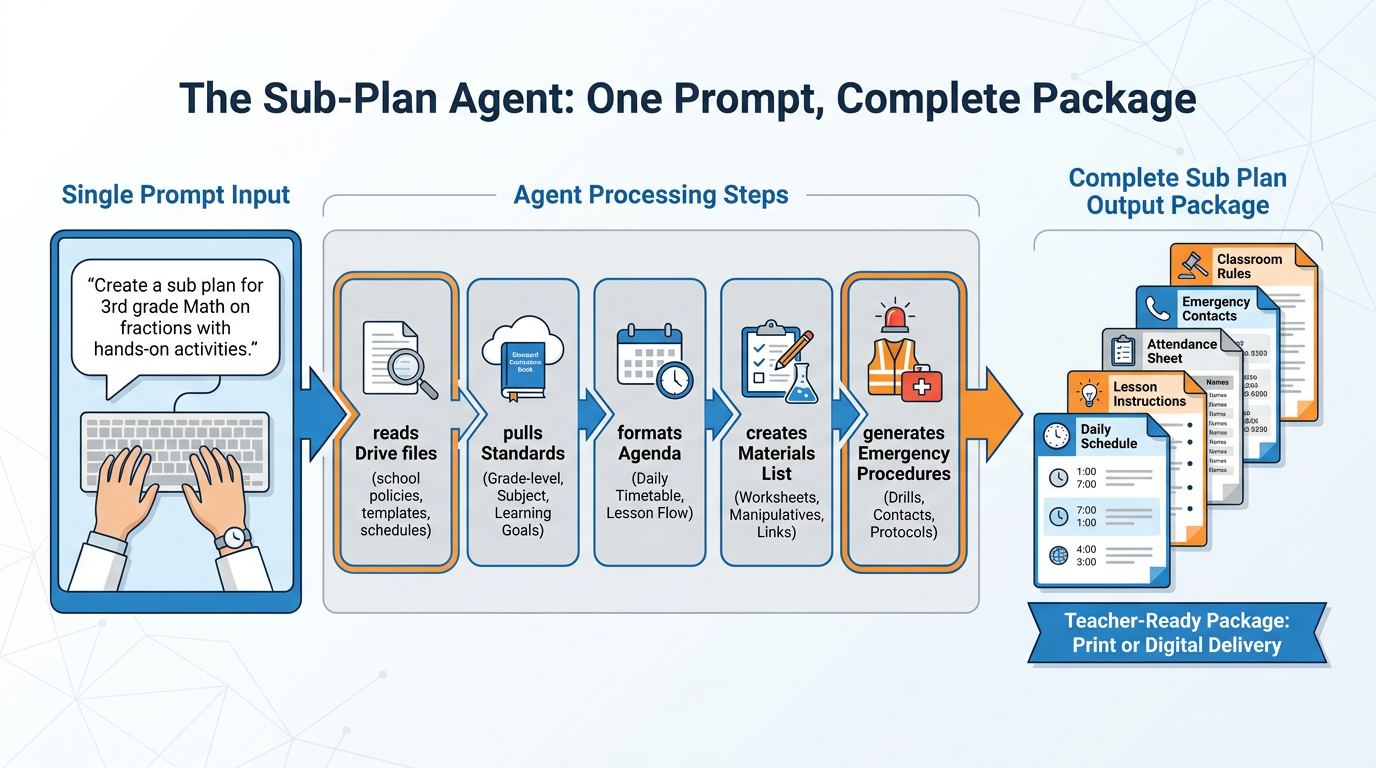
Figure 6:The Sub-Plan Agent Pipeline. One sentence in. An entire substitute folder out. The agent reads your Drive resources, formats the plan, and creates a ready-to-print document — all before you finish your morning coffee.
What it does: From a single prompt — “I need a sub plan for tomorrow, third period, we’re on Chapter 7 of the textbook, there’s a quiz on Thursday so don’t review that material” — it generates a complete substitute folder: a daily schedule, step-by-step lesson instructions written for someone who does not know your subject, a seating chart (from the one you’ve uploaded to Drive), attendance procedures, emergency contact information, classroom management expectations, and a student helper list.
What you do: Review it. Print it or share it. Go rest, because you’re sick.
You will build this agent in the Hands-On Lab. It’s the most vivid demonstration of what agents can actually do for a teacher’s daily life.
7.5The Differentiation Specialist
You have 28 students. Three of them are reading three grades below level. Two are English Language Learners who are still developing academic vocabulary. Four are accelerated enough that the on-grade-level material bores them by the second day of a unit. And one student has ADHD severe enough that wall-of-text instructions aren’t going to work at all.
Differentiation is the right answer. It’s also, in traditional practice, an enormous amount of additional planning work — because you essentially need multiple versions of every lesson.
What it does: Given your lesson plan or activity instructions, the Differentiation Specialist produces three versions: a scaffolded version with additional support structures (sentence frames, vocabulary pre-teaching, visual aids descriptions), the on-grade-level version (your original), and an extended version with additional challenge, deeper questions, and enrichment connections. It also generates a set of guiding questions at each level and suggests specific accommodations for common IEP/504 needs.
What you do: Review all three. Adjust based on your specific students — the agent doesn’t know Marcus has texture sensitivities that affect his focus or that Aaliyah responds much better to visual prompts than written ones. Your knowledge is irreplaceable. The agent’s drafting time is replaceable.
86.8 Connecting Agents to Your Existing Tools (Drive, Calendar, Gmail)
The power of agents is not just the language they generate — it’s that they can pull from and push to the systems you already use. In Google Antigravity, this happens through tool grants: explicit permissions you give the agent to access specific resources.
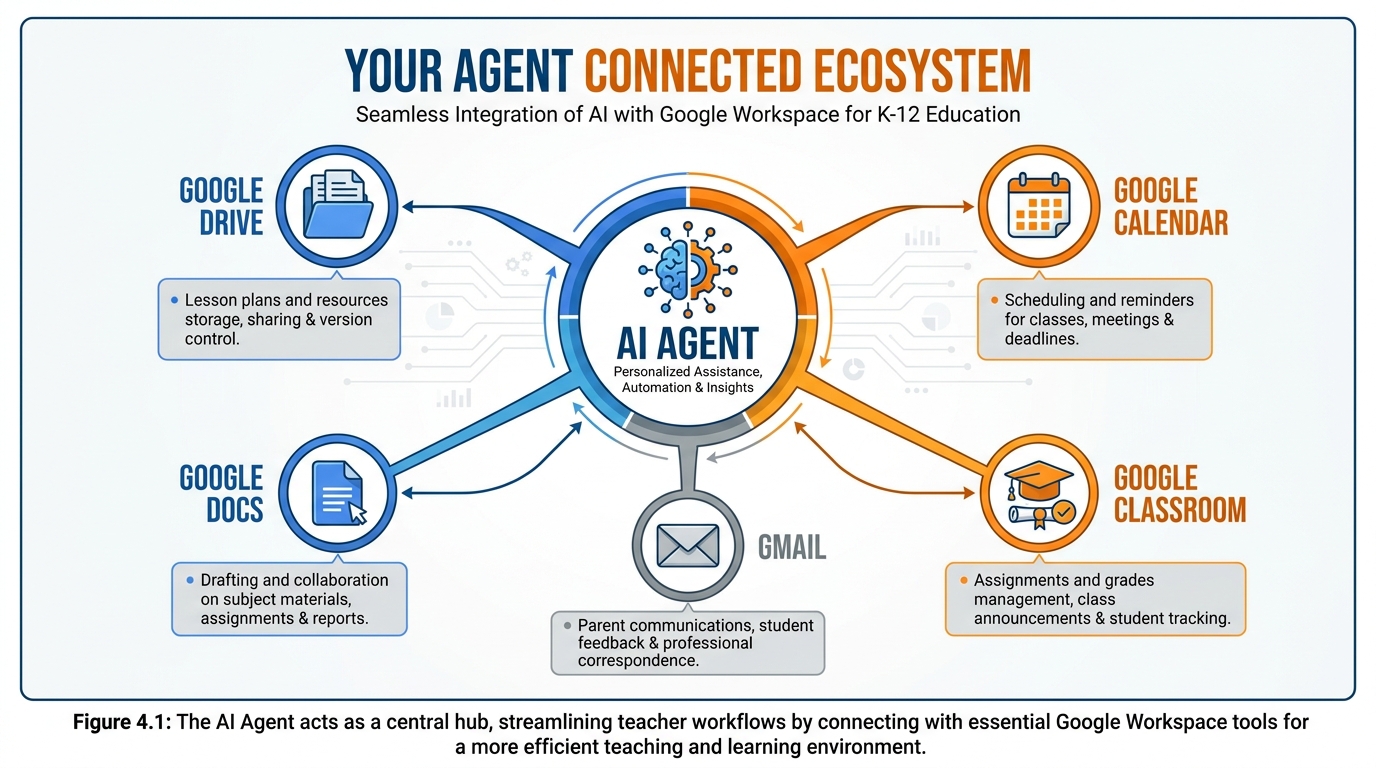
Figure 7:Your Connected Agent Ecosystem. Each spoke represents a live connection between your agent and a tool you already use. The agent doesn’t replace these tools — it orchestrates them, pulling data from where it lives and delivering output where you need it.
Here’s how each connection works in practice:
Google Drive: Your agent can read documents you’ve designated — your gradebook, your class roster, your lesson plan template, your IEP format guide. It cannot write to Drive unless you explicitly grant write access. Recommendation: give your agents read access to specific folders, never broad Drive access. Create a dedicated “Agent Resources” folder and put everything your agents need there.
Gmail: Your agent can draft emails (and queue them in your Drafts folder) without the ability to send. This is the configuration you almost always want. An agent that can send email autonomously is an agent that can make mistakes that go directly to parents. Draft-only is your safety valve. You review, you decide, you send.
Google Calendar: Your agent can read your calendar (to understand your schedule and avoid conflicts), create draft events, and check for availability. Particularly useful for the Curriculum Mapper — knowing your actual school calendar (test days, professional development days, holidays) lets it build a pacing guide that accounts for real time, not theoretical time.
Google Docs: Your agent can create new documents (useful for the Sub-Plan Generator, which might produce a multi-page plan), append to existing documents, and read from template documents. Give it a Docs template for your sub plan format and it will stay consistent.
Google Classroom: Classroom integration is the newest and still developing as of 2026. Currently, agents can read assignment information, due dates, and class roster data from Classroom. Direct posting to Classroom still requires your action. This may evolve — check current Google Antigravity documentation for the latest capabilities.
The diagram above shows the flow every agent should follow: teacher input → agent with tool access → output → teacher review → final action. The review step is not optional. It is structural. It is part of how the system works.
96.9 Supervising Your Team — Staying in the Driver’s Seat
Here’s the thing nobody tells you about managing a team: the hardest part is not delegating — it’s staying appropriately involved after you delegate.
New managers make one of two mistakes. Either they hover, micromanaging every decision and negating the value of having a team at all. Or they fully hand off and stop paying attention, letting things go wrong that they would have caught if they’d stayed in the loop.
The same dynamic applies to AI agents.
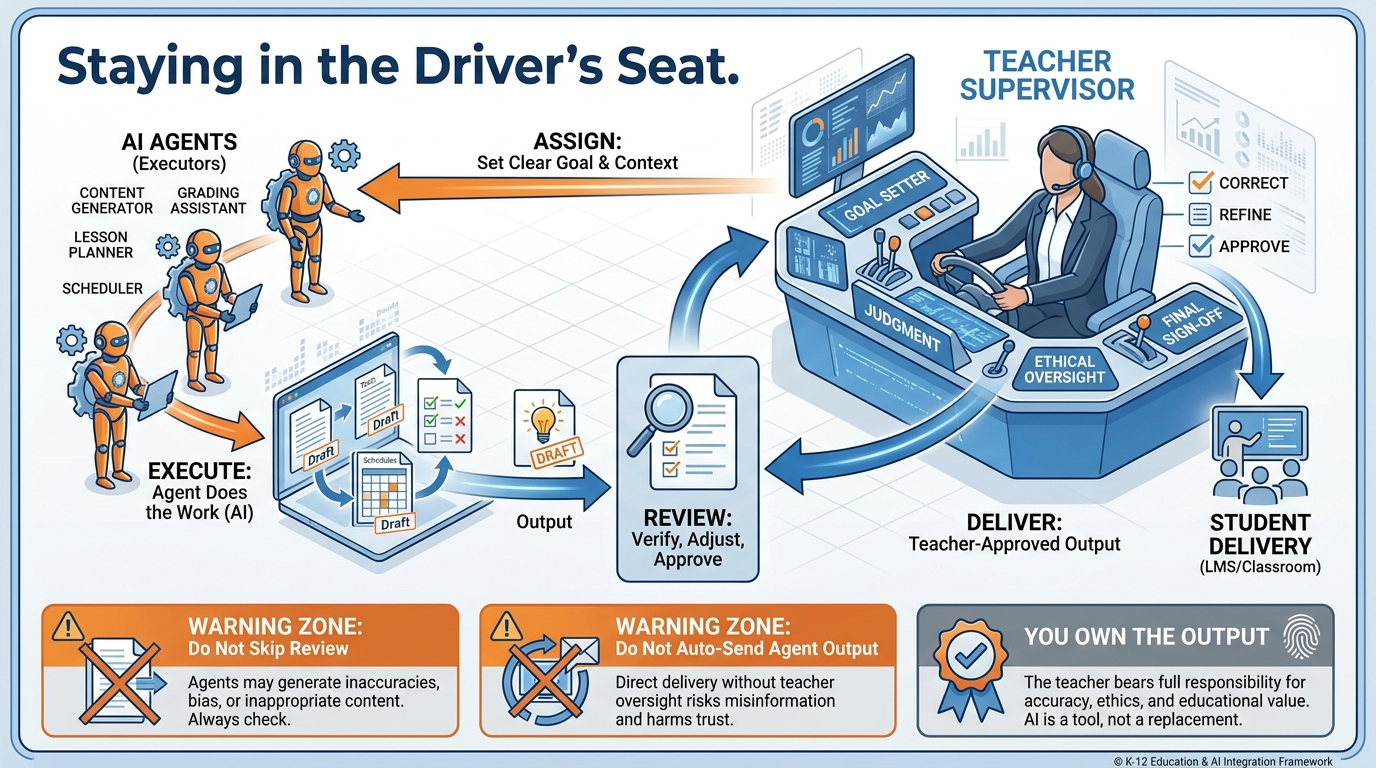
Figure 8:Staying in the Driver’s Seat. The agent does the work. You maintain the authority. The three-step cycle — Assign, Execute, Review — is not bureaucracy. It is the structure that keeps you professionally responsible for everything your agents produce.
The three-step cycle for every agent interaction:
Assign: Give the agent a clear goal. Not “do the thing” but “here is exactly what I need, here is the context you have, here is what I want you to produce, here is what you need my approval for before acting.”
Execute: Let the agent work. Don’t hover. Don’t re-prompt constantly. Give it the information it needs and let it do the job you set it up to do. The whole point is that you can do other things while it runs.
Review: This is mandatory. Before anything your agent produces leaves your desk — before a draft email goes out, before an IEP section gets submitted, before a sub plan gets handed to the office — you read it. You own it. If it’s wrong, you fix it. If it’s right, you approve it.
The review step is where your professional judgment lives. The agent is good at language. It is not good at knowing that this particular parent, Mrs. Jackson, does not respond well to the phrase “areas for growth” because of a conversation you had with her in September. You know that. The agent doesn’t. The review step is where that knowledge gets applied.
106.10 Autonomy, Competence, Relatedness — Why Delegating to Agents Either Fuels or Drains You
Let’s bring in the second theoretical anchor for this chapter. Edward Deci and Richard Ryan developed Self-Determination Theory (SDT) in 1985, with major extensions in 2000, as a comprehensive framework for understanding human motivation. At its core, SDT proposes that humans have three fundamental psychological needs, and when those needs are met, we flourish. When they’re frustrated, we disengage, burn out, or rebel.
The three needs: Autonomy, Competence, and Relatedness.
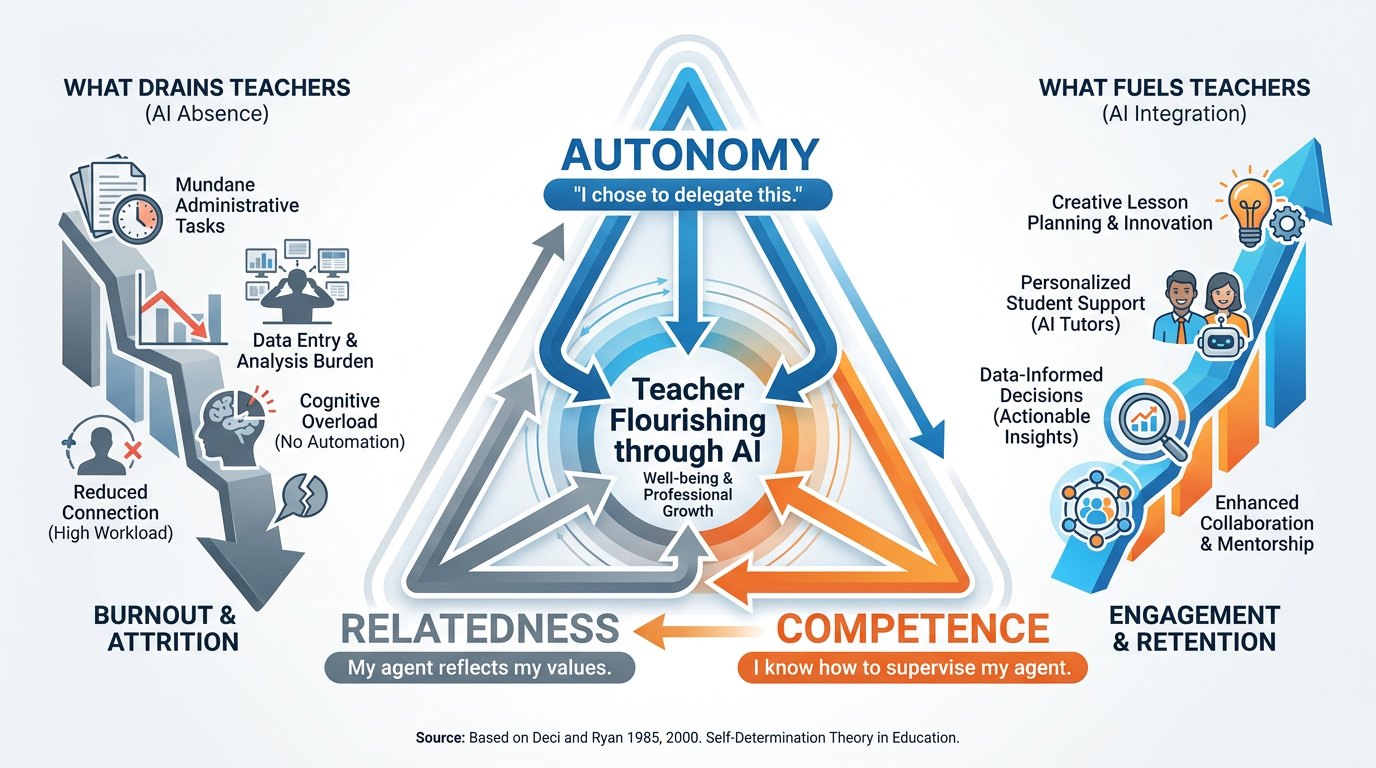
Figure 9:Self-Determination Theory and AI Delegation. Your relationship with your AI agents will either fuel or drain you depending on whether it supports your autonomy, builds your competence, and honors your relatedness with students and colleagues. The same tools, set up differently, can do either.
This framework matters because teachers frequently report two very different emotional responses to AI tools: some feel energized — more capable, more creative, more human with their students. Others feel diminished — replaced, deskilled, disconnected from the work that drew them to teaching. The difference, in almost every case, is whether their fundamental psychological needs are being met.
Autonomy: SDT-aligned autonomy means acting from your own values and choices — not just having freedom to act, but feeling that your actions are genuinely yours. When you choose to delegate the IEP draft to an agent because it frees you to spend that hour in a real conversation with the student, you experience autonomy. When your district mandates that agents draft all IEP sections and you are simply approving output you feel uncomfortable owning, autonomy is frustrated. The question is not whether agents are used — it’s whether you are the one choosing how and when.
Competence: SDT-aligned competence means experiencing yourself as effective and capable. Good agent use expands your competence — you can do things you couldn’t do before (personalized updates for 28 families, differentiated materials at three levels) and you feel more capable as a result. Bad agent use erodes competence — when you’re approving output you can’t evaluate, drafting on top of drafts you don’t fully understand, or losing the skills you used to have because you’ve stopped practicing them. Design your agent relationships so they make you more skilled, not less.
Relatedness: SDT-aligned relatedness means feeling genuinely connected to the people you serve. Here’s the risk: if you spend so much time building and managing agents that you have less time in real relationship with your students, you have made a bad trade. The entire purpose of building a synthetic team is to free up time for the irreplaceable human relationships — the Marcus in the third row who needs three specific kinds of challenge, the family that needs a personal phone call, not a template email, the colleague who just needs someone to eat lunch with on a bad Tuesday.
Agents should increase your relational capacity, not substitute for it. If you find yourself feeling further from your students after adopting AI workflows, something is misconfigured — not the technology, but the allocation of the time it saves.
Research Spotlight: SDT and Technology in the Workplace
Deci and Ryan’s research (2000) showed that when people feel controlled by technology — when the tool dictates their workflow rather than supporting their choices — their intrinsic motivation drops significantly, regardless of whether the technology improves their output metrics.
This finding has been replicated in educational technology contexts. Teachers who feel AI is imposed on them by administration show lower intrinsic motivation and greater burnout risk than teachers who voluntarily adopt AI tools that align with their own goals (see also: Vansteenkiste et al., 2006, on the role of autonomous motivation in educational professionals).
The takeaway: adoption context matters as much as tool quality. The same agent, adopted voluntarily by a teacher who chose it for their own reasons versus mandated by an administrator who bought a district license, will produce dramatically different professional outcomes. This is an argument for teacher autonomy in AI tool selection — not just instrumentally, but as a matter of professional psychological health.
116.11 Limits, Ethics, and Honest Disclosure to Students and Parents
This section is not a compliance checklist. It’s a professional reckoning.
When you use AI agents in your teaching practice, you are making decisions that affect students and families who have not consented to be part of an AI workflow. That reality comes with obligations — legal, ethical, and relational.
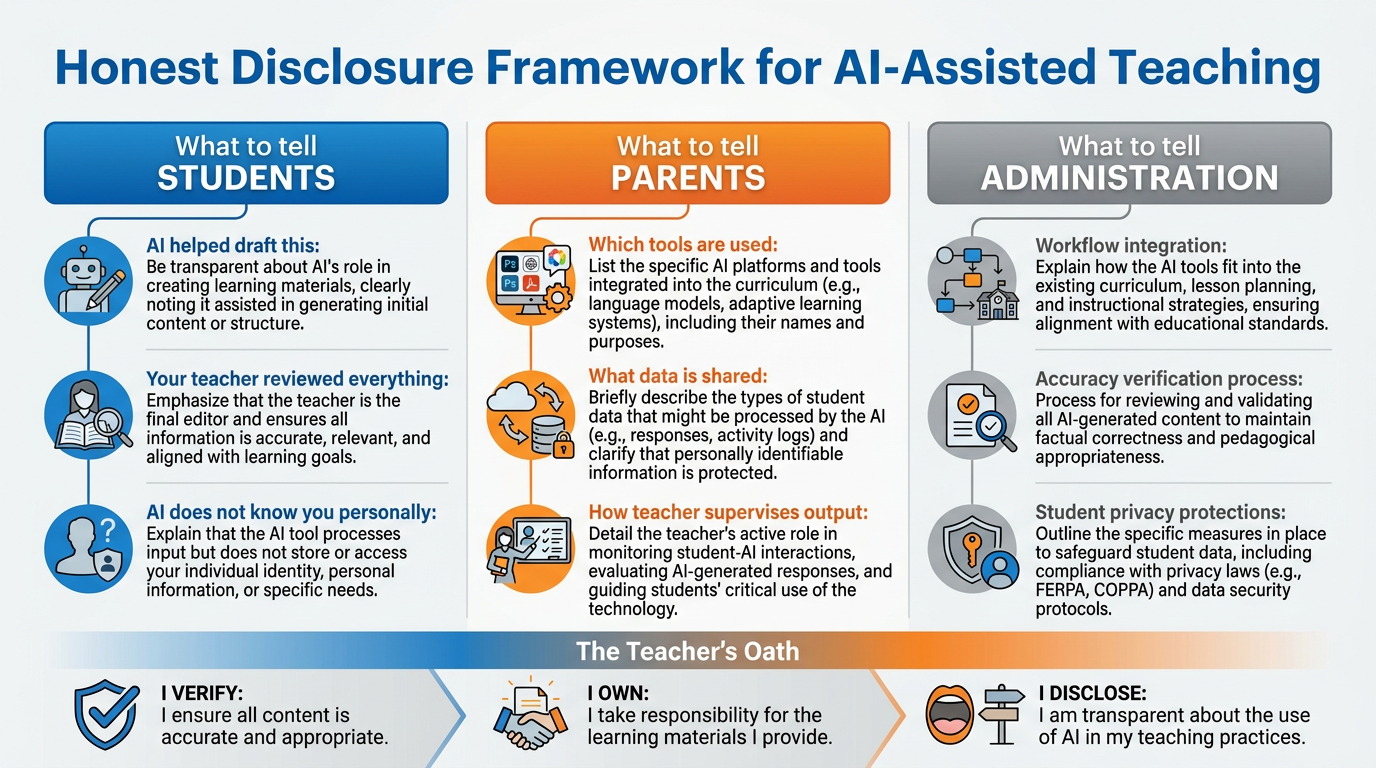
Figure 10:The Honest Disclosure Framework. Transparency is not a burden — it is the foundation of trust. These three conversations — with students, with parents, and with administration — protect everyone in the room, including you.
What you must tell students: Students have a right to know when their work is being evaluated by an AI system, even a human-supervised one. They don’t need a technical explanation. They need honest language: “I use AI to help me draft feedback on your writing, but I read every word and change what doesn’t fit. The grade you receive is my judgment. The feedback is a starting point that I’ve reviewed and approved.” That’s it. Simple, honest, and age-appropriate.
What students must not believe: that AI is giving them a grade independent of teacher judgment, that AI knows them personally, or that the feedback they receive is unmediated output from a machine. Your review and approval is the professional act that makes the feedback yours.
What you must tell parents: Parents are entitled to know the tools being used in their child’s education. Your school or district may have specific disclosure requirements — know them. At minimum, parents should know: (1) which AI tools are used in your classroom workflow, (2) what student data those tools can access, and (3) how you supervise and verify AI-assisted outputs before they affect their child. Most parents, informed clearly, are not alarmed by responsible AI use. They become alarmed when they find out after the fact that AI was involved in something that affected their child.
What you must tell administration: Know your district’s AI use policy. If your district doesn’t have one, this is a conversation worth initiating — because using tools your district hasn’t approved could leave you professionally exposed. Document your use cases. Show your review process. Demonstrate your guardrails. The teacher who can say “here is exactly how I use AI and how I verify its output” is in a fundamentally different position than the teacher who is quietly using tools the district doesn’t know about.
The data question you must not skip: Student data privacy is governed by FERPA (Family Educational Rights and Privacy Act) and, in Florida, state-level protections. The general rule: student personally identifiable information may not be shared with third-party AI systems unless those systems have a FERPA-compliant data processing agreement with your district. In Google’s case, Google Workspace for Education (your school account) has FERPA compliance built in. Your personal Google account, used with Google Antigravity, does not have the same protections for student data.
The practical implication: When using Google Antigravity or Gemini with your personal account, do not feed in student names, student ID numbers, or individually identifying information. Use pseudonyms (“Student A”), aggregate descriptions (“three students in my 4th period class who are reading below grade level”), or deidentified data. This protects your students and protects you.
The limits you must accept: There are things your agents cannot do and should not be asked to do. They cannot make final determinations about students with disabilities — that requires human professionals with credentials and legal accountability. They cannot replace the judgment call you make when a student’s work suggests something is wrong at home. They cannot notice that a student hasn’t submitted anything in three weeks because they’re dealing with a crisis. You can. Stay in the work.
126.12 Building a Cohesive Team That Works the Way You Teach
Your synthetic team should not feel like five separate tools you’ve bolted onto your existing workflow. At its best, it should feel like a well-functioning department — each agent knows its role, they don’t step on each other, and the whole thing reflects your values and professional identity.
Here’s how to build for coherence:
Give all your agents the same context document. Create a single Google Doc called “About My Teaching Practice” and link it to all your agents as a memory resource. Include: your name, grade level, subject, school, your communication style preferences, your classroom values, key things about your student population (generalized, not identifiable), and your non-negotiables. Every agent that can read this document will produce output that sounds like you — consistent across email, sub plans, feedback, and differentiation.
Build a naming convention. If you have five agents, name them something you’ll remember: Grader, IEP-Drafter, ParentWriter, SubBuilder, Differentiator. In Google Antigravity, you can organize them in a workspace. Treat them like a real roster — know who does what, check in on them periodically, retire and rebuild when their configuration needs updating.
Schedule regular agent reviews. Every six to eight weeks, revisit each agent and ask: Is this still doing what I need? Has my rubric changed? Has my district’s IEP format been updated? Is my communication style still reflected in the output? Agents drift when the world around them changes and their configuration doesn’t. A quick review keeps them current.
Build in the human moments explicitly. One of the paradoxes of automation: if you don’t deliberately protect time for the irreducible human work, the agent efficiencies get absorbed into more tasks rather than more relationships. Block time in your calendar for the things no agent can do. Student conferences. Hallway conversations. The parent phone call you make because this situation calls for your voice, not a template. Protect that time the same way you protect planning time.
The goal is not maximum automation. The goal is maximum teaching. You got into this profession because you wanted to be with students, not because you wanted to spend your evenings writing IEP language. Build the team that handles the language so you can be with the students.
13Chapter Summary
14📝 Case Study & Discussion Board (2 pts)
14.1Case Study: The Sub Folder That Finally Got Built
Ms. Chen is a 7th-grade science teacher at a Title I school in Miami. She has 31 students, three sections, and a chronic shortage of planning time. For four years, she has had no sub folder — meaning every time she calls in sick, she spends 20 minutes in bed on her phone sending frantic emails to colleagues asking them to cover and describing verbally what each class should do.
In October 2025, she builds a Sub-Plan Generator agent using Google Antigravity. She spends 90 minutes on a Sunday afternoon setting it up: connecting it to her lesson plans in Drive, giving it her school’s emergency procedures document, uploading her class roster with student helper designations, and writing the agent’s goal statement.
Three weeks later, she gets a stomach bug. At 5:30 a.m., before she even emails the office, she types one prompt into her agent: “I need a sub plan for today. We’re in Week 7, Chapter 6 of the textbook. Section 1 has a quiz tomorrow, don’t review yet. Section 2 and 3 are starting the lab on cells.”
Twelve minutes later, she has three separate sub plans — one per section — with the daily schedule, step-by-step instructions, a seating chart, emergency contact information, and a note about which students are classroom helpers. She reviews them, makes two small adjustments, and sends them to the office at 5:47 a.m. She goes back to sleep.
Her substitute, who has never been in a science classroom, successfully runs all three sections. No teacher friends were woken up. No students had a lost day.
Discussion Prompt (minimum 250 words):
Ms. Chen’s agent is not teaching the class — a human substitute is. But Ms. Chen’s professional expertise is present in every line of that sub plan. Using Knowles’ andragogy or Deci and Ryan’s Self-Determination Theory, explain why this kind of agent use is consistent with professional autonomy rather than a surrender of it.
What would have to go wrong with this scenario for it to become an example of irresponsible AI use? Identify at least two specific failure points and what guardrails could have prevented them.
What does Ms. Chen’s story tell you about the difference between automation that dehumanizes work and automation that humanizes it?
Discussion Guidelines:
Your initial post must be a minimum of 250 words.
You must include at least one scholarly citation (APA format) — Knowles (1970), Deci & Ryan (1985, 2000), or a peer-reviewed source you’ve located.
You must respond meaningfully to at least two of your peers — engage with their specific argument, not just their conclusion (minimum 75 words per response).
Due: Initial post by Wednesday, responses by Sunday.
15🧪 Hands-On Lab: Build the “Substitute Folder” Agent (10 pts)
15.1Overview
You’re going to build the agent from Ms. Chen’s case study. By the end of this lab, you will have a working Substitute Folder Agent that can generate a complete sub plan from a single prompt. This is not a simulation. This is a real agent you will use.
Time required: Approximately 90–120 minutes
Tools: Google Antigravity (antigravity.google) or Gemini with Extensions
Points: 10
15.2Step 1: Gather Your Context Materials (15 min)
Before you build the agent, you need to give it the materials it will work from. Create a folder in your Google Drive called Sub Plan Agent Resources. In that folder, place:
Your current class roster (students’ first names only, with any helper designations — do not include IDs or sensitive data)
Your school’s standard sub folder template (if your school has one — if not, create a simple daily schedule template in Google Docs)
A one-paragraph description of your classroom management expectations (what a sub needs to know: noise level norms, bathroom procedures, how to handle disruptions)
Any standing emergency procedures relevant to your school (office phone number, nurse location, etc. — check with your school for approved disclosure)
Note the share link for this folder (set to “Anyone with the link can view”) — you’ll give it to the agent.
15.3Step 2: Write Your Agent’s Goal Statement (20 min)
Open a Google Doc. This is where you’ll draft your agent’s goal before entering it into Google Antigravity. Write it in your own words, using this structure as a guide:
AGENT NAME: Sub-Plan Generator

WHAT I DO:
I create complete substitute teacher folders for [Your Name], a [grade level]
[subject] teacher. When given a prompt describing the day's context, I produce:
- A period-by-period schedule for each class section
- Step-by-step lesson instructions written for someone unfamiliar with the subject
- Classroom management expectations for the substitute
- A student helper list for each section
- Emergency contact and procedure reminders

WHAT I KNOW:
- I have access to the teacher's class roster in Google Drive [folder link]
- I have access to the classroom procedures document [doc link]
- Today's date and day of week (I should acknowledge this in the plan)

HOW I SOUND:
- Clear and direct — substitute teachers need instructions that are impossible to misinterpret
- Encouraging — a brief welcoming note to the substitute at the top
- Specific — not "do an activity" but "students open their textbooks to page 147
  and complete problems 1-12 independently, then check answers as a class"

WHAT I NEVER DO:
- Include student last names, ID numbers, or any identifying information
  beyond first names
- Make assumptions about which students have IEPs or 504s without being told
- Auto-send or auto-share anything — all output is for teacher review first
Spend time on this. A well-written goal statement is the difference between an agent that saves you time and one that produces output you have to rewrite entirely.
15.4Step 3: Build the Agent in Google Antigravity (30 min)
Go to antigravity.google and sign in with your personal Google account.
Click Create Agent (or New Agent — the interface may vary by version).
Name your agent: Sub-Plan Generator — [Your Name]
In the goal/instructions field, paste your goal statement from Step 2.
Under Tools, grant access to:
Google Drive (read-only access to your Sub Plan Agent Resources folder)
Google Docs (create new documents — for the output)
Under Memory, add a link to your “About My Teaching Practice” context document (if you’ve created one from earlier in the course) or write a brief description of your teaching context directly in the memory field.
Save the agent configuration.
If you’re using Gemini with Extensions (free tier path):
Enable Drive and Docs extensions in Gemini settings
Use the goal statement as a detailed system context at the start of your conversation
The output will be in the chat rather than auto-saved to Drive — copy it to a Google Doc manually
15.5Step 4: Test Your Agent (20 min)
Run a test prompt. Use a realistic scenario from your actual teaching context — a day when you might call in sick, mid-unit, with specific class needs. Your test prompt should be one to three sentences:
Example:
“I need a sub plan for tomorrow. My 2nd period class is starting their essay drafts today — they have the prompt in their Google Classroom assignment. My 4th period is doing a group review activity for the quiz on Friday. My 6th period is behind — they should finish the reading from Chapter 8 that we started on Monday. I have a student helper in each class — check the roster.”
Review the output. Ask yourself:
Is this specific enough for a sub who has never been in my classroom?
Are the instructions sequential and clear?
Is the tone right?
What’s missing?
Iterate. Run the prompt again with adjustments. Refine the goal statement if needed. A good agent gets better through iteration, not just initial setup.
15.6Step 5: Group Build (in-class or discussion board)
Working with your group, use AI to do two things:
First — identify a real teacher workflow problem. Not “grading takes too long” (too vague) but a specific, concrete problem that your group has actually experienced or observed: the exact moment where time runs out, where the task falls through the cracks, where the cognitive load becomes untenable. Use Gemini as a thinking partner to sharpen the problem until it’s specific enough to be solvable.
Second — design a mini-agent solution. What would an agent need to do, know, and have access to in order to solve this problem? Write a brief goal statement (it doesn’t have to be production-ready — it just needs to be specific). Build it if you can. Describe it in detail if you can’t.
Be ready to present to the class:
The problem you identified (and why it matters)
Your agent solution (the goal statement, what tools it needs)
What the agent would produce
What the teacher still has to do (the irreplaceable human parts)
What surprised you — what AI got right, what it missed, what you’d build differently
15.7Submission
Submit to Canvas:
A screenshot or PDF of your Sub-Plan Generator agent configuration in Google Antigravity (or your Gemini session showing the goal statement and output)
One sample sub plan produced by your agent (the output from Step 4)
A 150-word reflection: What was the hardest part of writing the goal statement? What did you have to iterate on, and what did that iteration teach you about how agents work?
Grading:
| Criterion | Points |
|---|---|
| Agent goal statement is specific, complete, and includes guardrails | 3 pts |
| Tool connections configured correctly (or clearly described) | 2 pts |
| Sample sub plan is usable by a real substitute teacher | 3 pts |
| Reflection demonstrates genuine engagement with iteration | 2 pts |
| Total | 10 pts |
16🎯 In-Class Assignment (10 pts)
Details and instructions will be provided in class.
Points: 10
17Glossary
AI Agent A software system that perceives its environment, makes decisions, and takes autonomous actions to achieve a defined goal, often using tools like email, calendars, and documents without requiring a human prompt at each step.
Google Antigravity Google’s agent-building platform (antigravity.google), released in 2025, that allows professionals to create and deploy AI agents connected to Google Workspace tools without writing code.
Andragogy Malcolm Knowles’ theory of adult learning (1968, 1970), contrasting with pedagogy (child learning). Adult learners are self-directing, experience-driven, problem-centered, and need immediate relevance — characteristics that align strongly with agentic AI tools.
Self-Determination Theory (SDT) Edward Deci and Richard Ryan’s framework (1985, 2000) proposing that human motivation and well-being depend on the fulfillment of three basic psychological needs: autonomy, competence, and relatedness.
Autonomy (SDT) In Self-Determination Theory, the need to feel that one’s actions originate from one’s own values and choices, rather than external pressure or control.
Competence (SDT) In Self-Determination Theory, the need to experience oneself as effective and capable in one’s environment — the feeling of being able to do what one sets out to do.
Relatedness (SDT) In Self-Determination Theory, the need to feel genuinely connected to and cared for by others — to matter to the people one interacts with.
Agent Goal Statement The written specification that defines what an AI agent is supposed to do, in what context, with what information, in what style, and with what escalation rules. The quality of the goal statement determines the quality of the agent’s output.
Tool Grant An explicit permission given to an AI agent to access and interact with a specific system — a Drive folder, a Gmail account, a calendar — as part of its task execution. Tool grants should be minimal (only what the agent needs) and scoped (only the specific resources it requires).
Guardrail A rule or constraint written into an agent’s goal statement that explicitly limits what the agent can do autonomously — for example, “never send email without teacher approval” or “flag all safety-related content for immediate human review.”
Memory (Agent) The context that an agent maintains across sessions — information about who it serves, how they work, and what preferences they have. Memory can be built through a linked context document or built-in configuration in the agent platform.
IEP (Individualized Education Program) A legally binding document developed for students with disabilities under IDEA (Individuals with Disabilities Education Act), specifying learning goals, services, and accommodations. Teachers contribute specific sections; AI agents can draft these sections for teacher review, never as a final product.
504 Plan An accommodation plan under Section 504 of the Rehabilitation Act, providing adjustments for students with disabilities in general education settings. Less intensive than an IEP, but equally important and equally subject to professional review requirements.
FERPA (Family Educational Rights and Privacy Act) The U.S. federal law protecting the privacy of student education records. Student personally identifiable information may not be shared with third-party AI systems without appropriate data processing agreements.
Synthetic Employee A colloquial term for an AI agent assigned a specific, recurring job within a professional workflow — functioning analogously to a team member with defined responsibilities, access, and authority limits.
Differentiation The practice of adjusting instruction, materials, or assessment to meet the varying needs of learners within the same classroom — providing appropriate challenge and support for students at different readiness levels.
Chapter 6 of 8 — AI Thinking for Educators · Dr. Ernesto Lee · Miami Dade College