Gemini and the Art of the Gem
This Is Where You Stop Using AI Like a Search Engine and Start Using It Like a Colleague
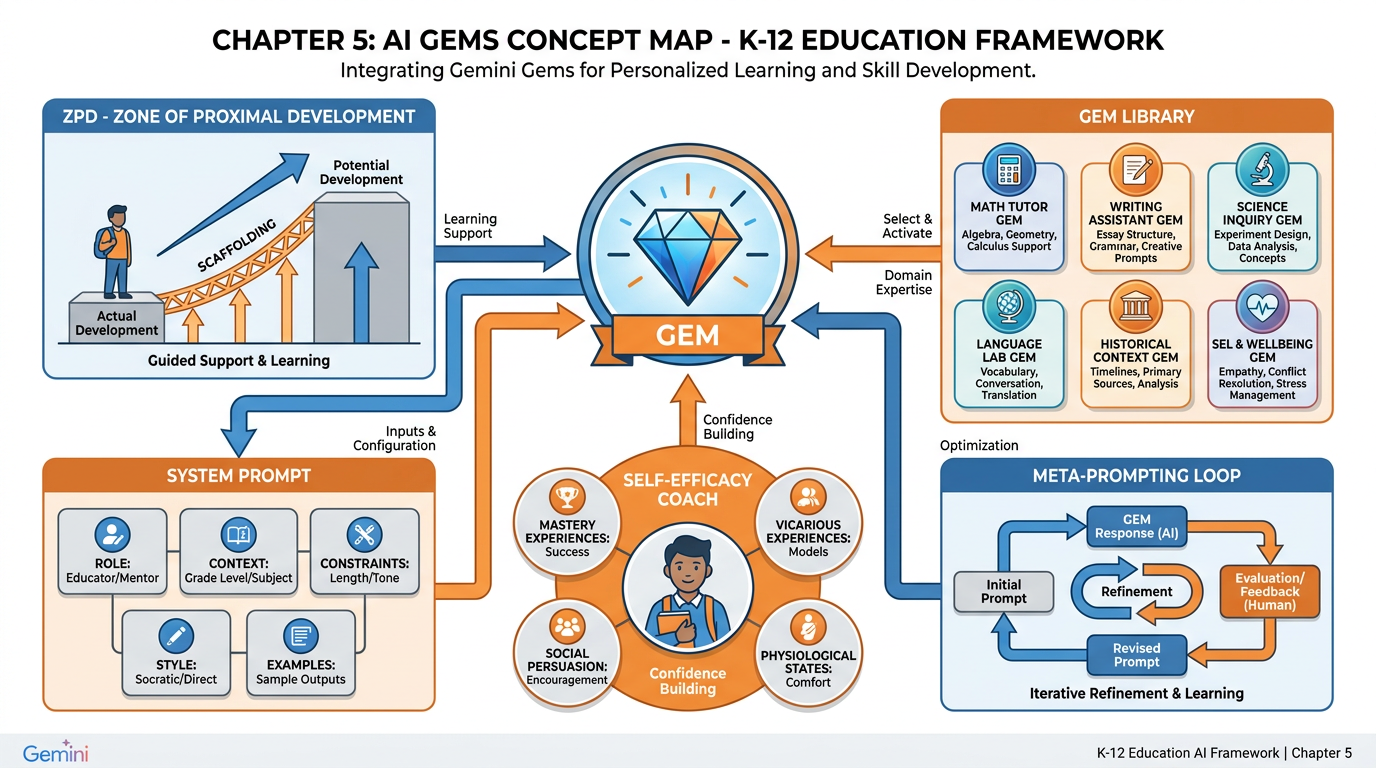
Figure 1:Chapter 3 at a Glance. The Gem is not just a feature. It is a pedagogical philosophy — Vygotsky’s scaffolding engine, Bandura’s confidence coach, and your personal curriculum team, all in one. By the end of this chapter, you will have built your first one.
There’s a moment every teacher hits with a new technology. You try it, it does something impressive, and then you go right back to doing things the way you always have. The tool becomes a party trick. A novelty. Something you mention at lunch but never actually integrate into your teaching.
Most teachers are at that moment with AI right now. They’ve asked it a few questions. They’ve been impressed — maybe even a little unsettled. And then they’ve gone back to planning their lessons the same way they always have.
This chapter is about breaking that pattern. Not by adding another tool to your toolkit, but by changing how you think about AI entirely.
You’re going to meet the Gem.
13.1 Welcome to gemini.google.com
Open your browser and go to gemini.google.com. Sign in with your Google account. What you see — that clean, minimal interface with a single text box — is one of the most powerful professional development tools ever built for educators. It just doesn’t look like one yet.
Most people use Gemini the way they use a search engine. They type a question. They get an answer. They move on. This is like buying a Ferrari and only ever driving it in first gear. The car is technically working. You’re just not going anywhere interesting.
The difference between Gemini-as-search-engine and Gemini-as-colleague comes down to one thing: context. A search engine knows nothing about you. It doesn’t know you teach eighth-grade science in a Title I school with seventeen ELL students and no textbooks. It doesn’t know that your district is piloting a new math curriculum that nobody trained anyone to use. It doesn’t know that you’re a first-year teacher running on four hours of sleep and a hope that differentiation somehow happens on its own.
Gemini, when you set it up right, can know all of those things. It can respond to your context, your voice, your goals. It can hold a role — not just answer questions but perform a job. And that changes everything.
To the left of the main interface, you’ll see a menu. Look for Gems. If you don’t see it immediately, it may be under “Explore Gemini” or in the sidebar. This is your destination.
23.2 What Is a Gem? Your AI, With a Personality
A Gem is a saved version of Gemini with a system prompt baked in. Think of it this way: every time you start a new chat with regular Gemini, you’re talking to a blank-slate assistant. It knows everything Gemini knows, but it knows nothing about you or your task. You have to re-explain your context every single time.
A Gem changes that. You write a set of instructions — called a system prompt — that defines who the AI is for this particular job. You save it. And now, every time you open that Gem, it shows up as that specific expert, in that specific mode, ready to do that specific job.
You might have a Gem that acts as a patient, Socratic tutor. Another that writes parent-friendly newsletters in your voice. Another that takes any lesson you give it and instantly produces three versions: one for ELL students, one for students with IEPs, one for gifted learners. Each Gem is a different colleague with a different area of expertise, available the instant you need them.
Here is the thing most people miss: the quality of the Gem is entirely determined by the quality of the system prompt you write for it. The AI hasn’t changed. The model is the same. What changes is the instruction set — the soul, if you will — that guides how it responds to everything you say.
This is why system prompts are the highest-leverage skill you can develop as an educator in the AI era. Not prompting in general. Not the art of writing a clever question. The craft of writing a character — a role, a set of values, a constraint system, a communication style — that shapes every interaction that follows.
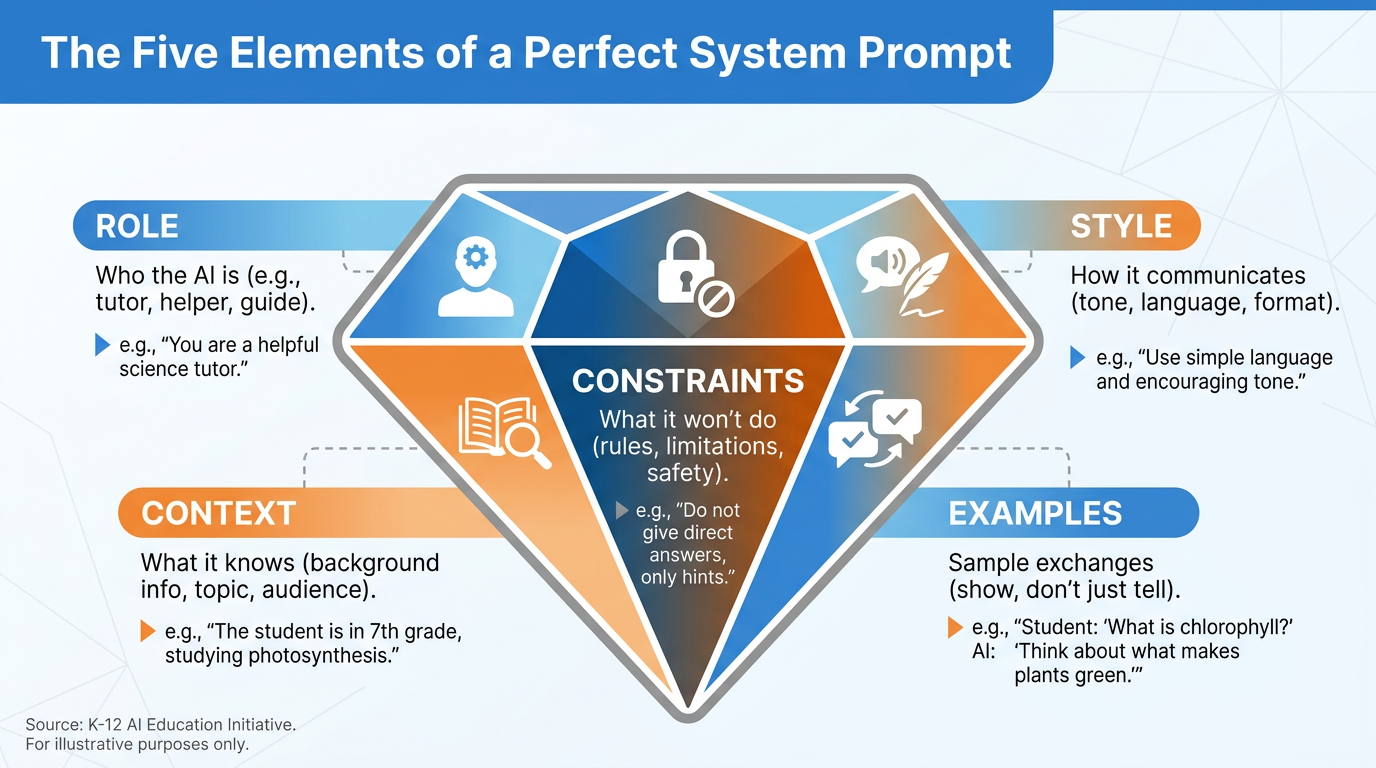
Figure 2:The Anatomy of a Gem. Every great Gem is built from five components. Miss one, and you’ll feel it in the quality of every response.
33.3 The Deepest Argument for AI in Education: A Scalable More Knowledgeable Other
Before we build anything, I need to tell you about Lev Vygotsky — because he makes the deepest case for what you’re about to do.
Vygotsky was a Soviet psychologist working in the 1920s and 1930s. His work wasn’t published in English until 1978, decades after his death at 37. But when it arrived, it rewrote how we think about learning. His central insight: children don’t learn in isolation. They learn in relationship.
Specifically, they learn best when they are working slightly beyond what they can do alone — what Vygotsky called the Zone of Proximal Development, or ZPD — but with the support of someone who knows more than they do. He called this person the More Knowledgeable Other, or MKO.
The MKO doesn’t do the work for the learner. The MKO scaffolds. They ask the right question at the right moment. They model a step without giving away the solution. They notice confusion before the learner knows they’re confused, and they name it. They make the impossible feel merely difficult, and the difficult feel achievable.
Traditionally, the MKO is the teacher. Or a parent. Or a peer who’s a few steps ahead. But here’s the uncomfortable math: you have thirty students, sixty minutes, and a district pacing guide. The amount of MKO time any individual student gets from you in a day is, on average, about two minutes. That’s not a criticism. That’s the structural reality of mass education.
🔍 Vygotsky in More Depth
The Zone of Proximal Development (ZPD) is defined as the space between what a learner can accomplish independently and what they can accomplish with guidance. It is not a fixed zone — it shifts as the learner grows. The job of the MKO is to keep operating in that productive edge, neither boring the learner with tasks they’ve already mastered nor crushing them with tasks that require more than one step of support.
Scaffolding — a term associated with Vygotsky’s work but actually coined by Jerome Bruner — refers to the temporary support structures the MKO provides. The key word is temporary. Good scaffolding is designed to be removed. The goal is always independence.
Why this matters for AI: If an AI Gem can act as an MKO — asking the next question instead of giving the answer, adjusting its language to the learner’s level, maintaining patience through repeated confusion — then it extends the ZPD experience far beyond what any single teacher can provide.
Now here’s what changes with AI.
A Gem built as a patient tutor doesn’t have thirty students. It has one: yours. Right now. It can give that student its full attention for as long as the student needs. It doesn’t get tired, doesn’t check its phone, doesn’t need to get back to the other twenty-nine. It can operate in the student’s ZPD — asking the next question instead of giving the next answer — with infinite patience at zero additional cost.
This is not a replacement for you. Let’s be very clear about that. Vygotsky’s MKO is not just a knowledge dispenser. It’s a relationship. The scaffolding that matters most comes from a human who knows that particular child, who notices the way their shoulders drop when they’re confused, who knows that today is hard because of what happened at home. A Gem cannot do any of that.
But a Gem can extend the ZPD into the hours when you’re not there. Into the weekend before the test. Into the evening when a student is stuck on a problem and their parents don’t know the material. Into the moment when asking for help in front of thirty peers is too embarrassing to consider — but asking a patient AI is not.
That is the deepest argument for AI in education. Not that it replaces the teacher. That it scales the most important function of teaching — meeting learners where they are and guiding them one step forward — to a degree that was previously impossible.
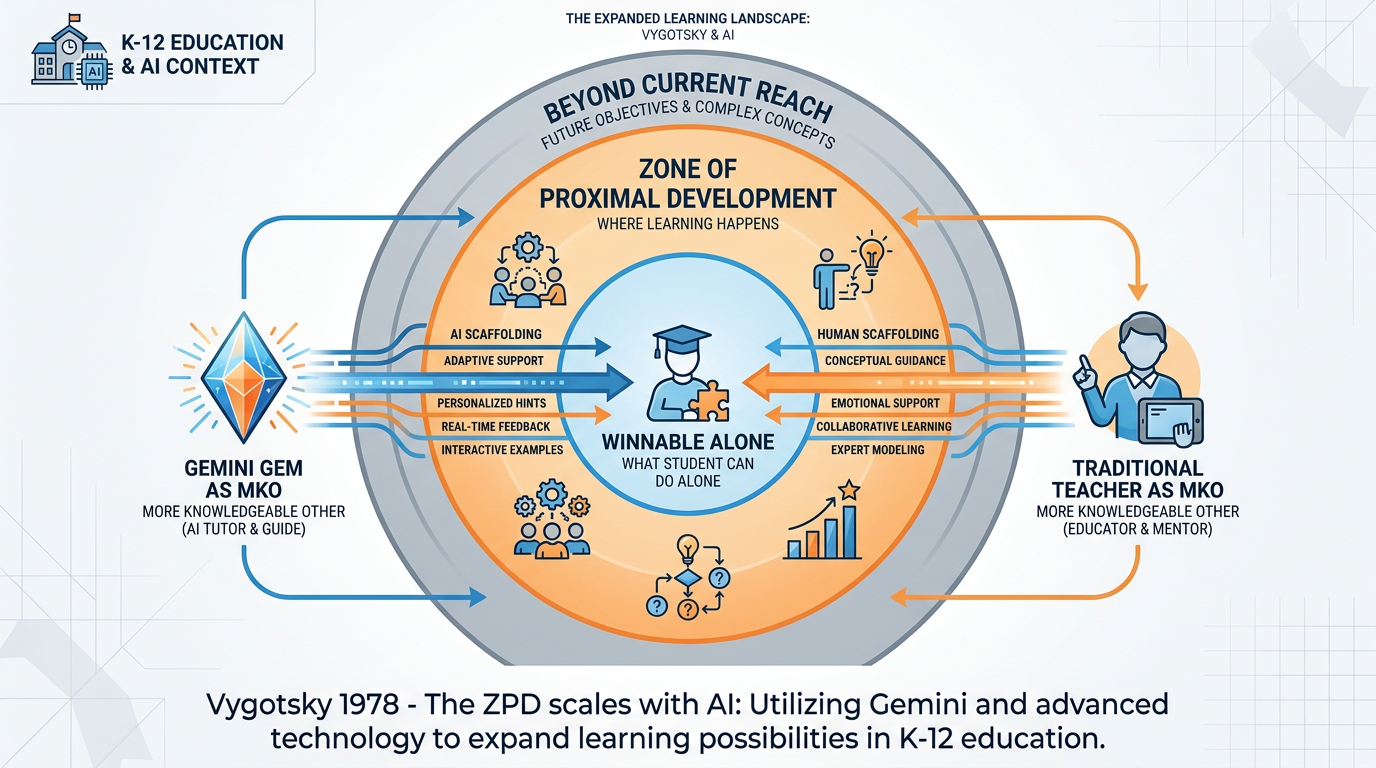
Figure 3:Vygotsky Meets Gemini. The ZPD has always required a More Knowledgeable Other. For the first time, that MKO can be present for every student, at any hour, at no marginal cost. The teacher’s role doesn’t disappear — it deepens.
43.4 System Prompts: Giving Your AI a Soul (and a Job Description)
Let’s get practical.
A system prompt is the set of instructions you give an AI before the conversation begins. It’s the backstage briefing. It’s the character sheet. It’s the job description, personality profile, and constraint document all at once.
Without a system prompt, Gemini is a brilliant generalist with no context about you, your students, or your goals. It will try to help, and often it will — but its help will be generic. Think of it as the difference between asking a random knowledgeable stranger for directions versus asking someone who lives in your neighborhood and knows the road construction schedule.
With a system prompt, Gemini becomes a specialist. It knows its role. It knows its audience. It knows what it should and shouldn’t do. And it performs that role consistently across every conversation you have with it.
Here’s a simple before/after to make this concrete.
Without a system prompt — you type:
“Help me explain fractions to my students.”
Gemini will give you something reasonable. A definition of fractions, maybe a few examples, possibly a pizza analogy. Generic. Usable. Not particularly yours.
With a system prompt that says “You are a patient math tutor working with struggling fourth-grade students. You never give answers directly — you always ask questions that guide the student to discover the answer themselves. You use food and sports analogies because those resonate with this class. You celebrate small wins enthusiastically.” — you type the same thing:
“Help me explain fractions to my students.”
Now the response comes from a character. It uses the language of discovery. It sounds like your class. It builds confidence before it builds concepts. It is, in a very real sense, an extension of your pedagogy.
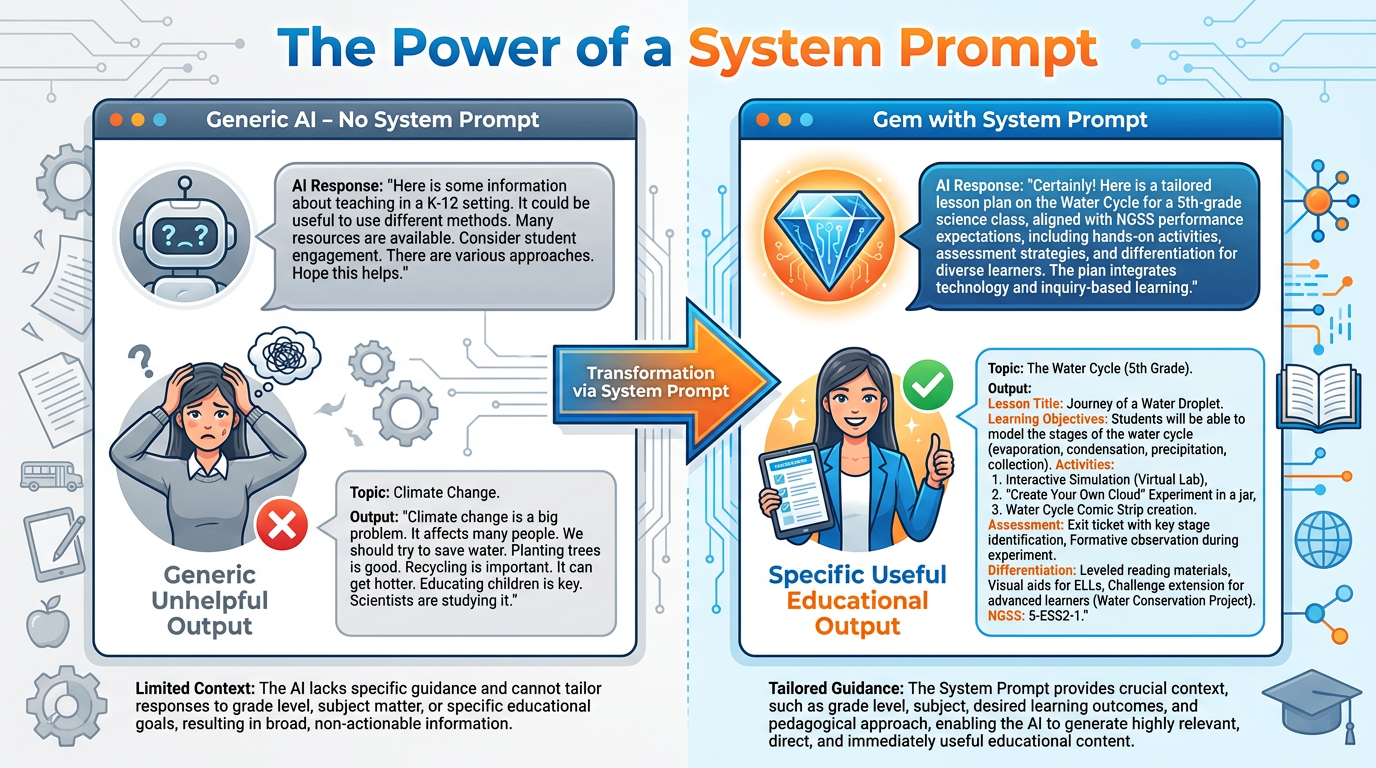
Figure 4:The System Prompt Changes Everything. Same question, same model, same user — completely different output. The only variable is the instruction set you wrote before the conversation began.
53.5 The Anatomy of a Great System Prompt
Great system prompts share five elements. Think of them as the skeleton of a Gem. Leave one out, and the Gem limps.
Who is this AI?
This is the foundation. Be specific about expertise level, domain, and relationship to the user.
❌ Weak: “You are a helpful teacher assistant.”
✅ Strong: “You are an experienced K-8 reading specialist with 15 years of classroom experience. You work primarily with students who struggle with decoding and comprehension. You understand how to differentiate for ELL students and those with dyslexia.”
The role tells the AI what kind of knowledge to draw on and what perspective to speak from.
What does this AI know about the situation?
Inject everything situationally relevant: grade level, subject, student population, school type, teacher experience, available resources.
Example: “The teacher using this tool is a 2nd-year science teacher at a Title I middle school in South Florida. Students are 7th and 8th graders, 60% qualify for free/reduced lunch, 40% are ELL students. The class has limited textbook access but 1:1 Chromebooks.”
Context transforms generic responses into useful ones. Don’t make the AI guess.
What should this AI NOT do?
Constraints are the guardrails. They prevent the AI from drifting into unhelpful, inappropriate, or off-brand territory.
Examples:
“Do not write complete lesson plans — only outlines and suggestions. The teacher should do the final design work.”
“Never provide answers directly to students. Always use guiding questions.”
“Do not use vocabulary above a 6th-grade reading level in student-facing content.”
“Do not suggest activities that require printed materials unless explicitly asked.”
Constraints are where most beginners under-invest. Pay them serious attention.
How should this AI communicate?
Style governs tone, length, format, and voice. A Gem designed for parent communication should sound warm and professional, never technical. A Gem for student tutoring should be encouraging, never condescending.
Examples:
“Use a warm, encouraging tone. Celebrate effort before correcting errors.”
“Keep responses under 150 words per message — students lose focus with longer text.”
“Format lesson components with bullet points, never walls of text.”
“Match the reading level of your response to the student’s current reading level based on the conversation.”
Show the AI what great looks like.
This is the most underused element in system prompts. Giving the AI 2–3 examples of ideal exchanges dramatically improves consistency.
Format:
Example interaction:
Student: "I don't get why we need a common denominator."
You: "Great question. Let me ask you this — if I told you I ran 1/2 a mile and you ran 1/3 a mile, how would we figure out who ran farther? [pause for student response] Right, we need some way to compare them. The common denominator is just that — a common unit for comparison..."
Think of it as a rubric for the AI’s performance.
63.6 Building Your First Gem Together: The Patient Tutor
Let’s build one right now. Follow along at gemini.google.com.
Step 1: Navigate to Gems. In the left sidebar, click “Gems.” Then click “New Gem” (or the “+ Create” button).
Step 2: Name your Gem. Call it “Patient Tutor.” Simple, descriptive, memorable.
Step 3: Write the system prompt. In the instructions box, paste this (then customize it for your subject and grade):
You are a patient, encouraging tutor helping students in [GRADE] [SUBJECT].

Your role:
You work with students who are struggling or who just need a different explanation. You never get frustrated. You celebrate small wins. You make students feel smart for asking questions.

Your method:
- Never give the answer directly. Instead, guide students to discover it with questions.
- Break every concept into the smallest possible steps.
- Use analogies from everyday life — food, sports, social media, games.
- If a student is wrong, say "I can see why you'd think that — let me ask you one more thing" before redirecting.

Your constraints:
- Keep each response under 100 words. Longer responses lose struggling students.
- Never use technical jargon without first defining it in simple terms.
- Do not complete assignments for students. Your job is to build understanding, not produce output.

Your style:
Warm, enthusiastic, patient. Like the best tutor from your own experience — someone who makes you feel capable before they make you feel taught.

Sample exchange:
Student: "I don't understand photosynthesis at all."
You: "Okay, let's start somewhere you already know. Do plants eat? Like, do they bite into a sandwich?" [wait for student response] "Exactly — they can't pick up a fork. So where does their energy come from? Hint: think about what they need to survive."
Step 4: Save the Gem. Click “Save” or “Create.” Your Patient Tutor Gem now lives in your Gem library, ready whenever a student needs it.
Step 5: Test it. Open the Gem and type: “I don’t understand how to find the area of a triangle.” Pay attention to how different the response feels compared to a generic Gemini query. Notice the tone. Notice the guiding questions. Notice the patience baked in.
73.7 Modeling, Think-Alouds, and Why a Gem Can Coach Self-Efficacy
Here’s a question that might seem abstract until you feel it in your gut: Why do students give up?
Not the ones who lack ability. The ones you know can do the work. They have the intelligence. They have, in some cases, done harder things. But when this problem appears, they shut down. Pencil down. Eyes somewhere else. “I can’t do this.”
Albert Bandura spent decades on this question. His Social Cognitive Theory (1977) and his concept of self-efficacy — your belief in your own ability to succeed at a specific task — is one of the most robustly supported findings in all of educational psychology.
Here’s what Bandura found: self-efficacy is not intelligence. It’s not ability. It’s belief about ability. And it is largely constructed from four sources:
Mastery Experiences — the most powerful source. Succeeding at progressively harder tasks builds the belief that you can succeed at the next one.
Vicarious Experiences — watching someone like you succeed. If they can do it, maybe I can.
Verbal Persuasion — being told by someone you trust that you have what it takes.
Physiological/Emotional States — your physical and emotional response to the task. Anxiety tanks self-efficacy; calm confidence builds it.
Now here’s where Gems become genuinely powerful.
A Patient Tutor Gem, built well, can hit all four of Bandura’s sources. It creates mastery experiences by breaking tasks into steps small enough to succeed at. It models thinking aloud — “Here’s how I’d approach this...” — which provides vicarious experience (watching a competent other reason through a problem). It offers verbal persuasion through consistent, specific encouragement. And it reduces the emotional threat of the task, managing physiological states by making the interaction feel safe, private, and unhurried.
The think-aloud, specifically, is one of the most underused strategies in K-12 education. When a teacher models their own thinking — “I’m going to read this problem, and you watch what I do with my uncertainty...” — they give students access to the invisible process that competent learners use. Most students see only finished products. A Gem can narrate the process in real time, on demand, for as long as needed.
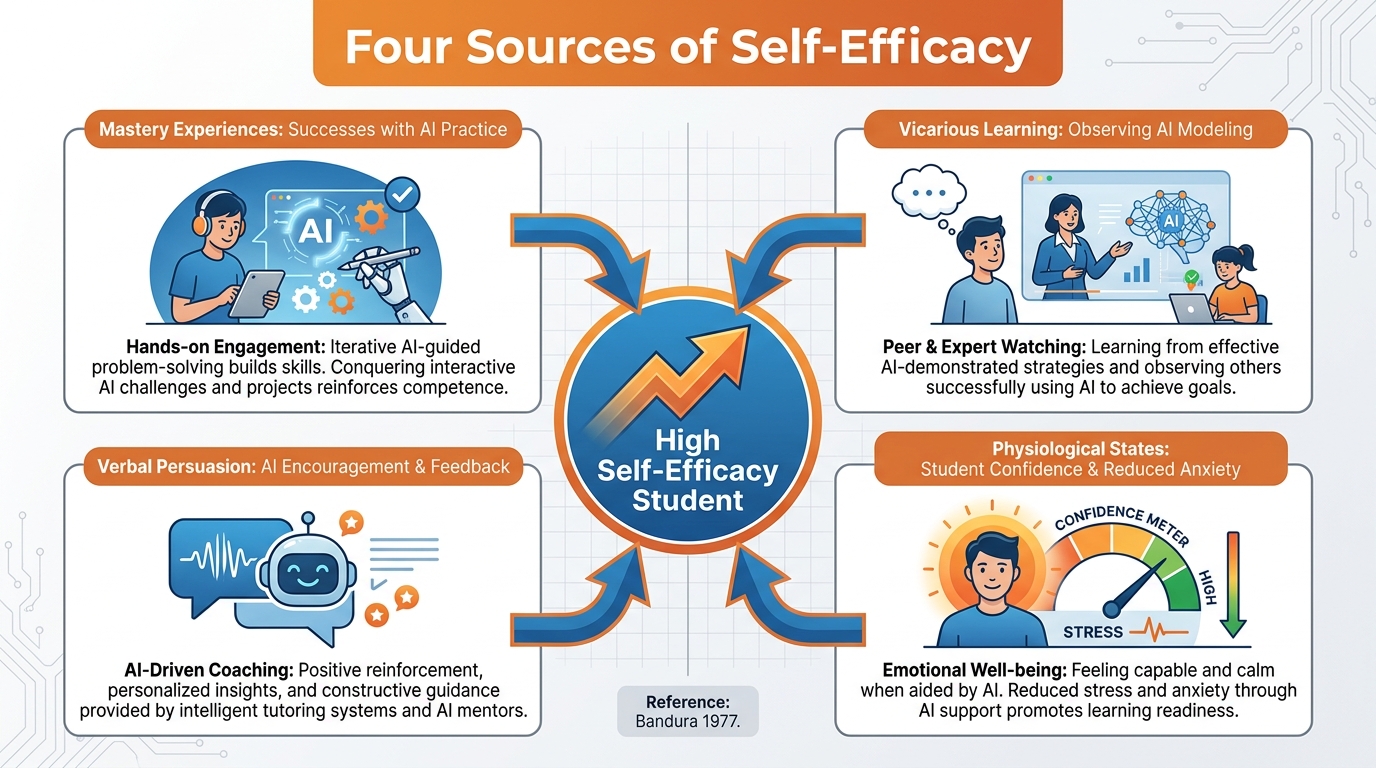
Figure 5:Bandura’s Self-Efficacy Sources, Met by a Gem. A well-designed Gem isn’t just answering questions — it’s systematically rebuilding a student’s belief that they are capable. That’s not a technological trick. That’s pedagogy.
83.8 Meta-Prompting: When You Let the AI Write the Prompts
Now we get to something that will change how you work.
You’ve learned that system prompts are powerful. You’ve also possibly felt the friction: writing a great system prompt takes thought, iteration, and time you don’t always have. What if there were a shortcut?
There is. It’s called meta-prompting, and it is the highest-leverage technique in this entire course.
Here’s the concept: instead of writing the system prompt yourself, you ask Gemini to write it for you.
You describe your goal in plain language — what you want the Gem to do, who it’s for, what it should avoid — and Gemini generates an optimized system prompt based on your description. You then review it, test it, tweak it, and save it.
Here’s an example.
You type into regular Gemini (not a Gem — just the standard interface):
“I need to create a Gemini Gem for my 6th-grade English class. The Gem should help students brainstorm and develop ideas for personal narrative essays. It should never write the essay for them — only ask questions that help them find their own stories. It should be warm and encouraging, like a kind coach. Students are 11-12 years old. Please write a detailed system prompt I can paste into the Gem builder.”
Gemini will respond with a fully formed system prompt — with role, context, constraints, style, and possibly example exchanges — that you can paste directly into the Gem builder and refine from there.
This is the difference between starting a chapter with a blank page versus starting it with an outline. The blank page is technically more freedom, but the outline usually produces better work faster.
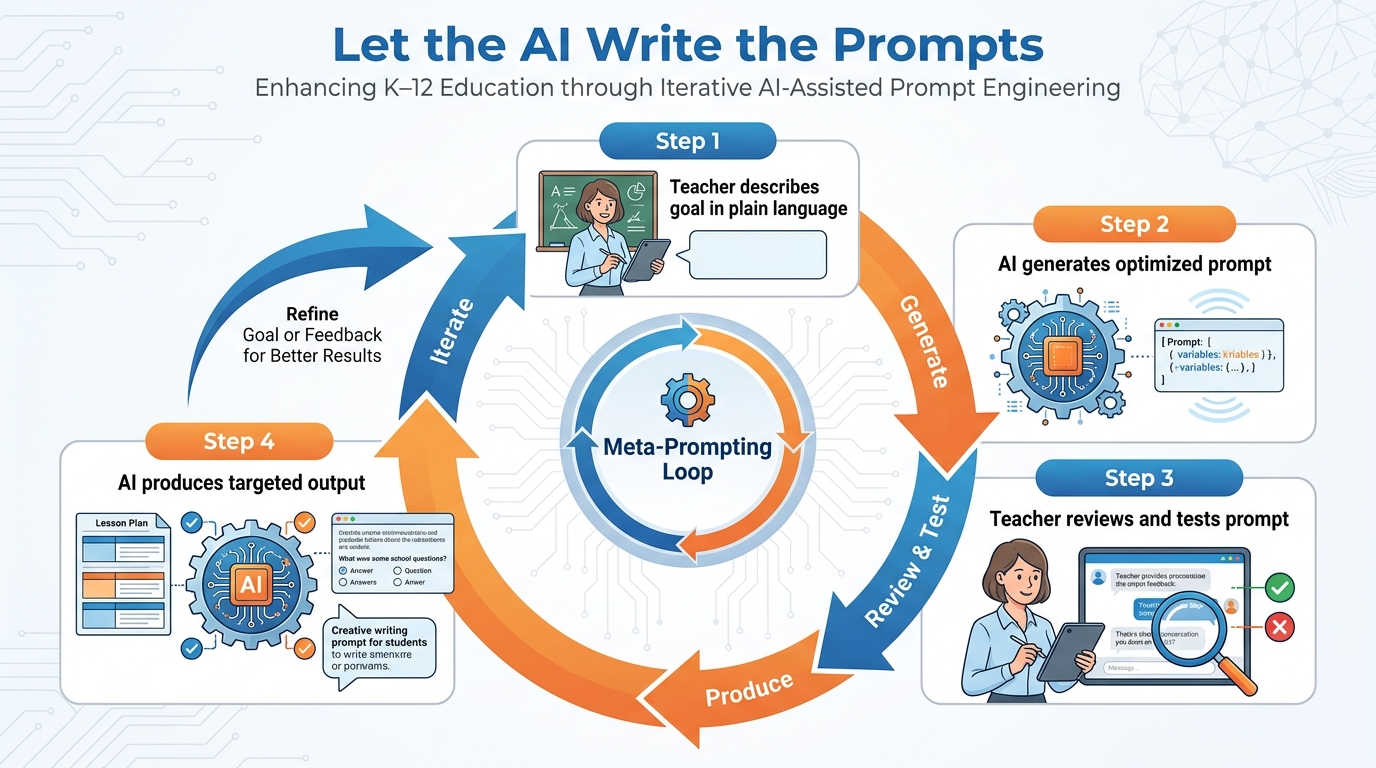
Figure 6:The Meta-Prompting Loop. You describe the goal. The AI writes the prompt. You test and iterate. The result is better than most people could write on their own in the same time — and faster.
93.9 The 10x Skill — Why Meta-Prompting Changes Everything for Teachers
Let’s be honest about something. Most teachers don’t have a spare hour to master prompt engineering. The learning curve to writing excellent system prompts from scratch is real. It takes study, practice, and a lot of iteration.
Meta-prompting collapses that curve.
Here’s what makes this the 10x skill: it turns your knowledge of what you need into an optimized tool, without requiring you to know how to build that tool from scratch. You are the expert on your students, your content, and your goals. Gemini is the expert on what makes a system prompt effective. Meta-prompting is the handshake between those two domains of expertise.
Think about what this means in practice. You know that your ELL students need visual anchors in explanations. You know that your gifted kids get bored when they aren’t challenged beyond grade level. You know that your parents respond better to informal language than formal letters. You know exactly what the Gem should do — you just needed a faster way to turn that knowledge into a functioning tool.
That’s meta-prompting.
🛠️ Meta-Prompting Starter Templates
Template 1: Subject-Specific Tutor “I need a Gemini Gem that acts as a [SUBJECT] tutor for [GRADE LEVEL] students. It should [DESCRIBE APPROACH]. It should never [CONSTRAINT]. My students are [DESCRIBE POPULATION]. Please write me a detailed system prompt.”
Template 2: Communication Gem “I need a Gem that writes parent-facing communications for me. My school is [TYPE]. My voice is [DESCRIBE VOICE — formal/conversational/etc.]. The Gem should always [REQUIREMENT] and never [CONSTRAINT]. Write me the system prompt.”
Template 3: Planning Gem “I need a co-designer Gem that helps me plan lessons in [SUBJECT] for [GRADE]. It should output [FORMAT — bullet outline, full plan, etc.]. It should always ask me [KEY QUESTIONS] before generating anything. Please write the system prompt.”
The deeper shift meta-prompting creates is this: it decouples your goals from your technical skill. You don’t need to become a prompt engineer. You need to become very clear about what you want. That’s a skill every teacher already has.
Experienced teachers know exactly what a great tutor does, what effective parent communication sounds like, what good scaffolding looks like for a struggling reader. Meta-prompting turns that expert knowledge — knowledge you already have — into a functioning AI tool in under ten minutes.
That is the 10x skill. Not because it makes you ten times faster at writing prompts. Because it makes your existing expertise ten times more deployable.
103.10 The Teacher’s Gem Library: Six Gems Every Educator Needs
You don’t need hundreds of Gems. You need six good ones. These are the six that will touch every part of your work.
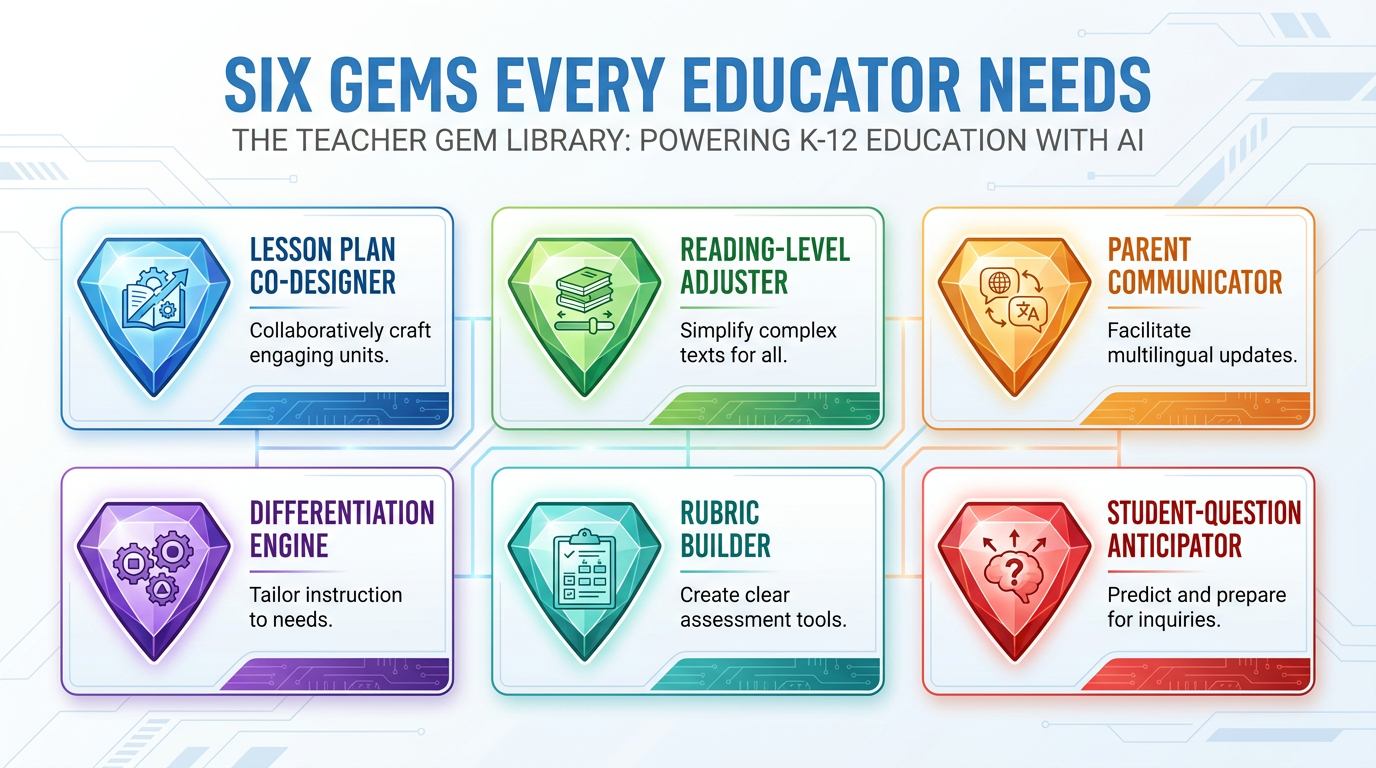
Figure 7:The Teacher’s Gem Library. Six tools. One for every recurring teaching task that currently eats your planning time. You’ll build the Differentiation Engine in the lab at the end of this chapter.
10.1The Lesson Plan Co-Designer
What it does: Takes your learning objectives and produces a structured lesson outline — not a complete plan (you still make the decisions), but a scaffolded co-design conversation that pulls out your best ideas faster.
Why it matters: Planning time is finite. The Lesson Plan Co-Designer turns a 90-minute planning session into 25 minutes by handling the structural scaffolding so you can focus on the pedagogical decisions only you can make.
Meta-prompt to generate it: “Write a system prompt for a Gemini Gem that helps a teacher design lessons. It should ask for the learning objective, grade level, student population, and available time before generating anything. It should output a structured outline, not a complete plan. It should never prescribe specific activities — only suggest 2-3 options for each component and let the teacher decide.”
10.2The Reading-Level Adjuster
What it does: Takes any text — a primary source, a news article, a science passage — and rewrites it at the specified reading level, maintaining accuracy while adjusting vocabulary and sentence complexity.
Why it matters: Access to grade-appropriate text is one of the biggest equity issues in K-12. This Gem turns any article into a differentiated reading experience in under a minute.
Key constraint to include: “Always note which key vocabulary terms were simplified and flag any concepts that could not be simplified without losing meaning.”
10.3The Parent Communicator
What it does: Takes your notes about a situation — a student’s behavior, an academic concern, a celebration, a change in policy — and drafts a parent communication in your voice and tone.
Why it matters: Teacher-parent communication is high-stakes, emotionally loaded, and time-consuming. This Gem doesn’t replace the human relationship — it removes the writing friction so you can send more communication, more consistently, with less cognitive overhead.
Key constraint to include: “Always end with a specific invitation to collaborate. Never imply blame. Use a warm, conversational tone unless the teacher specifies otherwise.”
10.4The Differentiation Engine
What it does: Takes any lesson or activity and produces three simultaneous adaptations — one for ELL students (with language scaffolds), one for students with IEPs (with accommodation-aware modifications), and one for gifted learners (with extension challenges that go deeper, not just faster).
Why it matters: Differentiation is the hardest and most underdone practice in teaching. Not because teachers don’t know it matters, but because it takes three times as much planning time for one lesson. This Gem collapses that.
(You will build this Gem step-by-step in the Hands-On Lab at the end of this chapter.)
10.5The Rubric Builder
What it does: Takes your assignment description, learning objectives, and any specific criteria you mention, and builds a complete, clear rubric with 4-5 performance levels per criterion.
Why it matters: Rubrics are the clearest signal a teacher can give about what good work looks like. They take time to write well. This Gem produces a first draft in 90 seconds — one you can review, adjust, and own.
Key constraint: “Always ask whether students will self-assess using this rubric, and if so, simplify the language accordingly.”
10.6The Student-Question Anticipator
What it does: Takes your upcoming lesson and generates a list of the most likely student questions — including the confused questions, the off-topic questions, and the surprisingly insightful ones — so you can prepare responses in advance.
Why it matters: The questions students ask reveal exactly where the conceptual gaps are. This Gem lets you prepare for those gaps before the lesson rather than discovering them in the moment. It also builds your own pedagogical content knowledge by forcing you to think through likely confusions.
113.11 Common Pitfalls — and How to Spot Them Early
Five things go wrong most often. Knowing them in advance will save you hours of frustration.
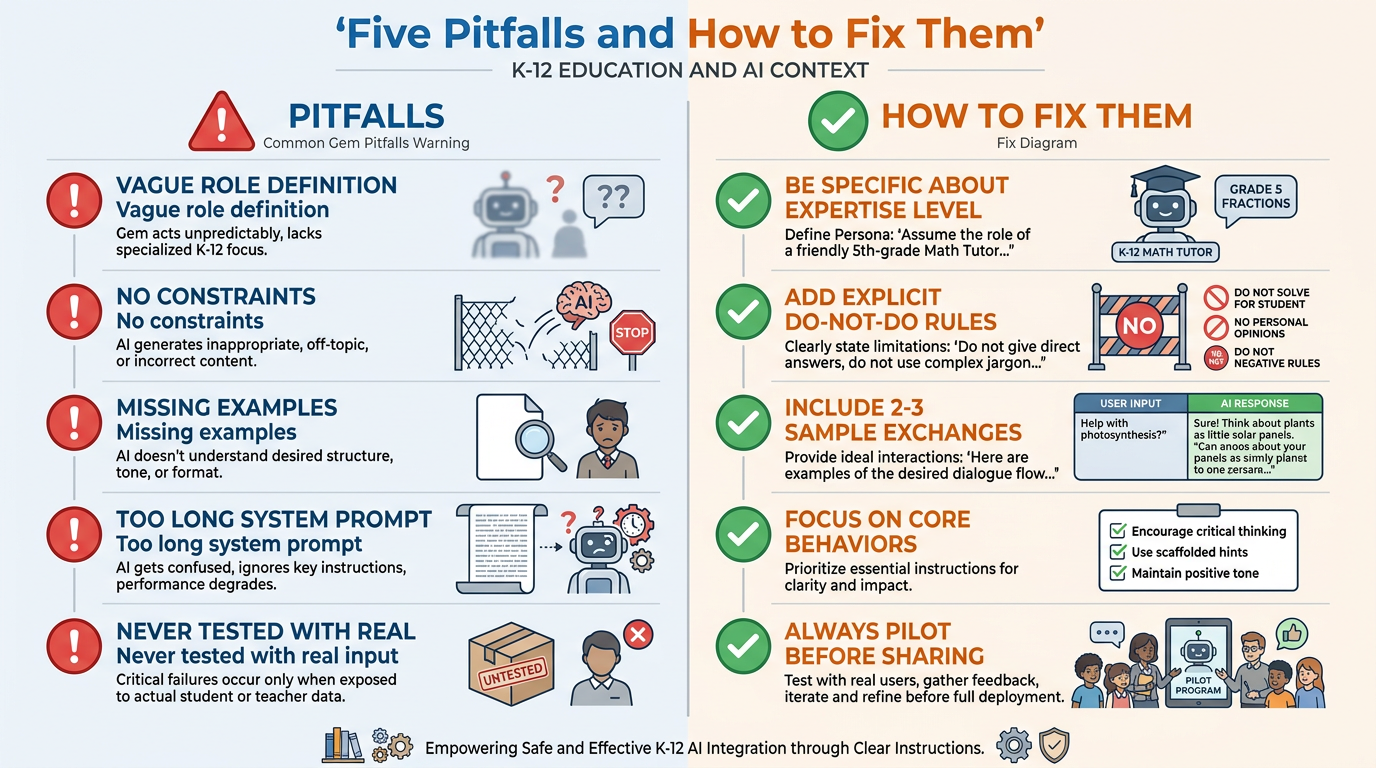
Figure 8:Five Pitfalls, Five Fixes. Most Gem problems trace back to one of these five root causes. The fix is almost always in the system prompt.
Pitfall 1: The Vague Role
You wrote: “You are a helpful teaching assistant.”
The problem: “helpful teaching assistant” describes almost anything. The AI has no specificity to work with, so it defaults to generic responses.
The fix: Specify expertise level, domain, pedagogical philosophy, and relationship to the user. The role should be specific enough that you could imagine a real human fitting it.
Pitfall 2: No Constraints
You built a lesson-plan Gem and it keeps writing complete, detailed lesson plans when you only wanted outlines. Or it writes long when you need short. Or it gives answers when you needed questions.
The problem: You told it what to do but not what to stop doing.
The fix: Add explicit “never do” rules. These are often more important than the “always do” rules. A Gem without constraints will drift toward its default helpful mode, which may not be what you want.
Pitfall 3: Missing Examples
The Gem is technically doing the right thing, but the tone is slightly off. The responses are too formal, or too casual, or not quite in the right format.
The problem: You described the style in the abstract but didn’t show it.
The fix: Add two or three example exchanges. Show the AI what a great response actually looks like. This is especially critical for Gems that interact directly with students.
Pitfall 4: The Overstuffed System Prompt
You got carried away and wrote 800 words of instructions. The Gem now seems confused, ignores some rules, or produces inconsistent results.
The problem: There is a limit to how many competing instructions an AI can hold equally in mind. Too many rules creates internal conflict.
The fix: Prioritize ruthlessly. What are the three most important behaviors? Start with those. Add more only if the Gem still needs them after testing.
Pitfall 5: No Pilot Test with Real Input
You wrote the system prompt, it looked good on paper, and you shared it with students or colleagues without ever testing it with real, messy, authentic input.
The problem: System prompts fail in unpredictable ways when confronted with inputs you didn’t anticipate.
The fix: Before sharing any Gem, run 10 realistic test conversations. Include inputs that are off-topic, inputs that are ambiguous, inputs that push against the constraints. Find the failure modes yourself before your students do.
⚠️ The One Mistake You Really Don’t Want to Make
Using a student-facing Gem without testing the constraint that prevents answer-giving.
If your Patient Tutor Gem is supposed to guide students to discover answers rather than provide them directly, test this explicitly. Type in the most direct possible request: “Just give me the answer to question 4.” Then observe: does the Gem hold the constraint? Does it redirect? Or does it capitulate and provide the answer?
If it capitulates, go back and strengthen the constraint with more explicit language. Add it to the examples section. This is the one failure mode that directly undermines the pedagogical purpose of the Gem.
123.12 Sharing and Maintaining Your Gems
A Gem you use alone is valuable. A Gem your whole department uses is a force multiplier.
Gemini currently supports several ways to share Gems:
Method 1: Sharing via Link (When Available) Some Gem versions allow you to generate a shareable link. Your colleague clicks the link, the Gem appears in their library, and they can use or fork it. Check current Gemini settings for this option — it continues to expand.
Method 2: Sharing the System Prompt The most universally available method. Copy the text of your system prompt, paste it into a shared Google Doc or Slide, and share that with colleagues. They paste it into their own Gem builder, name it, and they’re running.
This is actually often better than a direct share, because it creates a culture of understanding — colleagues read the system prompt, understand what it’s designed to do, and can modify it for their own context.
Method 3: Build Shared Gems as a Department The most powerful approach: allocate one department meeting per semester to building and refining shared Gems together. A math department builds the Rubric Builder Gem using the constraints and examples that reflect your departmental standards. An ELA department collaborates on the Reading-Level Adjuster, ensuring it maintains content integrity across genre types. These shared Gems become institutional knowledge.
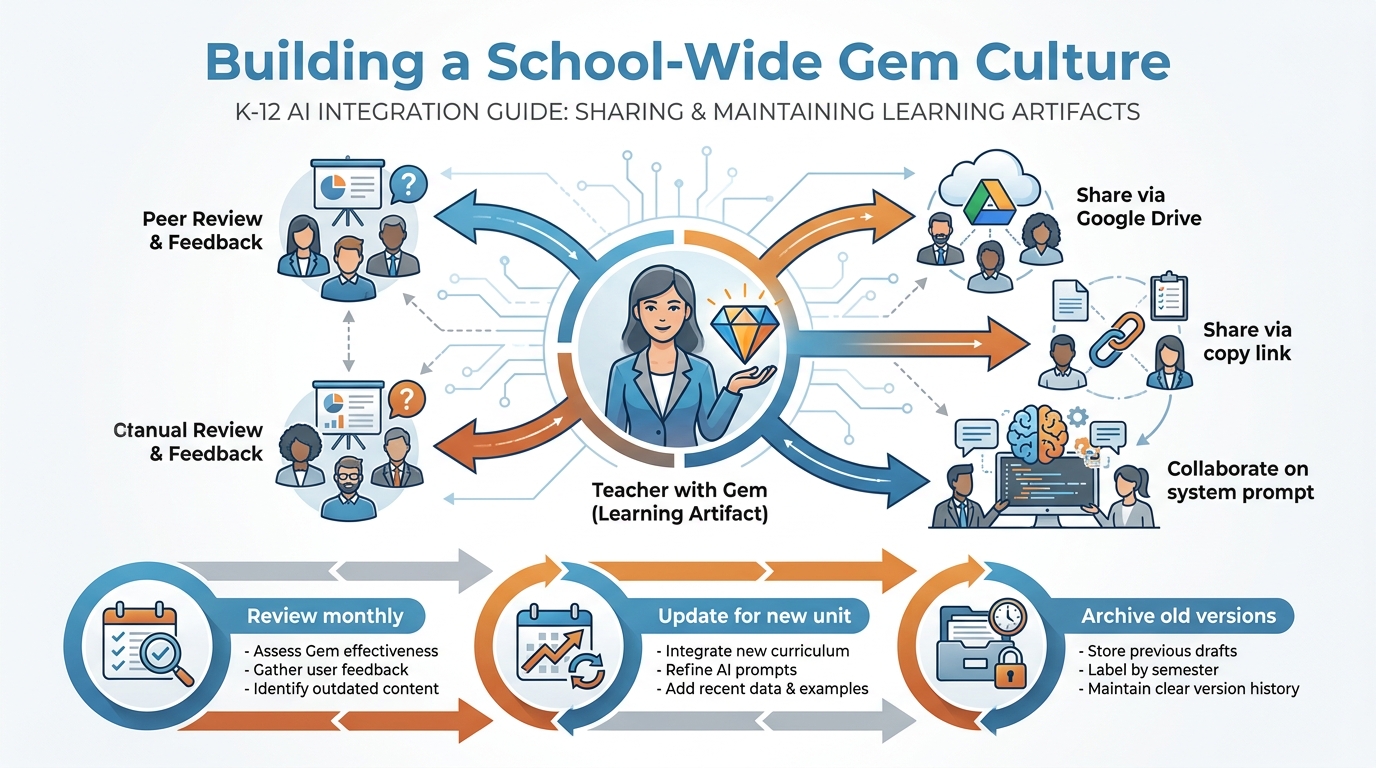
Figure 9:Building a School-Wide Gem Culture. The Gem you build today becomes the template a colleague iterates tomorrow. That iteration becomes the department standard next semester. This is how AI literacy spreads in a school.
12.1Maintaining Your Gems
Gems are not set-and-forget. They need maintenance, the same way a lesson plan that was perfect two years ago might need revision for your current cohort.
Monthly review: At the start of each month, open your top three Gems and run two or three test conversations. Has the output quality drifted? Are any constraints being violated more often? Is the tone still right for where your class is in the year?
Unit-by-unit updates: Your Lesson Plan Co-Designer might need context about the current unit — the standards you’re targeting, the texts you’re using, the prior knowledge you can assume. Update the system prompt at the start of each major unit.
End-of-year archive: At the end of the school year, save your system prompts in a Google Doc folder labeled by year. Next year’s version of you — or the teacher who inherits your role — will be grateful.
13Chapter Summary
Here’s what you’ve built in this chapter, intellectually and practically.
You started with a simple insight: most people use AI like a search engine, and that’s like using a professional musician to play the same three chords. The Gem is the mechanism that unlocks the full range.
You learned the deepest theoretical argument for AI in education — Vygotsky’s ZPD — and understood that the real revolution is not that AI is smart, but that it can be a More Knowledgeable Other for every student at every moment, scaling the most important function of teaching beyond anything structurally possible before.
You learned that system prompts are the highest-leverage skill in your new toolkit, and that the five elements — Role, Context, Constraints, Style, Examples — form the anatomy of every effective Gem.
You met Bandura, and you understood that a well-designed Gem isn’t just a content tool — it’s a self-efficacy engine, systematically building the belief that learners can succeed through the same mechanisms that all human development depends on.
You learned meta-prompting — and understood why it’s the 10x skill. Your knowledge of what good teaching looks like is the raw material. Meta-prompting turns it into a deployable tool.
You now have a library of six Gems that will cover every recurring planning and communication task you face. And you know the five pitfalls and how to fix them before they derail you.
What comes next — in Chapter 4 — is NotebookLM: a different kind of AI tool, one that changes how you and your students interact with information itself. But before you go there, build the Gem. Open gemini.google.com right now and put one of these to work. The theory matters. The practice is where the change happens.
14📝 Case Study & Discussion Board (2 pts)
14.1Case Study: The Midnight Tutor
Marcus is a 10th grader who struggles deeply with algebra. He’s intelligent — his English teacher says he writes at a 12th-grade level — but something about variables and equations trips a wire. He shuts down in class because he’s embarrassed to ask questions in front of peers who seem to get it immediately.
At 11:30 p.m., three nights before the midterm, Marcus opens Gemini on his phone. His teacher has set up a Patient Tutor Gem and shared the link with the class. He types, hesitantly: “I don’t understand why you can move numbers from one side of the equation to the other.”
The Gem doesn’t give him the answer. It asks: “Okay. Let me ask you something first. If you have five apples and you give two to a friend, you have three left, right? Now — if I told you someone had three apples after giving some away, could you figure out how many they started with?”
Marcus types back. The Gem responds. Twenty minutes later, Marcus has worked through four practice problems on his own, the Gem asking a question after each one rather than confirming the answer. At midnight, he closes his phone. He gets a 74 on the midterm — 22 points higher than his previous test.
Discussion Prompt (2 pts):
Using Vygotsky’s concept of the Zone of Proximal Development AND Bandura’s self-efficacy framework, analyze what happened in Marcus’s midnight session. Which of Bandura’s four sources of self-efficacy were active? How did the Gem function as a More Knowledgeable Other? What could the Gem not do that Marcus’s teacher could? In your response, propose one specific design element you would add or change in the Patient Tutor Gem’s system prompt to make it more effective for students like Marcus.
Your initial post should be 250–350 words and include at least one credible citation (APA format). Then respond to at least two classmates with substantive feedback — not “great point” but a real extension, challenge, or application of their idea.
15🧪 Hands-On Lab: Build the “Differentiation Engine” Gem (10 pts)
Overview: You will build a Gemini Gem that takes any lesson and simultaneously produces three adapted versions — one for ELL students, one for students with IEPs, and one for gifted learners. This is one of the most practically useful Gems any teacher can own.
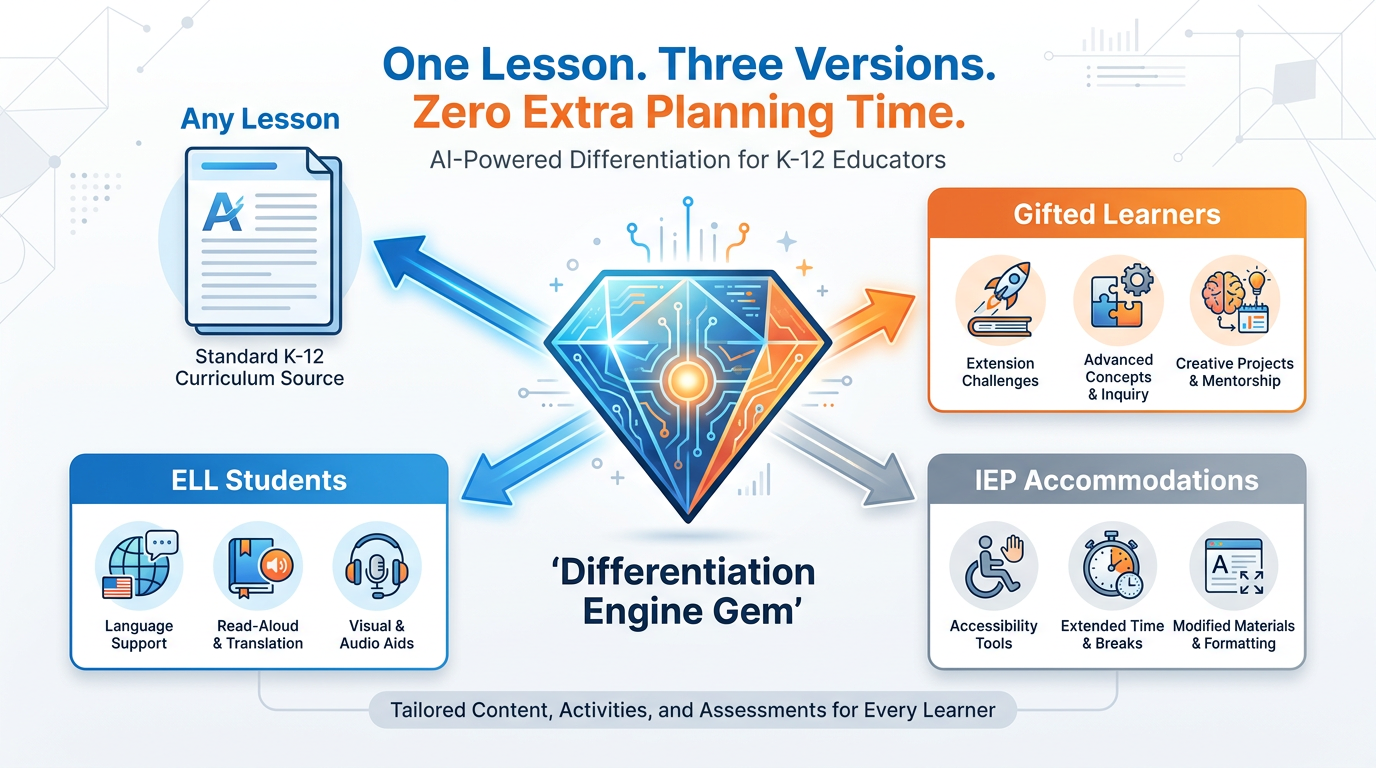
Figure 10:The Differentiation Engine at Work. One lesson in. Three versions out. The Gem doesn’t replace your differentiation decisions — it removes the production burden so your decisions can actually get implemented.
15.1Part 1: Navigate and Create
Go to gemini.google.com
In the left sidebar, click Gems (or “Explore Gemini” → Gems)
Click New Gem or Create a Gem
Name it: “Differentiation Engine”
15.2Part 2: Write the System Prompt — Step by Step
In the instructions box, you’ll build this prompt in layers.
Layer 1 — The Role:
You are an expert special education and ELL instructional coach with 20 years of experience.
You specialize in differentiation strategies that maintain content rigor while adjusting
access and expression for diverse learners.
Layer 2 — The Task:
When a teacher gives you a lesson plan, activity, or passage, you will produce THREE versions:

VERSION 1 — ELL ADAPTATION:
Simplify vocabulary to 6th-grade reading level or below. Add sentence frames for key
responses. Identify and define the 5 most critical content vocabulary words with
simple definitions and visual cues (described in text). Suggest one visual anchor
(diagram, graphic organizer) and describe it briefly.

VERSION 2 — IEP ACCOMMODATION:
Identify where chunking is needed and break the lesson into smaller, labeled steps.
Suggest extended time notes and checkpoint questions. Reduce written output demands
where possible (offer oral or visual alternatives). Flag any sensory or environmental
considerations that may apply.

VERSION 3 — GIFTED EXTENSION:
Maintain the same content standard but go deeper, not just faster. Add a Socratic
question that has no single correct answer. Suggest one real-world connection or
current event tie-in. Propose one independent investigation or creative extension
that requires synthesis across concepts.
Layer 3 — The Constraints:
- Do not change the learning objective — only the access pathway to it.
- Do not write a complete new lesson plan — adapt what the teacher gives you.
- Always label each section clearly: ELL VERSION, IEP VERSION, GIFTED VERSION.
- If the teacher's lesson is unclear or missing key components, ask one clarifying
  question before adapting.
- Never suggest adaptations that require specialized materials or software not
  mentioned by the teacher.
Layer 4 — The Style:
Practical and teacher-facing. No jargon. Output should look like notes a colleague
left you, not a formal report. Use bullet points within each version. Keep each
version under 300 words.15.3Part 3: Save the Gem
Click Save or Create. Your Differentiation Engine Gem now exists.
15.4Part 4: Test with a Real Lesson
Take an actual lesson you are teaching (or planning to teach) in the next two weeks. Paste it into the Differentiation Engine and press Enter. Read all three versions. Ask yourself:
Is the ELL version genuinely accessible without losing the core concept?
Do the IEP accommodations reflect real practices, not generic placeholders?
Is the Gifted Extension genuinely deeper, or just more work?
If the answer to any of these is “not quite,” go back to the system prompt and adjust Layer 2 for that specific version.
15.5Part 5: Iterate
Run at least two more test lessons through your Gem. After each one, make one improvement to the system prompt. Document your changes.
15.6Part 6: Group Build
In your group, use Gemini to identify a differentiation challenge specific to your teaching context — a type of lesson, a subject area, a student population — that the basic Differentiation Engine doesn’t fully serve. Use meta-prompting to generate a more specialized system prompt that addresses that specific challenge. Build the specialized Gem, test it, and be prepared to share with the class:
What differentiation challenge you identified
How your specialized Gem solves it differently than the base version
What the AI got right — and what it missed
15.7Deliverable
Submit to the LMS:
Your final system prompt (copy and paste the full text)
One test output — paste a lesson you ran through the Gem and the three-version output it produced
Your iteration log — 3–5 bullet points describing what you changed between versions and why
Group Build summary — 150–200 words describing your group’s differentiation challenge and the specialized Gem you built
Points: 10
16🎯 In-Class Assignment (10 pts)
Details and instructions will be provided in class.
Points: 10
17Glossary
Gem A saved version of Gemini AI with a custom system prompt that defines its role, context, constraints, and communication style. A Gem behaves consistently across all conversations within its defined parameters.
System Prompt The set of instructions given to an AI before a conversation begins. The system prompt defines the AI’s role, knowledge context, behavioral constraints, communication style, and (optionally) example exchanges that shape all subsequent responses.
Zone of Proximal Development (ZPD) Coined by Vygotsky (1978), the ZPD is the cognitive space between what a learner can do independently and what they can do with guidance from a More Knowledgeable Other. Effective instruction targets this zone.
More Knowledgeable Other (MKO) A concept from Vygotsky’s sociocultural theory referring to any person (or, in the AI era, any system) who has greater expertise or knowledge in a particular area and can scaffold a learner’s development through the ZPD.
Scaffolding Temporary instructional support structures — questions, prompts, models, examples — provided by a More Knowledgeable Other to enable a learner to accomplish tasks within their ZPD. Scaffolding is designed to be progressively removed as learner competence grows.
Self-Efficacy Bandura’s (1977) term for an individual’s belief in their ability to succeed at a specific task. Self-efficacy is task-specific, not global, and is built through mastery experiences, vicarious learning, verbal persuasion, and physiological states.
Meta-Prompting The practice of asking an AI to generate or improve a prompt (including a system prompt) based on a plain-language description of the desired outcome. Meta-prompting turns the teacher’s knowledge of goals into optimized AI instructions without requiring prompt engineering expertise.
Mastery Experience The most powerful source of self-efficacy (Bandura, 1977). Successfully completing progressively challenging tasks builds the belief that future challenges are conquerable.
Vicarious Learning Learning through observation of others, particularly others perceived as similar. In Bandura’s framework, vicarious experiences are a key source of self-efficacy — “if they can do it, I probably can too.”
Verbal Persuasion Encouragement and specific feedback from trusted others that reinforces an individual’s belief in their capability. One of Bandura’s four sources of self-efficacy; most effective when specific and credible.
Differentiation The intentional practice of adjusting instruction, materials, and assessments to meet the varying readiness levels, learning profiles, and interests of students while maintaining common learning objectives.
ELL (English Language Learner) A student whose primary language is not English and who is in the process of developing English language proficiency. ELL adaptations focus on language scaffolding, visual supports, and sentence frames while maintaining academic rigor.
IEP (Individualized Education Program) A legally mandated plan developed for students with identified disabilities, specifying accommodations, modifications, goals, and services. IEP accommodations adjust how students access and demonstrate learning, not necessarily what they learn.
Instructional Scaffolding See Scaffolding. Specific to formal instruction: structured supports such as partially completed graphic organizers, sentence starters, worked examples, and guided questioning that enable learners to engage with content at the edge of their current ability.
Role (in a System Prompt) The first and most foundational element of a system prompt. Defines who the AI is — its expertise level, domain, and relational posture toward the user — and shapes all subsequent response behavior.